
GymMaster Gym Software Manual
Doors and Readers
GymMaster software combined with door access hardware form an access control system which allows automated individualized entry
- Hardware
- Gatekeepers: Gatekeeper H6 · Gatekeeper H5 · Gatekeeper H4 · Gatekeeper Mini 4 · Gatekeeper Mini 3
- Door readers: Sentinel Wall Reader · Sentinel Keypad · Cidron · CN485 · CV485
- Desktop readers: Desktop Reader · Sentinel Desktop
- Other: Tailgating cameras · Key Fobs
- Installation and Documents
- Integrate Hardware with GymMaster
- Manage Doors
- Door Access
- Troubleshooting
- Frequently Asked Questions
Sentinel Desktop
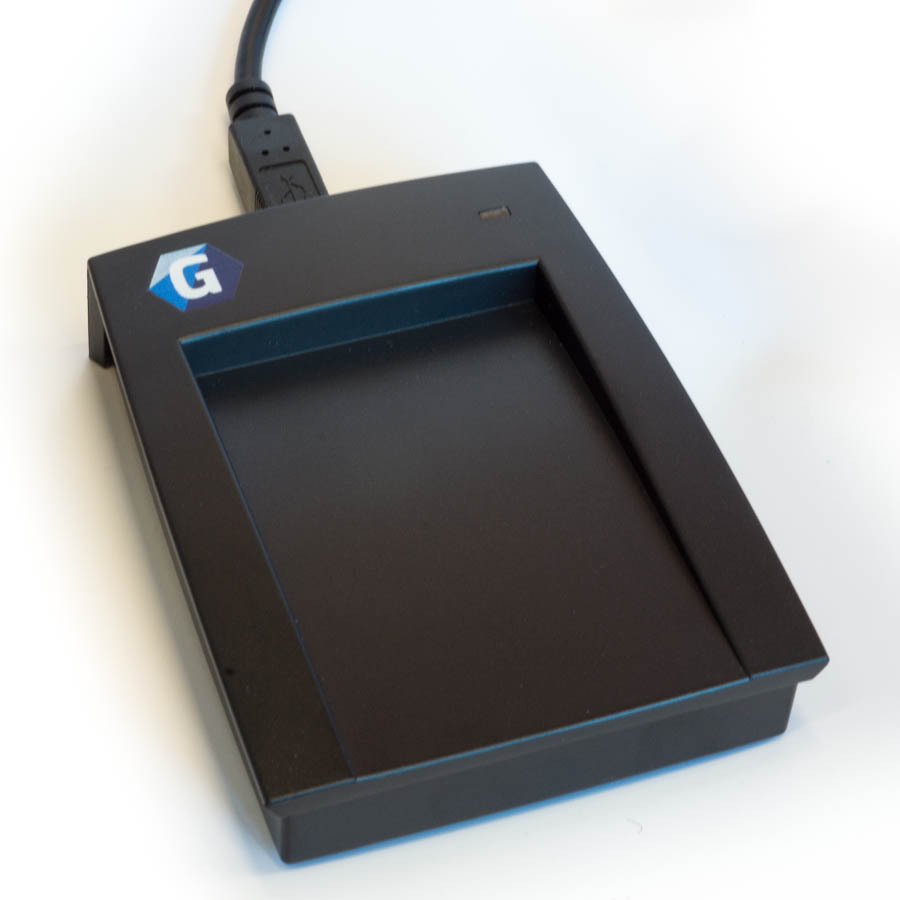
The Sentinel Desktop is a flat Mifare RFID reader for the reception desk. It connects to the Gatekeeper with a USB cable.
How it works
What it does
The Sentinel Desktop identifies members at reception. It reads Mifare (ISO14443A) RFID fobs and cards, and it has Bluetooth Low Energy (BLE) support. It cannot open doors.
A member holds an RFID fob or card near the reader, at 1–3 cm (0.5–1 in). The reader sends the fob data to the Gatekeeper through the USB cable.
The reader gets its power through the USB cable. It does not have a power supply of its own.
Note: The Wi-Fi version has been deprecated.
Parts and connections
| Item | Details |
|---|---|
| Port | One female USB 2.0 Type-B or Type-C port on the reader. |
| Cable | USB 2.0 Type-A male to Type-B or Type-C male. The Type-A end connects to a USB port at the front of the Gatekeeper. |
| Cable length | Maximum 3 m (118 in / 9.8 feet) between the Gatekeeper and the reader. |
| Hubs | Do not use a USB hub or a USB extension. Connect the reader directly to the Gatekeeper. |
| LED | One LED in the top right corner. The GymMaster logo is in the top left corner. |
| Label | See the bottom of the reader for the serial and part number. |
Lights and sounds
| Indicator | Meaning |
|---|---|
| Yellow LED | The reader is idle and ready. |
| Green LED and 1 beep | Access granted. |
| Red LED and 2 beeps | Access denied. |
| Blue LED and 3 beeps | New tag is presented. Access denied. |
| LED is off | The reader has no power. Examine the USB cable and the Gatekeeper power. |
Specifications
| Item | Value |
|---|---|
| Power consumption | 12W (max) through USB |
| Communication interface | RS232 (USB) |
| Frequency | 13.56MHz (at 1-3 cm or 0.5-1 in) |
| Standard | 13.56MHz: ISO14443A, LE BLE |
| Indicators | LED, sound |
| Operating temperature | -15°C - 65°C |
| IP rating | IP65 |
| Configuration methods | Factory configured |
Documents
- Sentinel Desktop Data Sheet (PDF)
- Gatekeeper Sentinel Setup (Wi-Fi) (PDF)
- Reader Troubleshooting Guidelines (PDF)
- Gatekeeper H Technical Instructions (PDF)
Next - Tailgating Cameras

 2026 © Treshna Enterprises Ltd.