
GymMaster Gym Software Manual
Doors and Readers
GymMaster software combined with door access hardware form an access control system which allows automated individualized entry
- Hardware
- Gatekeepers: Gatekeeper H6 · Gatekeeper H5 · Gatekeeper H4 · Gatekeeper Mini 4 · Gatekeeper Mini 3
- Door readers: Sentinel Wall Reader · Sentinel Keypad · Cidron · CN485 · CV485
- Desktop readers: Desktop Reader · Sentinel Desktop
- Other: Tailgating cameras · Key Fobs
- Installation and Documents
- Integrate Hardware with GymMaster
- Manage Doors
- Door Access
- Troubleshooting
- Frequently Asked Questions
Key Fobs
Give each member an RFID key fob or key card. Members use it to check in and to open your doors.
Each key fob is unique, so GymMaster knows who checked in and when.
When a member ends their membership, you can give their key fob to a different member.
Custom Key Fobs
Custom epoxy key fobs show your club logo. They are a low-cost way to advertise your club.
To order custom key fobs:
- Go to the bottom of a page in GymMaster.
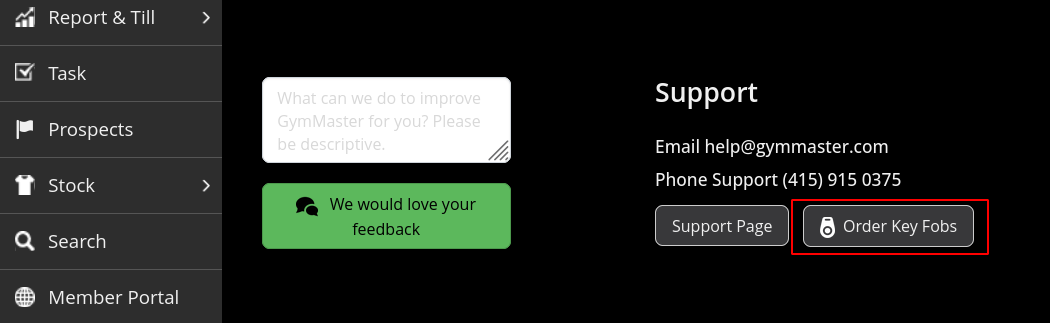
- Click Order key fobs, next to the feedback form.
- Select custom printed tags, then follow the instructions on the screen.
Order Key Fobs
When your stock of key fobs is low, you can order more from GymMaster.
At the bottom of almost all pages in GymMaster, there is an Order key fobs link:
The link opens the GymMaster Client Portal. In the Client Portal:
- Make sure that your shipping information is correct.
- Select the colour and the quantity of key fobs. The shipping cost changes when you add more key fobs.
- Select a payment method.
- Examine your order, then confirm it.
Next - Installation and Documents

 2026 © Treshna Enterprises Ltd.