
GymMaster Gym Software Manual
Member Portal
Allow members online access to their account and membership details, bookings, communication history and workout plans
- Allow Member Access
- Setup Portal Billing
- Allow Sign Up Online
- Allow Bookings via Portal
- Allow Cancellations via Portal
- Post Club Notices in Portal
- Portal Communication
- Allow Member Holds via Portal
- Customize How Portal Looks Online
- Configuration Summary
- Frequently Asked Questions
- Setup Member App
Memberships by Category
If you have different categories of memberships available online, you may wish to group your memberships;
- Organize memberships into groups using Membership Categories
- For example divide memberships into Gym Memberships and Swim Memberships
- There is no limit to the number of categories you can use
- Each membership can belong to one category only
- Category names will be used as headers online to separate membership groups
- Use Sort Order when creating your Categories to select which order groups are displayed
Default is alphabetical
- Use Sort Order when creating your Categories to select which order groups are displayed
Membership by Category Example
In example below, the club has divided their memberships into 3 categories; Gym, Classes and Gym, and Visit Packs.
Multiple memberships can be added within each category.
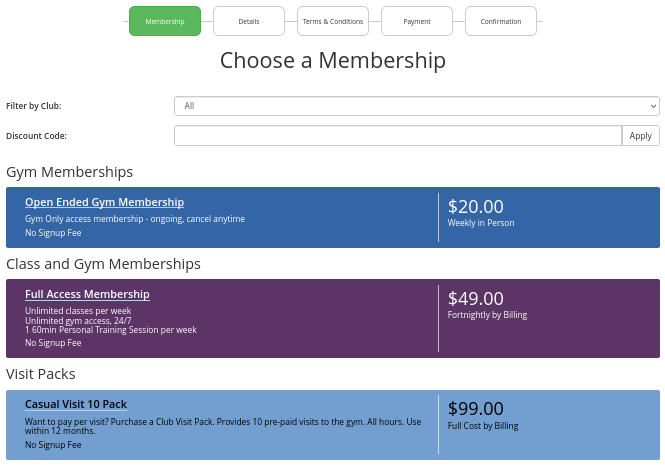
View Memberships by Multi-Step List Option
Membership Next Step - Membership Color

 2026 © Treshna Enterprises Ltd.
