
GymMaster Gym Software Manual
Member Portal
Allow members online access to their account and membership details, bookings, communication history and workout plans
- Allow Member Access
- Setup Portal Billing
- Allow Sign Up Online
- Allow Bookings via Portal
- Allow Cancellations via Portal
- Post Club Notices in Portal
- Portal Communication
- Allow Member Holds via Portal
- Customize How Portal Looks Online
- Configuration Summary
- Frequently Asked Questions
- Setup Member App
Enable Membership Purchase
Allow new and existing members to purchase Memberships online via sign up process, Member Portal and Member App.
Member Portal Configuration
Step One
- Go to Settings > Membership Types
- Select Membership Type Settings
- Select Member Portal Configuration
- Enable Purchase of New Memberships Online
- Continue through all Membership Type Settings - Member Portal Configuration one by one
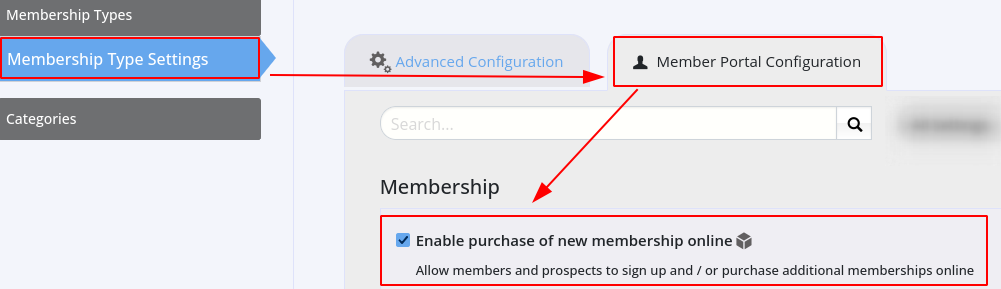
Enable Purchase of Individual Memberships
Step Two
- Go to Settings > Membership Types
- Select to Add / Edit Membership
- Navigate to Sell Membership Online
- Select Enable Online Signup
- Add service Description - this will be displayed online
- Complete details
- Repeat Step Two for every Membership where online purchase is allowed
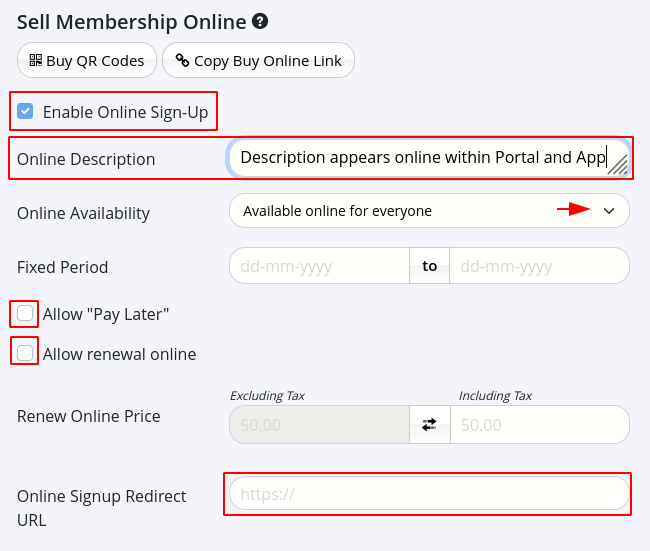
Membership Next Step - Membership Presentation

 2026 © Treshna Enterprises Ltd.
