
GymMaster Gym Software Manual
Member Portal
Allow members online access to their account and membership details, bookings, communication history and workout plans
- Allow Member Access
- Setup Portal Billing
- Allow Sign Up Online
- Allow Bookings via Portal
- Allow Cancellations via Portal
- Post Club Notices in Portal
- Portal Communication
- Allow Member Holds via Portal
- Customize How Portal Looks Online
- Configuration Summary
- Frequently Asked Questions
- Setup Member App
Confirmation Page
The confirmation page is where your new members will arrive immediately after completing the online sign-up process.
There are two options to create this page — please select one;
Option 1: Use a confirmation page created within your own website.
To link your own page as the completion page of the sign-up process;
- Go to Club Details
- Scroll down to Member Portal
- Online Sign-up Redirect URL - Input your pre-created Confirmation Page URL
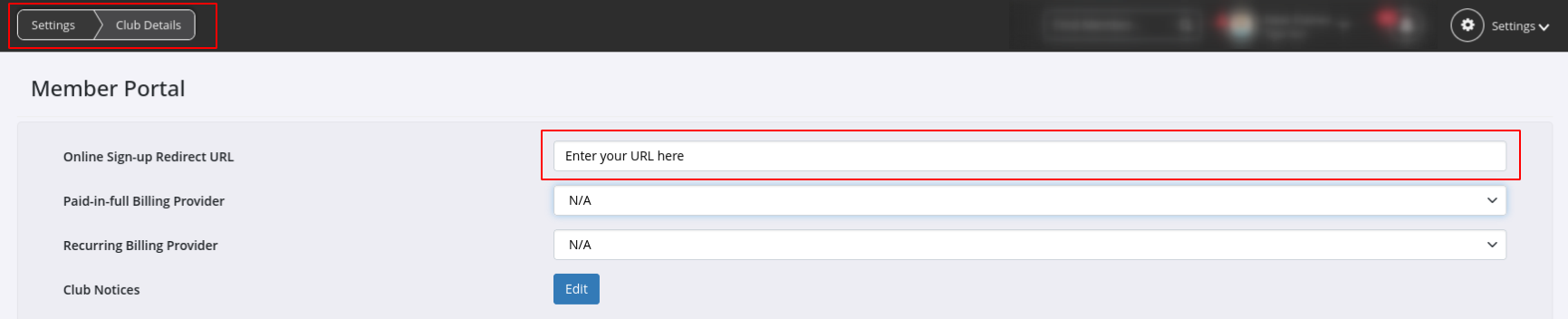
- Save
Option 2: Use a default confirmation page created by GymMaster, with text defined by you.
To do this;
- Go to Member Portal Configuration > Sign Up
- Text on Sign-up Confirmation Page
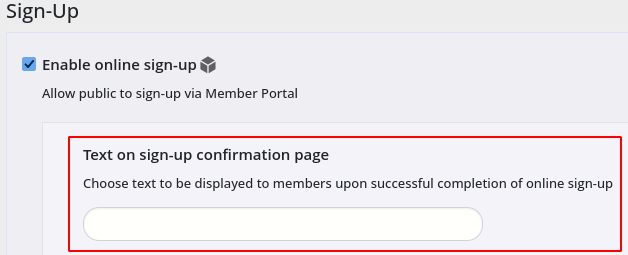
- Text on Sign-up Confirmation Page
Save
Next - Confirmation Email

 2026 © Treshna Enterprises Ltd.
