
GymMaster Gym Software Manual
Member Portal
Allow members online access to their account and membership details, bookings, communication history and workout plans
- Allow Member Access
- Setup Portal Billing
- Allow Sign Up Online
- Allow Bookings via Portal
- Allow Cancellations via Portal
- Post Club Notices in Portal
- Portal Communication
- Allow Member Holds via Portal
- Customize How Portal Looks Online
- Configuration Summary
- Frequently Asked Questions
- Setup Member App
Preview Notice in Member Portal and App
Club notices appear at the top of the Member Portal and Member App.
These notices will appear to all members per club, allowing you to share information like club closure dates, events, promotions.
To view your club notice as it appears in Member Portal / App, create a mock member to sign up for membership and to log-in to Portal or App
- Create mock member using process you would a real member; set membership to ‘$0’ and set billing to ‘never bill’
- Download App and / or log into Member Portal via left main menu on GymMaster
Example shows Member Portal on left, Member App on right;
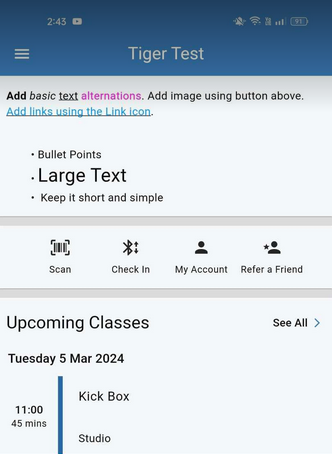
Club Notices Complete
Next - Portal Communication

 2026 © Treshna Enterprises Ltd.
