
GymMaster Gym Software Manual
Member Portal
Allow members online access to their account and membership details, bookings, communication history and workout plans
- Allow Member Access
- Setup Portal Billing
- Allow Sign Up Online
- Allow Bookings via Portal
- Allow Cancellations via Portal
- Post Club Notices in Portal
- Portal Communication
- Allow Member Holds via Portal
- Customize How Portal Looks Online
- Configuration Summary
- Frequently Asked Questions
- Setup Member App
Cancel Memberships Online
Default configuration for membership cancellation is done within Member Portal Configuration.
- Go to Settings > Advanced Configuration > Member Portal Configuration
- Select Membership
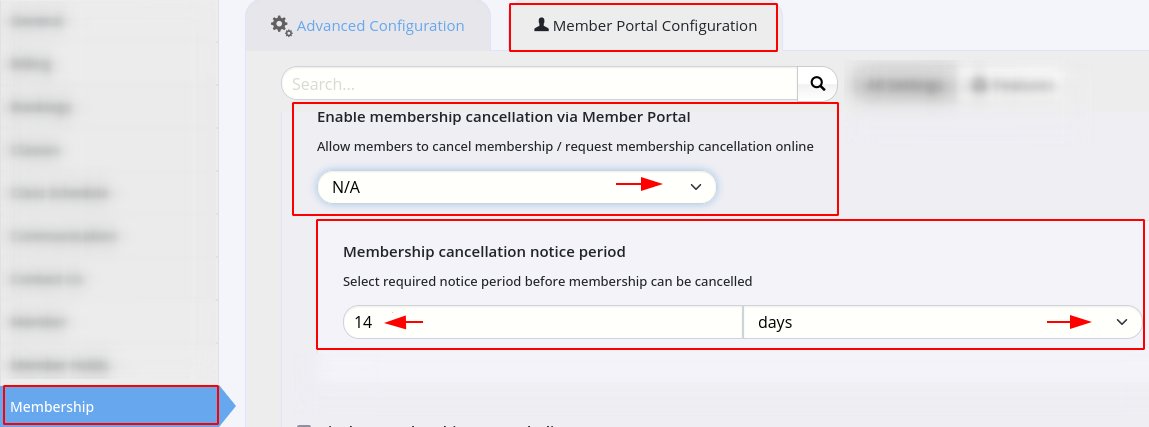
- Enable membership cancellation via Member Portal
- Allow members to cancel membership / request membership cancellation online
- Cancel Membership - membership can be directly cancelled online
- Cancellation will occur once cancellation notice period is complete
- Request Cancellation - membership request will be sent to staff via club email address as set in Club Details
- Staff can then respond to request in accordance with your business processes
- Cancel Membership - membership can be directly cancelled online
- Allow members to cancel membership / request membership cancellation online
- Membership Cancellation Notice Period - Select required notice period before membership cancellation can occur
- Select Membership
Online Cancellations Complete
Next - Post Club Notices in Portal

 2026 © Treshna Enterprises Ltd.
