
GymMaster Gym Software Manual
Member Portal
- Member Access
- Sign Up Online
- Bookings and Classes
- Portal Communication
- Customize Portal
- Frequently Asked Questions
- Setup Member App
Add Button
Changes made here will also apply to the Member App
A limited range of menu options can be added per heading;
- Account - Sign Waiver; Static Link (URL)
- Booking - Book Class, Book Service, Class Calendar, Static Link (URL)
- Purchase - Add Membership, Static Link (URL)
- Training - Static Link (URL)
As an example, to add a button for booking a specific class or service category;
- Navigate to the Booking section
- Select Add > Book Class or Book Service

- Then select the class / service category to filter by;
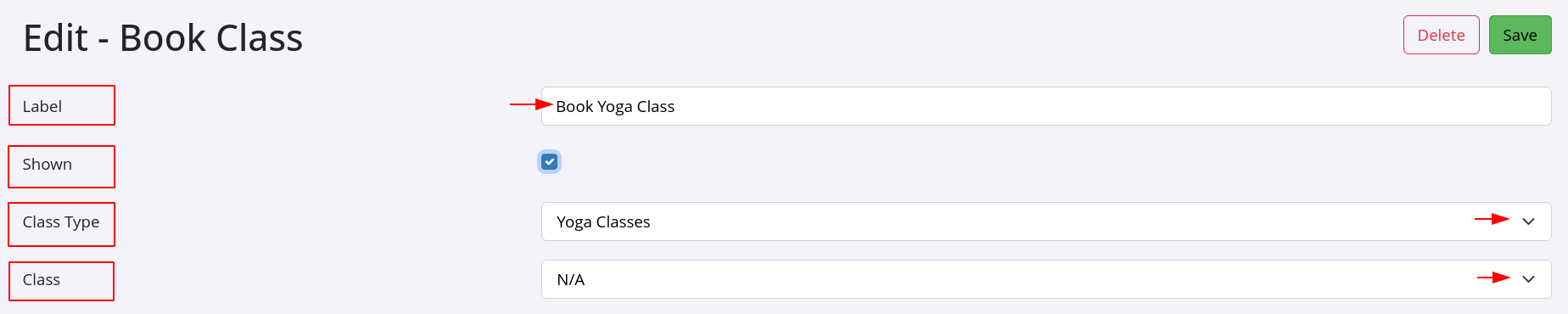
See below for example of how this could look within your menu;
-
- Original shown menu listings, in this example

- Original shown menu listings, in this example
-
- Enabled and named ‘Book Yoga Class’ option

- Enabled and named ‘Book Yoga Class’ option
-
Selecting this option will direct members to a list of all Yoga Classes that are designated as ‘Bookable Online’, enabling them to reserve a spot in these classes.
-
Multiple ‘Book Class’ options can be added to your menu list.

 2026 © Treshna Enterprises Ltd.