
GymMaster Gym Software Manual
Member Page
Manual tasks related to members can be managed through the different tabs within each member’s page
- Accounts and Billing
- Bookings
- Communication
- Details
- Grading
- Memberships
- Side Menu
- Training
- Frequently Asked Questions
Apply Manual Hold
Go to Member Page > Membership Tab
- Select Hold Membership

Select Membership/s you wish to add hold
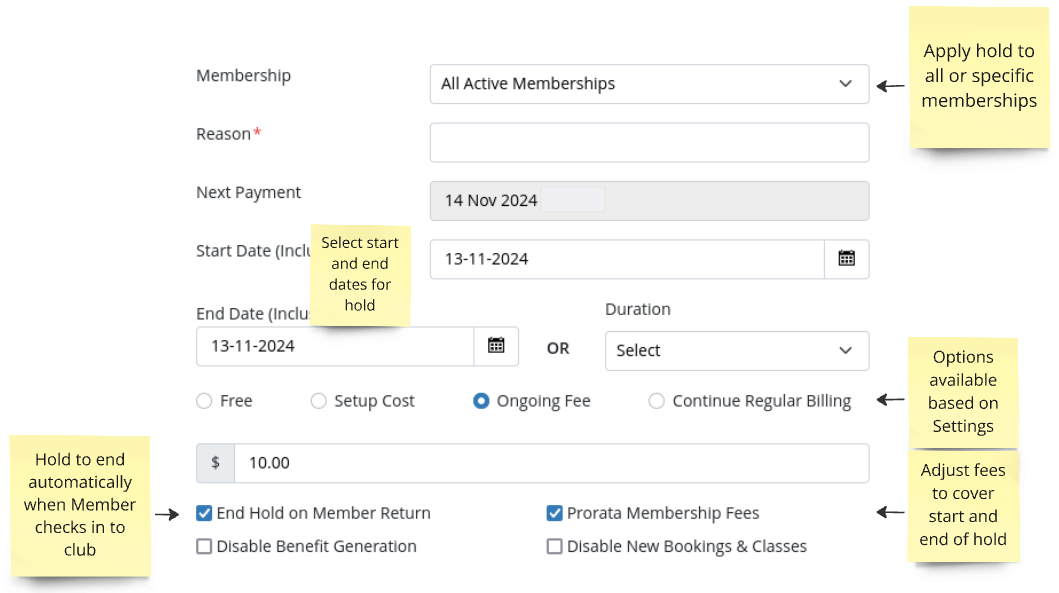
- Add Reason for hold (optional)
- Select Start date of hold
- Select End Date OR Duration of hold
- Select fee for adding hold;
- Free
- Setup Cost
- Ongoing Fee
- Continue Regular Billing
- Enable End Hold on Member Return to end the hold earlier than the selected end date if the member returns before the hold period is over
- Select Prorata Membership Fees to charge the member a proportional part of the fees based on the timing of the hold.
Not shown when How Holds Affect Billing is set to Billing Delay. Billing Delay holds move the next billing date instead of prorating - Enable Disable New Bookings and Classes to prevent the member from enrolling in classes and bookings during the hold period
- Save
Next - Online Holds

 2026 © Treshna Enterprises Ltd.