
GymMaster Gym Software Manual
Member Page
Manual tasks related to members can be managed through the different tabs within each member’s page
- Accounts and Billing
- Bookings
- Communication
- Details
- Grading
- Memberships
- Side Menu
- Training
- Frequently Asked Questions
Settings
Default settings for member and staff initiated holds are configured within Advanced Configuration.
These apply to;
- Manual Holds
- Online Holds (additional settings required, see Online Hold Settings below)
Go to Settings > Advanced Configuration > Member Holds
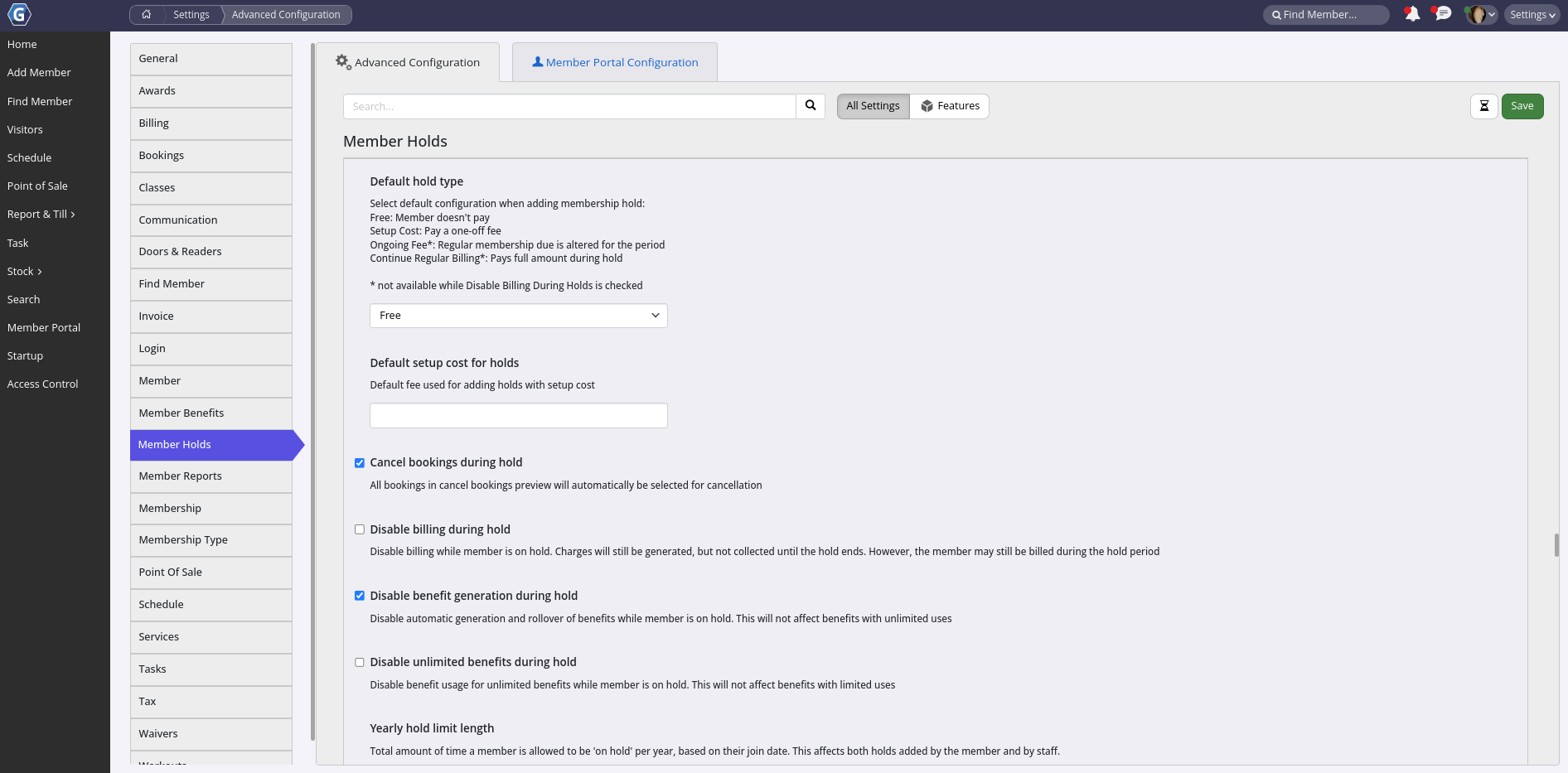
Configure the following options;
- Default Hold Type - The fee option that is selected when staff add a hold. Staff can choose a different option on each hold. Holds added online use Hold Charge Type instead
- Free - member does not pay during the hold
- Setup Cost - member pays a one-off fee. The fee is charged once for each hold, even when the hold covers more than one membership
- Ongoing Fee - the regular membership fee is replaced with the ongoing fee for the hold period.
Not available when Disable Billing During Hold is ticked, or when How Holds Affect Billing is set to Billing Delay - Continue Regular Billing - member pays the full amount during the hold. The hold is recorded, but charges do not change.
Not available when Disable Billing During Hold is ticked
If the default can not be used, the add hold form starts on Free. See Hold Fee Options - Examples below
- Default Setup Cost for Holds - The fee filled in when staff select Setup Cost. Staff can change it on each hold
- How Holds Affect Billing - How a new hold changes the member’s billing
- Adjust - billing dates stay the same. Membership fees in the hold period are prorated when Prorata Membership Fees is ticked on the hold
- Billing Delay - charges are not prorated to match the billing days. Instead the member keeps the days they had already paid for when the hold started, and their next billing date moves to the day they come back plus those days. The member then pays the full fee on the new date, and billing continues from there, so their billing day can change. Ongoing Fee can not be used
See How Holds Affect Billing - Examples below Applies to new holds added by staff and online, and to gifted time. Each hold keeps the option it was added with, so changing this setting does not change existing holds. Mass holds always use Adjust. New GymMaster sites use Billing Delay
- Cancel Bookings During Hold
- Staff holds - all bookings in the hold period are selected in the cancel bookings preview. Staff can clear any booking before saving
- Online holds - when ticked, all of the member’s bookings in the hold period are canceled automatically, without charge. When unticked, bookings are not canceled
Mass holds use their own booking option
- Disable Billing During Hold - Stop collecting payments from a member while they are on hold. Charges are still generated, and are collected after the hold ends
- A hold on a single membership only delays the charges for that membership. Other charges are still collected
- Point of sale charges are still collected
- Members on hold are left out of the debtor report
- Gifted time does not count as a hold
- Disable Benefit Generation During Hold - Stop limited benefits being generated and rolled over during the hold. Benefits with unlimited uses are not affected
- This is the default for new holds. Staff can change it on each hold
- Holds added online always use this setting
- Mass holds always disable benefit generation
- Changing this setting does not change existing holds
- Yearly Hold Limit Length - Total time a member can be on hold each year
- Yearly Hold Limit Count - Number of holds a member can have each year
- Hold Limits Reset Each Calendar Year - When ticked, the yearly limits run from 1 January to 31 December. When unticked, each member’s year starts on the anniversary of their join date
Both yearly limits;- Are per member, across all of their memberships
- Use the year that the hold starts in
- Count holds added by staff and online, including Continue Regular Billing holds. Gifted time, mass holds and deleted holds are not counted
- Block staff as well as members. Staff with Member Admin access can override the limit
- Are turned off for all members while a mass hold is running
See Yearly Hold Limits - Examples below
- Gifted Time Extends Minimum Term - When ticked, gifted time during the minimum term moves the end of the minimum term out by the length of the gifted time.
Gifted time always extends the membership end date, whether this is ticked or not - Mass Hold Tool - Allow staff with Admin access to add holds or gifted time to many members at once, by membership type and club. To use, click the Mass Hold button on the Club Details page.
Holds added with this tool do not count towards the yearly hold limits
Save
How Holds Affect Billing - Examples
These examples show what the member is charged when a hold is added with each option. They all use the same member unless the example says otherwise:
- Membership fee of $60 per month, billed on the 1st of each month
- June has 30 days, so one day of membership is worth $2 in June
- On the hold form, End Date is the member’s last day on hold. They come back the next day, and are charged again from that day
How Billing Delay works out the new billing date
- Find the member’s next billing date on or after the day the hold starts
- Count the days the member had already paid for when the hold started. These are their days in credit
- The new billing date is the day the member comes back plus the days in credit. This is the same as moving the next billing date out by the length of the hold
- The regular charge on the old billing date is removed. The member pays the full fee on the new billing date, and billing carries on from the new date at the same frequency
Example 1 - Short hold inside one billing period
On hold from 10 June to 19 June (End Date 19 June), back on 20 June. That is 10 days on hold. The member paid $60 on 1 June for all of June.
- Adjust, Prorata Membership Fees ticked
- The June charge becomes $40 (20 days at $2). The 10 days on hold are not charged
- If the $60 was already paid, the $20 difference stays on the account as credit, and is used on the next charge
- 1 July is charged $60 as normal. The billing day stays the 1st
- Adjust, Prorata Membership Fees not ticked
- The June charge stays at $60. Only billing periods that the hold covers from start to end are free
- The membership end date still moves out by 10 days
- 1 July is charged $60 as normal
- Billing Delay
- Next billing date on or after 10 June: 1 July
- Days in credit: 10 June to 30 June = 21 days
- New billing date: back on 20 June + 21 days = 11 July
- The 1 July charge is removed. The member pays $60 on 11 July, then on 11 August, 11 September and so on. Their billing day is now the 11th
Example 2 - Hold that crosses a billing date
On hold from 20 June to 9 July (End Date 9 July), back on 10 July. That is 20 days on hold. July has 31 days.
- Adjust, Prorata Membership Fees ticked
- The June charge becomes $38 (1 June to 19 June, 19 days at $2)
- The July charge becomes about $42.58 (10 July to 31 July, 22 of 31 days)
- The billing day stays the 1st
- Adjust, Prorata Membership Fees not ticked
- Neither June nor July is covered from start to end by the hold, so both are charged $60
- The membership end date moves out by 20 days
- Billing Delay
- Next billing date on or after 20 June: 1 July
- Days in credit: 20 June to 30 June = 11 days
- New billing date: back on 10 July + 11 days = 21 July
- The 1 July charge is removed. The member pays $60 on 21 July, and then on the 21st of each month
Example 3 - Long hold over several billing periods
On hold from 15 June to 14 September (End Date 14 September), back on 15 September. That is 92 days on hold.
- Adjust, Prorata Membership Fees ticked
- June is $28 (14 days), July and August are $0, and September is $32 (16 days)
- Adjust, Prorata Membership Fees not ticked
- June is $60, July and August are $0 (fully covered by the hold), and September is $60
- Billing Delay
- Next billing date on or after 15 June: 1 July
- Days in credit: 15 June to 30 June = 16 days
- New billing date: back on 15 September + 16 days = 1 October
- The member is not charged on 1 July, 1 August or 1 September. Their next charge is $60 on 1 October. In this example the billing day is still the 1st, because the hold started and ended on the same day of the month
Example 4 - Weekly membership with Billing Delay
$15 per week, billed every Monday. The hold starts on a Wednesday and lasts 10 days, so the member comes back on the Saturday of the following week.
- Next billing date on or after the hold start: the Monday after, 5 days later
- Days in credit: Wednesday to Sunday = 5 days
- New billing date: the Saturday the member comes back + 5 days = Thursday
- The Monday charge is removed. The member pays $15 on that Thursday, and then every Thursday. With Adjust they would keep being billed on Mondays
How the hold fee options work with each billing option
- Free - Works as shown in the examples above
- Setup Cost - A one-off fee, for example $20, is charged once for each hold. See Hold Fee Options - Examples below. It is charged with both Adjust and Billing Delay, on top of what the examples show
- Ongoing Fee - Adjust only. For each billing period in the hold, the ongoing fee is charged instead of the membership fee. In Example 3 with an ongoing fee of $10, July and August would be $10 each instead of $0
- Continue Regular Billing - The hold is only recorded. Charges and billing dates do not change, even when How Holds Affect Billing is set to Billing Delay
Other things that change how a hold is billed
- Disable Billing During Hold - The charges shown above are still created, but a charge that falls due during the hold is collected on the first billing day after the hold ends. In Example 2 with Adjust, the July charge of about $42.58 is collected after 10 July instead of on 1 July
- Gifted time - Uses the same billing option as holds. With Billing Delay, 10 days of gifted time moves the next billing date out by 10 days, the same as Example 1
- Mass holds - Always use Adjust, whatever this setting is
- Paid in full memberships - Have no billing date to move. With either option the hold moves the membership end date out by the length of the hold
- Changing the setting - Only new holds use the new option. A hold keeps the option it was added with, so editing an old Adjust hold still prorates, and editing an old Billing Delay hold still moves the billing date
Editing or ending a Billing Delay hold
- Changing the dates of the hold, or ending it early with End Hold on Member Return, works out the new billing date again. In Example 1, if the End Date is changed to 14 June so the member is back on 15 June, the new billing date becomes 6 July (15 June + 21 days)
- After the hold ends and the new billing date has passed, the hold can not be edited or removed
- Staff can not set the Next Payment Date earlier than the date the hold moved it to
- A new Billing Delay hold must start after any other hold on that membership
Which option to choose
- Adjust - Members keep the same billing day. Charges around the hold can be part amounts when Prorata Membership Fees is ticked, and without it the member pays in full for any billing period the hold only partly covers
- Billing Delay - Members always pay the full fee, never a part amount, and do not pay for the days they were away. Their billing day can change after a hold. Ongoing Fee can not be used
Hold Fee Options - Examples
These examples use the same member as the billing examples above: $60 per month, billed on the 1st. How Holds Affect Billing is Adjust, with Prorata Membership Fees ticked, unless the example says otherwise.
The hold is from 10 June to 19 June, back on 20 June (10 days), unless the example says otherwise. With Free, the June charge is $40, as in Example 1 above.
Setup Cost
Default Setup Cost for Holds is $20.
- The member is charged a one-off $20 Suspension Initial Admin Fee, as well as the $40 June charge
- The fee is dated on the member’s next billing day on or after the hold starts, so it is collected with their regular payment on 1 July. A member with no billing day, for example on a paid in full membership, is charged on the hold start date
- The fee is charged once for each hold:
- One hold on All Active Memberships, covering two memberships: $20 once
- Two holds, one for each membership: $20 for each hold, so $40
- Changing the hold dates keeps the fee, on the date it was first charged. Deleting the hold removes the fee
- With Billing Delay the fee is the same amount, but it is dated on the member’s new billing date, because the hold has moved it. In the example above that is 11 July instead of 1 July
Ongoing Fee
Default Ongoing Fee for Holds is $10. The ongoing fee is charged for each billing period, like the membership fee, so here it is $10 per month.
- Short hold (10 June to 19 June, back on 20 June)
- June: $40 for the 20 days not on hold, plus $3.33 of ongoing fee for the 10 days on hold ($10 × 10 of 30 days). June is $43.33
- July: $60 as normal
- Long hold (15 June to 14 September, back on 15 September)
- June: $28 for 14 days, plus $5.33 of ongoing fee for 16 days on hold = $33.33
- July and August: $10 each, instead of $0 with Free
- September: $32 for 16 days, plus $4.67 of ongoing fee for 14 days on hold = $36.67
- Without Prorata Membership Fees - only the billing periods that the hold covers from start to end are replaced with the ongoing fee. In the long hold, July and August are $10 each
- An ongoing fee of $0 is the same as Free
- Ongoing Fee can not be used when Disable Billing During Hold is ticked, or when How Holds Affect Billing is Billing Delay
Continue Regular Billing
- The hold is only recorded. The member pays $60 on 1 June and on 1 July as normal, and no billing date moves, even with Billing Delay
- The hold still counts towards the yearly hold limits
Which option the add hold form starts on
- The form starts on Default Hold Type. Staff can choose a different option on each hold
- If the default can not be used, the form starts on Free:
- Default Hold Type is Ongoing Fee or Continue Regular Billing, and Disable Billing During Hold is ticked
- Default Hold Type is Ongoing Fee, and How Holds Affect Billing is Billing Delay
- Staff can not change the fee option of an existing hold. To change it, remove the hold and add it again
- Holds added online use Hold Charge Type and Hold Charge Type Fee instead. Members can not choose
Yearly Hold Limits - Examples
These examples use a member who joined on 1 March 2024, so their hold year runs from 1 March to the end of February. Yearly Hold Limit Length is 8 weeks (56 days) and Yearly Hold Limit Count is 3.
Example 1 - Going over the length limit
- The member has had two holds this year: 3 weeks in April and 4 weeks in August. That is 49 days and 2 holds
- In November, staff try to add a 2 week hold. 49 + 14 = 63 days, which is more than 56, so the hold is not saved. The message says the hold puts the member over the yearly hold limit, and how long until the limit renews
- A 1 week hold is saved. 49 + 7 = 56 days, which is exactly the limit. It is the member’s 3rd hold this year
Example 2 - Going over the count limit
- After Example 1, the member has had 3 holds this year and 56 days on hold
- In January, the member tries to add a 2 day hold. It would be their 4th hold this year, and the limit is 3, so the hold is not saved. The length limit is also used up
- On 1 March the member’s year starts again, and both limits reset
Example 3 - One hold longer than the limit
- A new hold of 10 weeks (70 days) is not saved, even if the member has had no holds this year. The message says the hold is longer than the yearly hold limit
- For holds added online, also see Maximum Time on Member-Added Hold. It limits each hold, while the yearly limit is the total for the year
Example 4 - A hold that crosses the start of a new year
- The member is on hold from 15 February to 14 March, back on 15 March (28 days). Their new year starts on 1 March
- The hold counts in the year it starts in, as 1 hold
- Only the 14 days before 1 March count towards the length limit. The 14 days from 1 March do not count towards either year
Example 5 - Hold Limits Reset Each Calendar Year
- With Hold Limits Reset Each Calendar Year ticked, the year runs from 1 January to 31 December for every member, whatever their join date
- In Example 2, the January hold is in a new year. It is the member’s 1st hold that year, so it is saved
- The holds in April, August and November are all in the same calendar year, so Example 1 is the same
Editing holds and overriding the limits
- When staff edit a hold, the hold is not counted twice. Only its new length is counted
- A hold that is already over the limit can always be made shorter. Making it longer is checked against the limit
- Staff with Member Admin access can tick Continue and override hold limit? to save a hold that is over a limit. That hold still counts towards the totals when later holds are added
- For staff without Member Admin access, the Duration list on the add hold form only shows lengths up to the yearly limit
- Members can not override the limits when they add a hold online
- Not counted: gifted time, holds added with the mass hold tool, and deleted holds
- Counted: holds added by staff and online on any of the member’s memberships, including Continue Regular Billing holds, and holds where staff overrode the limit
- While a mass hold is running, both limits are turned off for all members
Online Hold Settings
These options only apply to holds added or requested online. Holds added by staff are not affected, and use Default Hold Type above instead.
Go to Settings > Advanced Configuration > Member Portal Configuration > Member Holds
- Enable Membership Hold via Member Portal - Allow members to add a hold, or request a hold, on their membership online
- N/A - no holds online. The hold button is hidden and the hold pages can not be opened
- Add Hold - members add the hold themselves. It starts straight away, and any hold fee is charged
- Request Hold - members send a request. The club and the member are emailed, and staff add the hold
- Minimum Hold Notice Period - How far ahead a hold must start. With 1 day, a hold can start tomorrow but not today
- Minimum Time on Member-Added Hold - Shortest hold a member can add or request
- Maximum Time on Member-Added Hold - Longest single hold a member can add or request. For a yearly total, use Yearly Hold Limit Length above
- Hold Charge Type - What the member pays for a hold they add online.
Requested holds are added by staff, so this option does not apply to them- Free - member pays no setup fee and no membership fees during hold
- Setup Cost - member pays a one-off fee, with no ongoing fees during hold. The fee is charged once for each hold, and is collected with the next regular billing. A member who puts two memberships on hold separately pays it twice
- Set Hold Charge Type Fee
- Ongoing Fee - the regular membership fee is replaced with the ongoing fee for the hold period. A fee of $0 is the same as Free
- Set Hold Charge Type Fee
The fees work the same way as for staff holds. See Hold Fee Options - Examples above
- Set Hold Charge Type Fee
The yearly hold limits, Cancel Bookings During Hold and Disable Benefit Generation During Hold above also apply to online holds.
Save
Next - Manual Holds

 2026 © Treshna Enterprises Ltd.