
GymMaster Gym Software Manual
Add Member
Devices & Subscriptions
Once a member is saved, you’ll find options to manage their devices and communication preferences within their contact card.
Manage Devices
Limit how many devices each member can connect to the GymMaster App.
This security feature helps you maintain tighter control over account access and enhances security—especially important when using Bluetooth for contactless entry.
Don’t see this feature? Contact GymMaster Support to enable it
Manage Subscriptions
Select how your new member receives club communication by managing their notification preferences across Email or SMS/Member App*.
Choose which messages are sent, and how they’re delivered:
- General Updates – Club news, updates, and announcements
- Membership Alerts – Notifications for changes, renewals, or approaching expiration
- Marketing Messages – Promotions, events, and special offers
- Booking Confirmations – Class bookings and appointment reminders
- Account Reminders – Billing notices and payment alerts
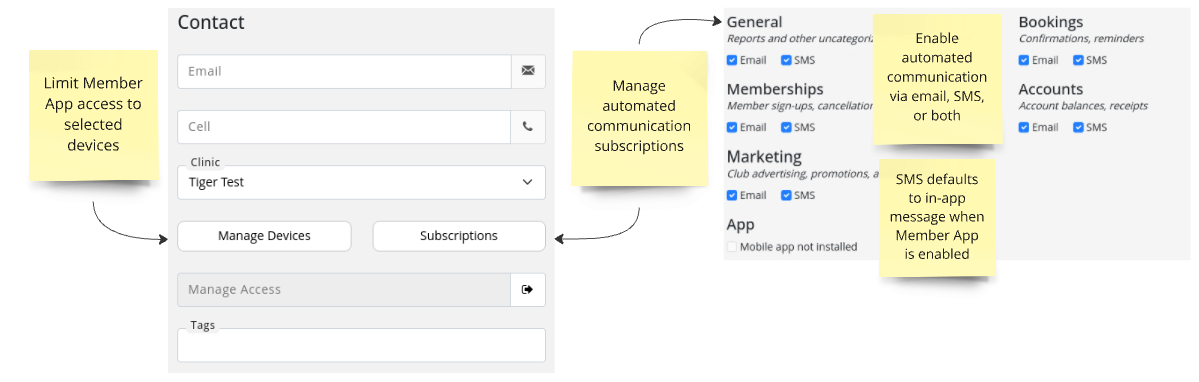
Once you have setup the GymMaster Member App, app notifications will override SMS, making communication smarter, faster, and more cost-effective.
Be sure to let your members know to Download Member App and enable app notifications in their settings.
Ready to go back to adding your new member? Return to Add Member

 2026 © Treshna Enterprises Ltd.
