
GymMaster Gym Software Manual
Rosters and Open Hours
Rosters are used to set availability of trainers and facilities in schedule and assign door access hours for staff and members
24/7 Access
Roster not displayed under Rosters and Open Hours as it cannot be altered
24/7 = 24 hours per day, 7 days per week
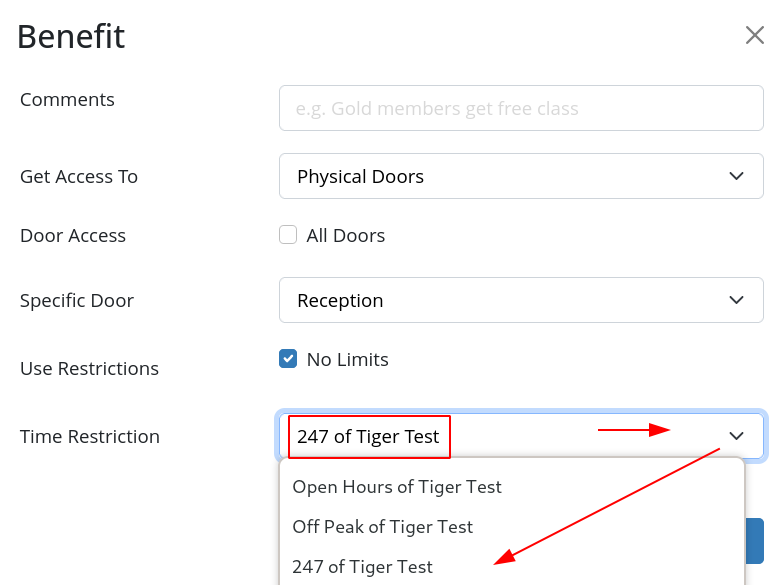
The 247 system roster can be selected when assigning resource rosters, staff and member access.
You may choose to define your Member’s Access hours as 24/7, if it suits your club access capabilities and your Membership Type.
Please note that any of your System or Door Rosters can be selected to define Member Access hours.
For example;
Your club is open between 5am - 10am, but you wish to allow 24/7 Access for members with specific Memberhips.
- Set Open Hours as 5am - 10pm
- For a 24/7 Membership, you would assign ‘247’ as the Time Restriction when assigning Membership Benefits to their Membership Types
GymMaster provides the hardware required to allow full secure access for your members during your non-staffed hours.
See Doors and Readers and contact your GymMaster Sales Support team member to learn more.
See Edit Roster to learn how to adjust times within a Roster
Please note:
- ‘0:00am’ refers to midnight at the beginning of the day
- ‘12:00am’ refers to midnight at the end of the day
- Available selections are in 30min time periods; can be overwritten directly
- Take care to select correct AM and PM time
Next - Trainer Rosters

 2026 © Treshna Enterprises Ltd.
