The Member Page is the central hub for everything related to an individual member’s account.
From here, you can view details, manage memberships, handle billing, communicate, book sessions, and track training.
To keep things clear and easy to navigate, the page is divided into key sections, each accessed via its own tab.
The left side-bar is described within it’s own page.
Details Tab
Memberships Tab
Accounts and Billing Tab
Communication Tab
Bookings Tab
Training Tab
Side Bar
When members sign up online, their memberships are automatically added to the Memberships tab on their Member Page.
This tab is your central place for viewing, managing, and updating all membership-related activity for a member.
A member hold allows you to temporarily pause a member’s membership.
This is commonly used when a member is travelling, injured, or taking a short break from the club.
When a hold is applied—by staff or the member—both club access and membership billing are typically paused for a defined period.
A hold can be applied to a single membership or across all memberships held by the member.
Holds extend the rollover date of the affected membership.
Key terms when applying a hold;
End Hold on Member Return:
Automatically ends the hold early if the member returns before the scheduled end date.
Prorata Membership Fees:
Charges a proportional amount of membership fees based on when the hold starts and ends within the billing cycle.
Disable New Bookings and Classes:
Prevents the member from making new class or service bookings while their membership is on hold.
Gifting time allows your club to provide a member with a period of free access to one or more of their memberships.
During the gifted period, the member retains full access and benefits, with no billing applied.
A member must already hold an active membership for time to be gifted.
Gifted time does not replace a membership, it temporarily extends it by moving the membership rollover date forward by the gifted amount.
Gifted time can be applied to a single membership or across all active memberships held by the member.

Use Add Membership when selling a membership to a member in person.
Once the membership details are selected, GymMaster will guide staff to the appropriate next step:
The membership becomes active from the selected start date.
Key terms when setting up membership purchase;
Start Date:
The date the membership begins and access is granted.
First Payment Date:
The date the first membership payment will be charged.
Up-Front Fee:
A prorated adjustment applied when the first payment differs from the regular ongoing amount.
This accounts for the time between the membership start date and the first scheduled payment.
Sign-Up Fee:
An optional one-off fee charged in addition to the membership fee.
This can be automatically configured within the membership type.

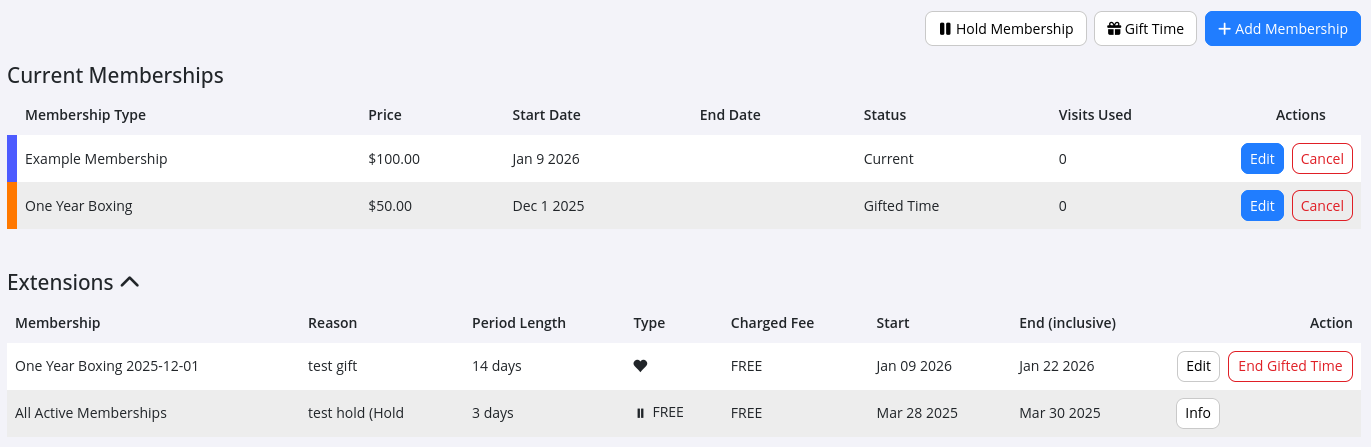
This section displays all memberships the member currently holds that are active.
You can view when each membership started, when it is due to expire, and how many visits have been recorded against it.
Edit membership details here.
This action requires Intermediate or Admin access.
Cancel a membership before its scheduled expiry here.
A cancelled membership can be uncancelled within 30 days of cancellation.
Key terms when cancelling a membership;
Enforce Minimum Term Date:
When enabled, the member will continue to be charged until the minimum term expires and will retain access during this period.
This can be overridden to allow cancellation without continued payments.
Disable Member’s Future Billing:
Stops any future charges for this membership.
This is useful when a member pays out their cancellation upfront or is granted a period of free use after cancelling.
No charges will apply between the cancellation date and the membership termination date.
Prorata Cancellation:
If the cancellation occurs part-way through a billing cycle, this option prorates the final charge.
View and manage any current holds or gifted time applied to the member’s memberships.
This section also stores a full history of all past holds and gifted time across all memberships.
All past memberships are stored here for reference.
Recently cancelled memberships can be uncancelled within 30 days by selecting Inf* then Uncancel.

View all benefits the member currently has access to.
By default, this shows benefits linked to active memberships, with the option to also view historic memberships and benefits previously held.



 2026 © Treshna Enterprises Ltd.