
GymMaster Gym Software Manual
Member Page
Manual tasks related to members can be managed through the different tabs within each member’s page
- Accounts and Billing
- Bookings
- Communication
- Details
- Grading
- Memberships
- Side Menu
- Training
- Frequently Asked Questions
Change Password
Update member’s Member Portal password;
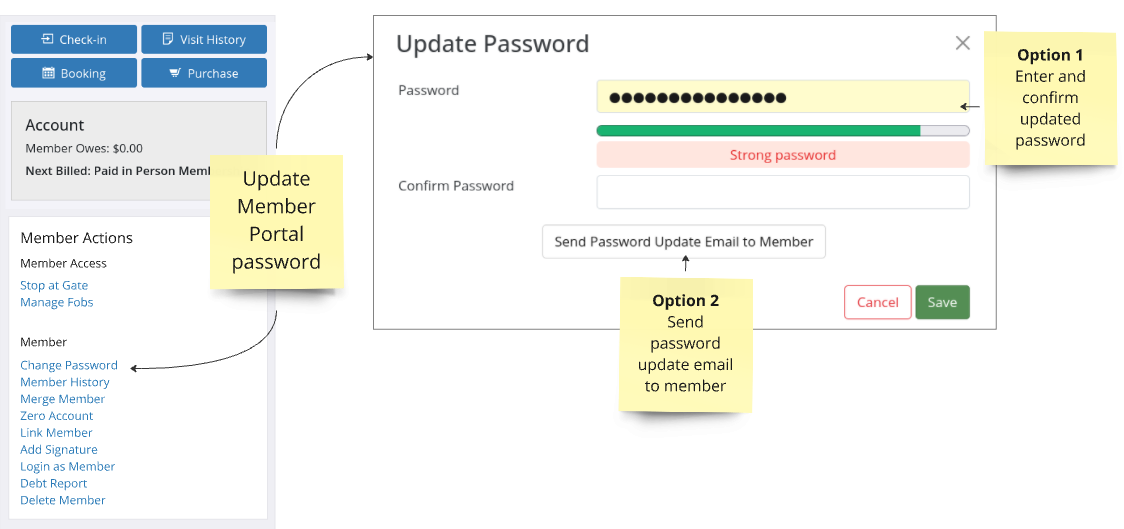
Option 1
- Input New Password
- Password must contain minimum 6 characters
- Member will receive email to confirm update
- Link within email will allow them to update password again
Option 2
- Send Update Password Email
- Password must contain minimum 6 characters
- Link within email will be valid for 24hrs
- If link not used within time-frame, password will not be changed
Next - Member Changes

 2026 © Treshna Enterprises Ltd.