
GymMaster Gym Software Manual
Membership Types
Memberships are agreements between club and your members, providing members access to your club, services and classes in return for payment
- Membership Settings
- Membership Categories
- Add Membership Type
- Add Membership to Member
- Frequently Asked Questions
Door Access
Consider the benefit profile you wish to offer members who purchase this membership
What benefits will this membership allow regarding door access?
Work through the following options, considering what access rules you wish to apply;
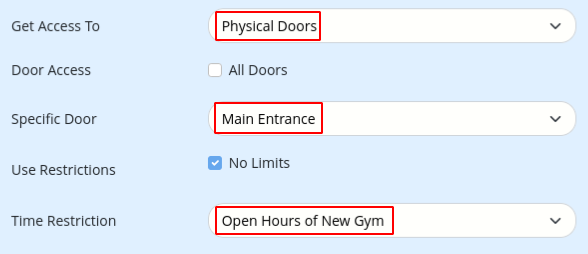
- Get Access To
- Select Physical Doors
- Door Access
- All Doors
- Selecting All Doors will allow you to select;
- All Clubs (when part of a franchise)
- All Doors of Members Club Only
- Memberships Club Only
- Selecting All Doors will allow you to select;
- Specific Door
- Select door this benefit allows access to, such as Front Door or Reception
- To select two or more doors (but not All Doors) set this up as separate benefits; one per door
- Restrictions
- Use Restrictions
- No Limits means member can access door as often as they want, within allocated access hours
- To set limits within the number of times a member can access within a period of time;
- Unselect No Limits
- Allocate number of times member can access club per week / fortnight / month etc
- Time Restriction
- This allocates access hours - within what hours per day / week can your member access the club?
- Set an existing System roster, or specifically create a door roster to suit;
- This allocates access hours - within what hours per day / week can your member access the club?
- Use Restrictions
- Save
Next - Products

 2026 © Treshna Enterprises Ltd.