
GymMaster Gym Software Manual
Financial Configuration
Customize and manage the financial aspects of your business, ensuring smooth financial processes for club and members.
Membership Discounts
Select where/when the discount is applied, and what amount is discounted
- Select Membership Categories and Membership Types the discount code can be used for when purchasing

- Enable Account Credit - you can select discount to be applied as credit to members account
- Account Credit will be applied on membership completion. Any fees that are required to be paid to complete the membership must be paid before the account credit gets applied

- Account Credit will be applied on membership completion. Any fees that are required to be paid to complete the membership must be paid before the account credit gets applied
- Enable Signup Fee Discount - if discount applies to signup fee, select the details of the discount here
- Options are Percentage discount, Flat Amount discount, Set Rate

- Options are Percentage discount, Flat Amount discount, Set Rate
- Enable Membership Price Discount - if discount applies to membership fee for the duration of the membership, select the details of the discount here.
- Options are Percentage discount, Flat Amount discount, Set Rate
- If discount applies to a limited time period of the membership, select these details further down at Enable Promotional Period.

- Enable Promotional Period - if discount applies to membership fee for limited duration during membership, select the details of the discount here
- Promotional Discount Periods cannot be applied to Paid In Full membership types
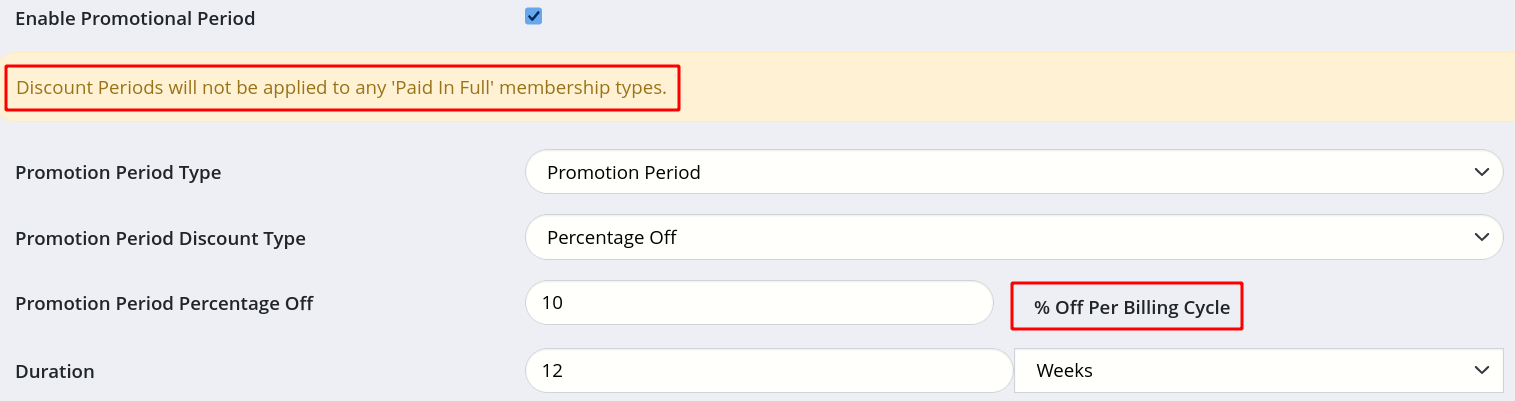
- Promotional Discount Periods cannot be applied to Paid In Full membership types
Membership Discount Code Completed
Next - Booking Discount Code

 2026 © Treshna Enterprises Ltd.
