
GymMaster Gym Software Manual
Report and Till
Reports are organized collections of data providing insights into your clubs performance
- Standard
- Staff Attendance
- Trainer Commission
- Debt Collection
- Till Take
- Key Performance Indicators
- Frequently Asked Questions
Run Standard Report
To run Standard Report;
-
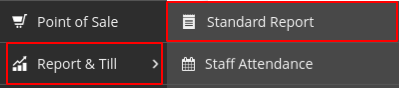
Go to Report & Till > Standard Reports
-
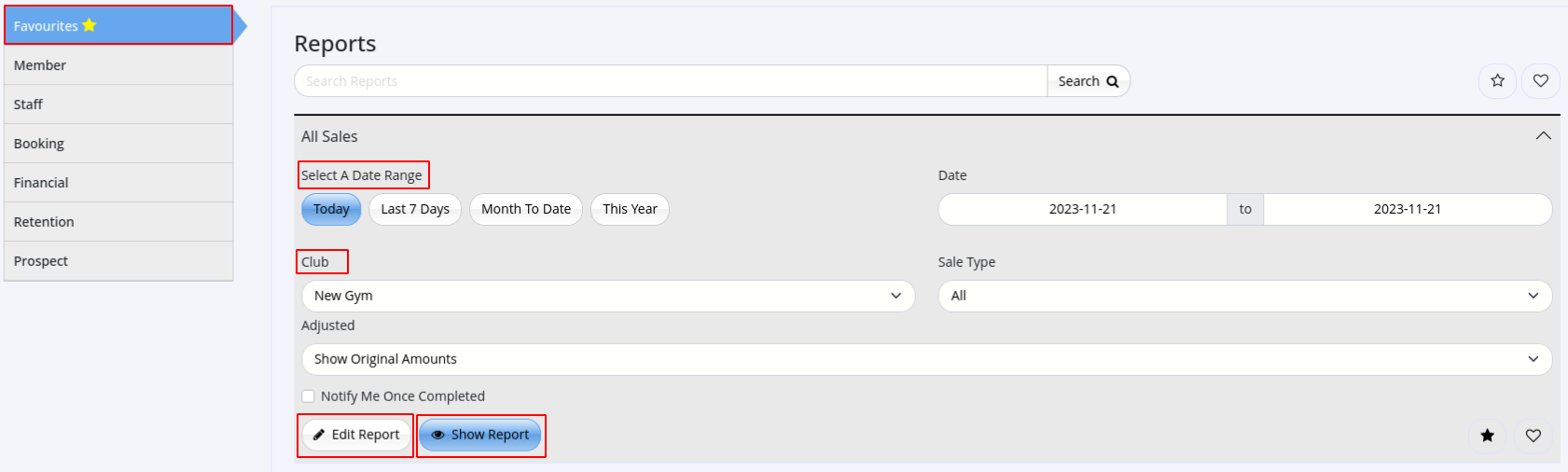
Select a broad category that matches your required data;
- Favorites
- Members
- Staff
- Bookings
- Finances
- Member Retention
- Prospect
-
Find the specific report that best matches the details you require
- Select Report
- Options vary slightly per report type, but will often allow selection by;
- Date
- Club
-
Report can be further customized via Edit Report;
- Edit title and description of Report
- Filter options (See Standard Reports FAQs - Filtering and Customized Reports for more details)
-
Select Show Report or Save & Run Report
Next - Report Options

 2026 © Treshna Enterprises Ltd.