
GymMaster Gym Software Manual
Products
Products are the items that your club offers for sale, such as foods, supplements, clothing, or equipment
Stock
-
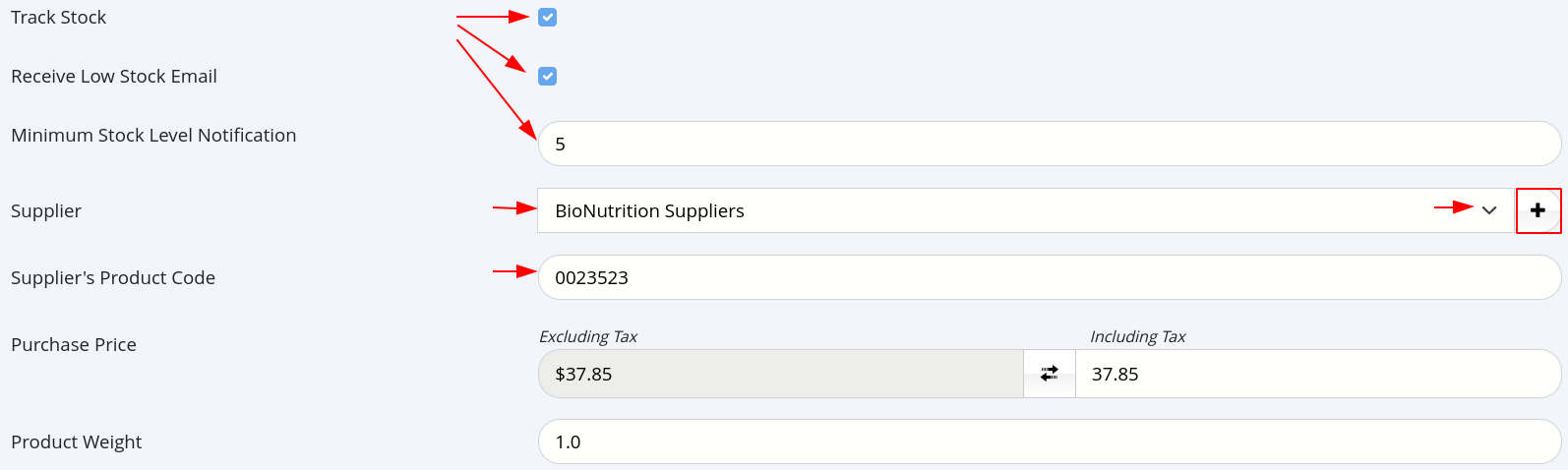
Track Stock - Enable GymMaster to monitor inventory levels as purchases are completed
- Updating of stock levels when product received from suppliers must be performed manually
- Receive Low Stock Email - Allow GymMaster to alert selected staff when stock levels drop below specified amount
- Email sent once per week. Select which staff receive email via Staff Member - Options Tab.
- Minimum Stock Level Notification - Set stock level which triggers product to be added to low stock email
-
Supplier - Select the supplier of this product
- Supplier Product Code - Input suppliers identifier code for product.
- Used to correctly identify product for future ordering
- Supplier Product Code - Input suppliers identifier code for product.
-
Cost Price - Cost price of product from supplier
- Tax rate based on selection made in Product Type
-
Stock to Deduct per Purchase - Determine how much product is deducted from stock levels with each transaction
Next - Product Variations

 2026 © Treshna Enterprises Ltd.
