
GymMaster Gym Software Manual
Glossary
Icons


Billing / Payment Icons
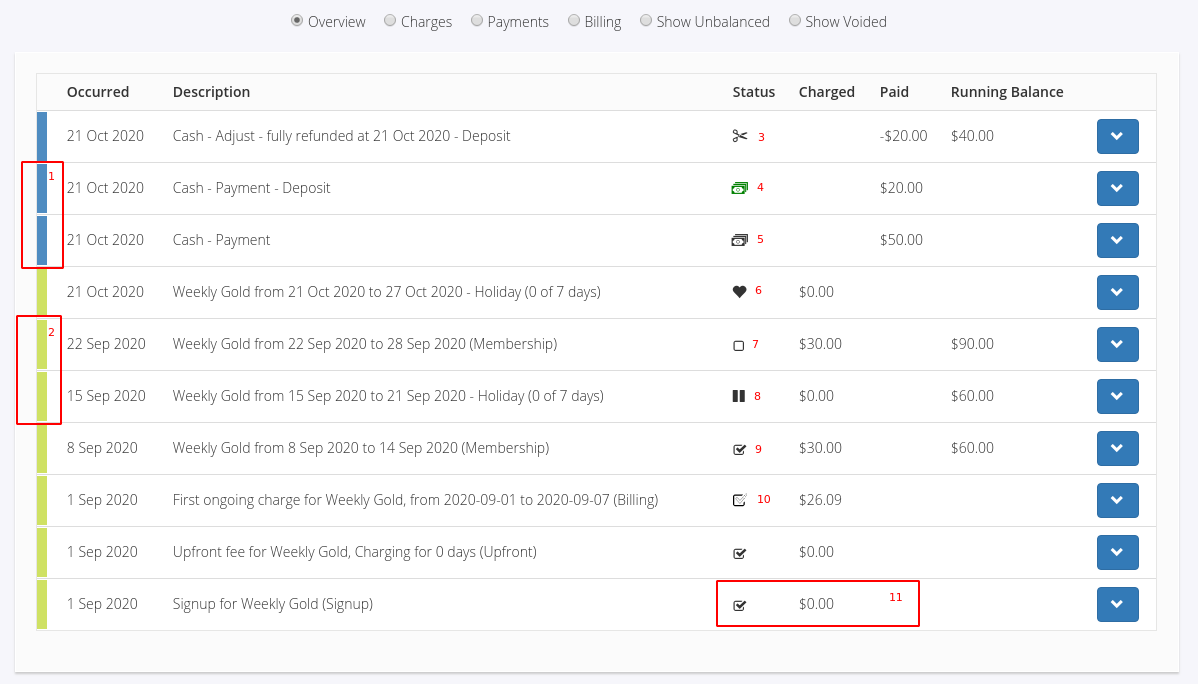
- 1; Payment Line - Indicated by a blue band on the Account’s History line item.
- 2; Charge Line - Indicated by a green band on the Account’s History line item.
- 3; Adjustment - An adjustment has been made to counteract a payment or charge.
- 4; Over paid / Deposit - The payment is not fully assigned to charges yet, there are available funds to be used.
- 5; Payment Received - Indicated by the payment received icon
- 6; Gifted Time - The member has been given free time during this period, the charge amount is adjusted to reflect this.
- 7; Unpaid - Charge is outstanding, no payments have been made yet.
- 8; Membership Suspended - The membership is suspended during this period, the charge amount is adjusted to reflect this.
- 9; Paid - Charge has been fully paid.
- 10; Partially Paid - Charge has an associated payment, but there is still an outstanding amount owing.
- 11; Zero Charges - Charges with no value are automatically marked as paid.

 2026 © Treshna Enterprises Ltd.