
GymMaster Gym Software Manual
Forms and Waivers
Use forms to ensure necessary documentation is in place, while facilitating a smooth on-boarding process for new members.
- Form Types
- Create Forms
- Link Forms to Class / Service
- Link Forms to Membership
- Require Signature to Complete Membership
- Enable Questionnaire After Sign-up
- Save / View Member Forms
Link Forms To Class / Service
Waivers and questionnaires can be linked to a class / service, requiring member to complete form upon booking
Enable Booking Questionnaires
To allow questionnaires to be attached and completed upon registration for a class;
Go to Advanced Configuration > Bookings;

To require member to fill questionnaire on first booking only, enable this under Advanced Configuration > Member Portal Configuration > Bookings;

Link Forms
- Go to Bookings and Classes > Add / Edit Class OR Add / Edit Service > Online Booking
- Click on field to select waiver and / or questionnaire
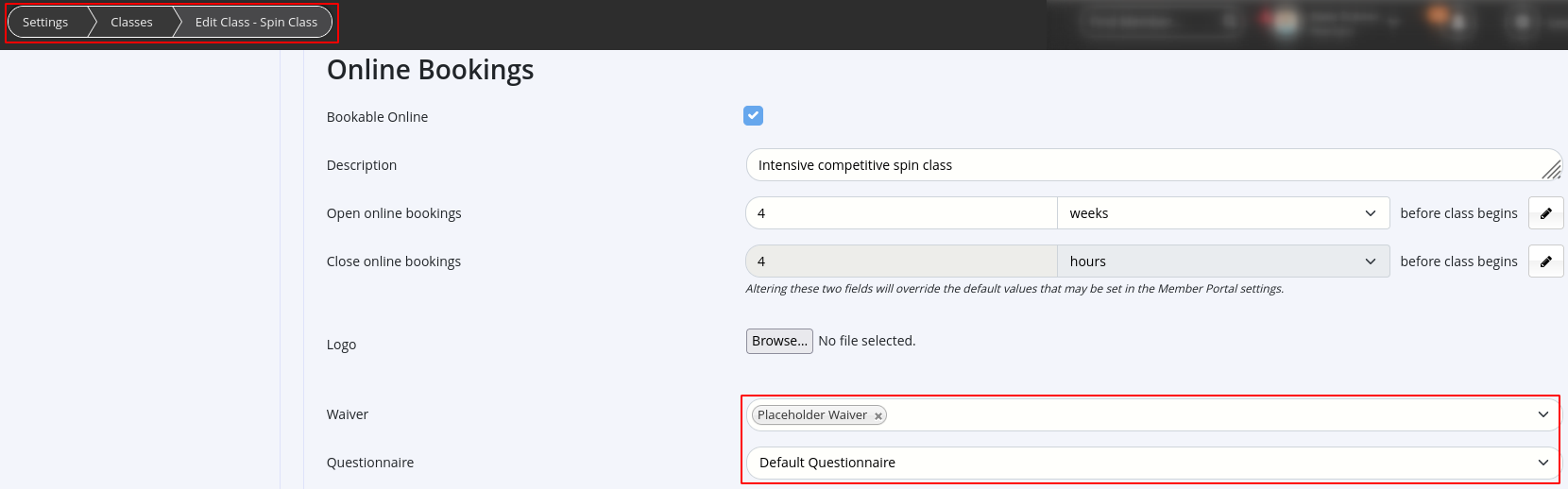
- Select form to attach to class / service
- Click on field to select waiver and / or questionnaire
- Save
When member makes a booking, they will be prompted to complete form online via Member Portal, if this feature is enabled.
If form is not completed online, staff can prompt member to sign it when they check in for the class.
Once waivers and questionnaires are completed they will be stored under Member Details > Communication tab
Next - Link Forms to Membership

 2026 © Treshna Enterprises Ltd.