
GymMaster Gym Software Manual
Custom Fields
Tailor fields and sections within GymMaster to align with the unique requirements of your club.
- Member Input Fields
- Labels
- Promotions
- Prospect Funnel
- Membership Cancel Reasons
- Booking Cancel Reasons
- Prospect Not Interested Reasons
Prospect Funnel Stages
You have the flexibility to customize your Prospect Funnel Stages to align with your club’s specific journey from prospect to membership.
Consider the different stages a prospect might go through at your club, and adapt the funnel stages accordingly.
Each step that requires staff action should be included in the funnel.
As your staff interacts with prospects, they can progress them to subsequent stages for streamlined tracking and engagement.
- Create / Edit your Prospect Funnel under Custom Fields > Prospect Funnel Stages
- Edit existing field, or Add New Prospect Funnel Stage
- Use blue direction arrows to select the order of your stages
- Funnel Stage placed at the top of list in Custom Fields will be your first stage, the entry stage for new prospects
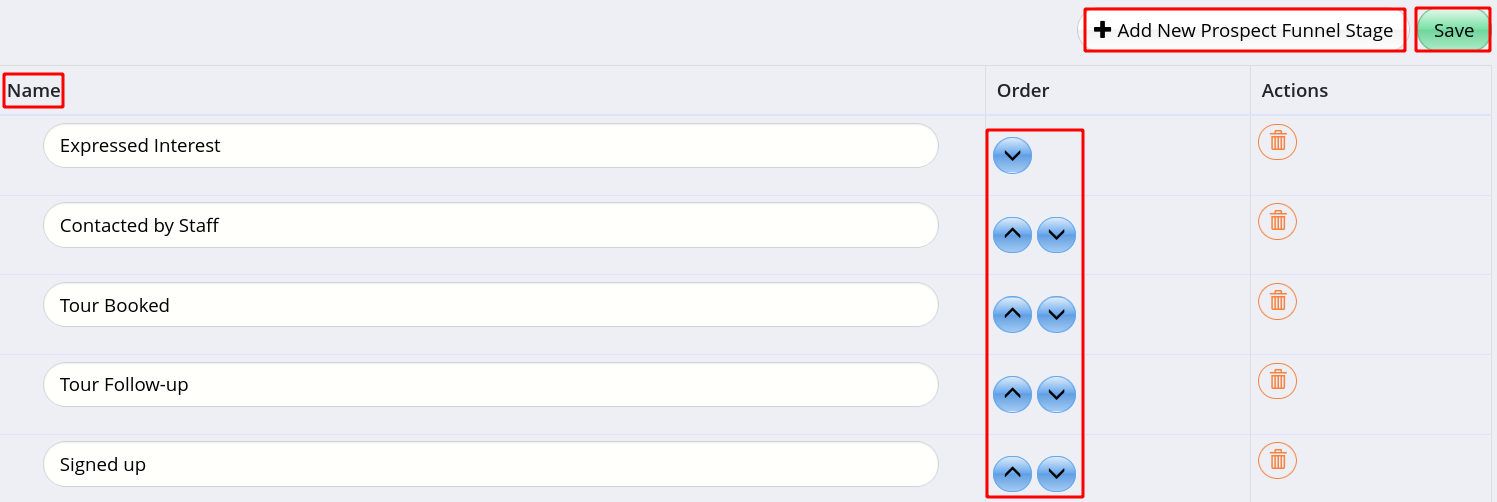
- Funnel Stage placed at the top of list in Custom Fields will be your first stage, the entry stage for new prospects
- Save
Next - Membership Cancel Reasons

 2026 © Treshna Enterprises Ltd.
