
GymMaster Gym Software Manual
Bookings and Classes
This is the back-end of your Schedule. Set up your facilities, staff / trainers, classes and services to allow them to be scheduled and booked
Add Facilities
Facilities refer to the spaces or rooms within your facility that will be used to run your classes or services.
- Go to Settings > Bookings and Classes > Facilities
- Select Add Facility
Settings
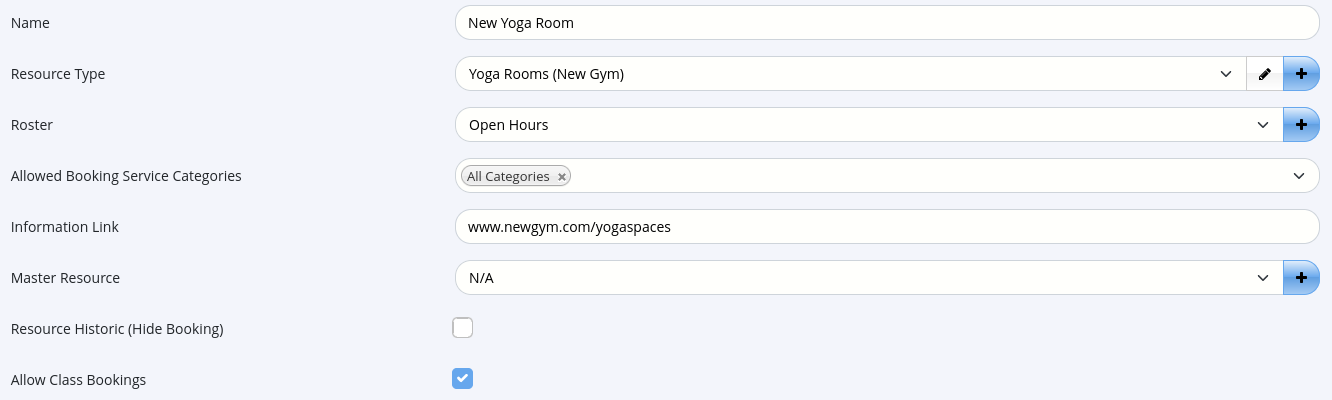
- Enter the Facility Name, select the Category
- Choose a Roster that matches the availability of the facility
- If no Roster matches requirements, create a new Roster using the + button on the right
- Use the Master Resource option to avoid double bookings if a facility can be divided into two or more parts, such as a basketball court
- To create sub-facilities, select the full facility (eg Basketball Court Full) as the Master Resource, and add sub-facilities with unique names, such as Basketball Court Side A/B
- To prevent classes from being booked to a specific facility, de-select the Allow Class Bookings box during the facility setup
Save
Facilities Complete
Next - Staff / Trainers

 2026 © Treshna Enterprises Ltd.