
GymMaster Gym Software Manual
Billing
Billing is the process of handling automated and manual financial transactions related to membership payments.
Failed Billing Settings
What automated response should GymMaster take when fees are unpaid?
Settings in Advanced Configuration will allow you to dictate the next automated step when billing results in a failed payment from member.
The following selections can be made;
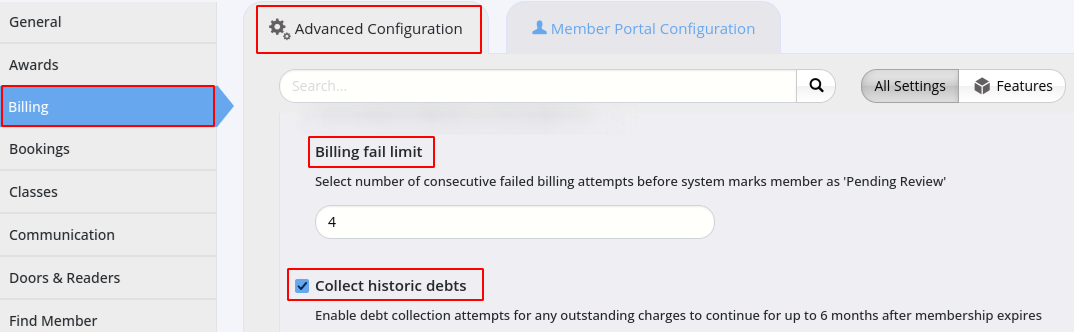
Go to Settings > Advanced Configuration
Billing
- Billing Retry Interval - automatically retry a failed charge after the selected time-frame
- Only charges from automatic billing batches are retried. Member Portal payments and manual batches are not retried
- The number of retries is limited by the club’s billing retry limit (1 by default)
- Set to 0 to turn retries off
- Failed billing attempts before Pending Review - select number of consecutive failed billing attempts before system marks member as ‘Pending Review’
- If the selected number of attempts fail, GymMaster will switch a member’s automatic billing off to avoid incurring additional dishonor fees
- Both batch billing and real-time payments (such as Member Portal payments) count as attempts
- ‘Pending Review’ stops automatic billing only. Staff can still take payment through the Point of Sale
- Set to 0 to turn this check off
- Collect debts after membership ends - keep collecting outstanding charges after a member’s membership has ended
- Charges are collected for up to 4 months after the member’s last direct debit membership ended
- Charges more than 6 months old are never billed automatically, staff can collect them through the Point of Sale
- When unticked, charges from memberships that have ended are not billed automatically
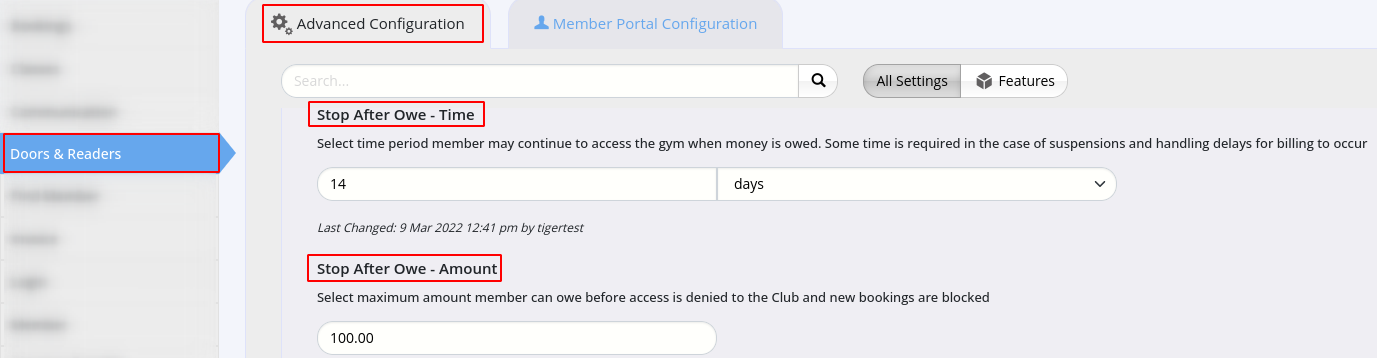
Doors & Readers
- Stop After Owe - Time - select time period member may continue to access the gym when money is owed
- GymMaster looks back over this period and uses the member’s lowest balance in it
- Access is only blocked if the balance stayed at or over Stop After Owe - Amount for the whole period, so one payment during the period removes the block
- Set to 0 to use the member’s current balance
- Stop After Owe - Amount - select maximum amount member can owe before access is denied to the Club and new bookings are blocked
- Access is blocked when the member owes this amount or more, so a value of 0 blocks members with a $0 balance
- An owing deadline in the future on the member’s account stops the block until that date
See Automated Holds for more details
Next - View All Failed Billing

 2026 © Treshna Enterprises Ltd.
