
GymMaster Gym Software Manual
Portal Funnel Task Automation
Converting leads is a key driver of club growth. That’s where a well-designed prospect funnel makes a real difference. With a clear structure and the right automation in place, your funnel becomes the system that welcomes prospects, presents timely offers, suggests tours or trials, and guides them toward membership at a pace that suits them.
When task automation is set up effectively, much of this process can run with minimal staff involvement, using automated tasks and communication templates. While task automation can seem complex at first, the fundamentals are straightforward. Spending a short amount of time understanding how tasks work will allow you to create targeted actions that move prospects smoothly from one stage to the next.
Types of Automated Tasks for the Portal Funnel
Automated tasks in the prospect funnel generally fall into three categories;
1. Task When a Prospect Enters a Stage
These tasks trigger as soon as a prospect enters a specific stage of the funnel.
They can either be fully automated actions handled by GymMaster, or prompts for staff follow-up.
Common examples include:
- Sending an automated welcome email with a free trial offer
- Offering a free tour or fitness assessment
- Inviting the prospect to a complimentary personal training session
- Sending a limited-time promotional membership offer after a trial ends
- Prompting staff to follow up a few days after a tour if no decision has been made
Create Task When Prospect Enters New Stage
The most important part of this task type is choosing the correct Trigger Event.
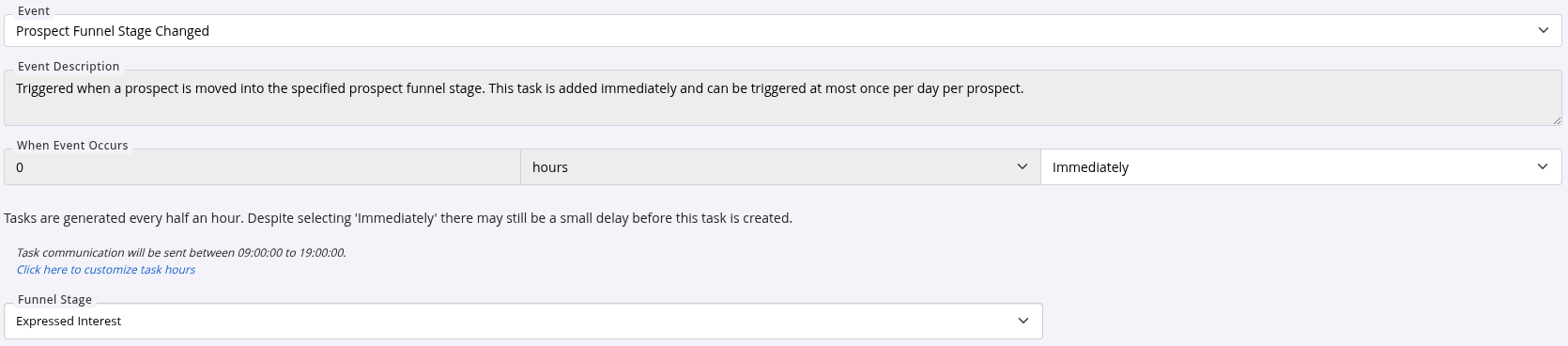
When creating a task that fires as a prospect moves through the funnel, always start with the event Prospect Funnel Stage Change.
In the example below, the task is triggered immediately when a prospect enters the first funnel stage, Expressed Interest.
Next, define what action should occur when the prospect reaches this stage.
In the example below, a pre-written email is sent automatically, welcoming the prospect to the club and offering a two-week gym access trial.

For this example, No Action is selected in the Prospect section at the bottom of the task, as the email does not move the prospect to another stage.

Finally, give the task a clear name and description in the General section.
No staff action is required for this type of task.
Save the task, then test it to confirm it triggers and behaves as expected.
2. Task to Move or Snooze a Prospect Within the Funnel
Based on specific events or conditions, prospects can be automatically moved between funnel stages, or temporarily snoozed and later unsnoozed. This allows the funnel to reflect what the prospect is actually doing, without relying on manual updates from staff.
Common examples include:
- A prospect is automatically added to the funnel when they book their first class and are not yet a member (this default task already exists)
- A prospect moves from Expressed Interest to Trial Membership when they accept a two-week trial
- A prospect moves from Expressed Interest to Tour Attended when they complete a gym tour
- A prospect is snoozed after completing a trial, giving them space before further follow-up
- A prospect is unsnoozed after a defined period, so follow-up tasks and communication resume
Create Task to Move a Prospect to a New Stage
This task type relies on two key steps: selecting the correct Trigger Event, and defining what change occurs within the prospect funnel.
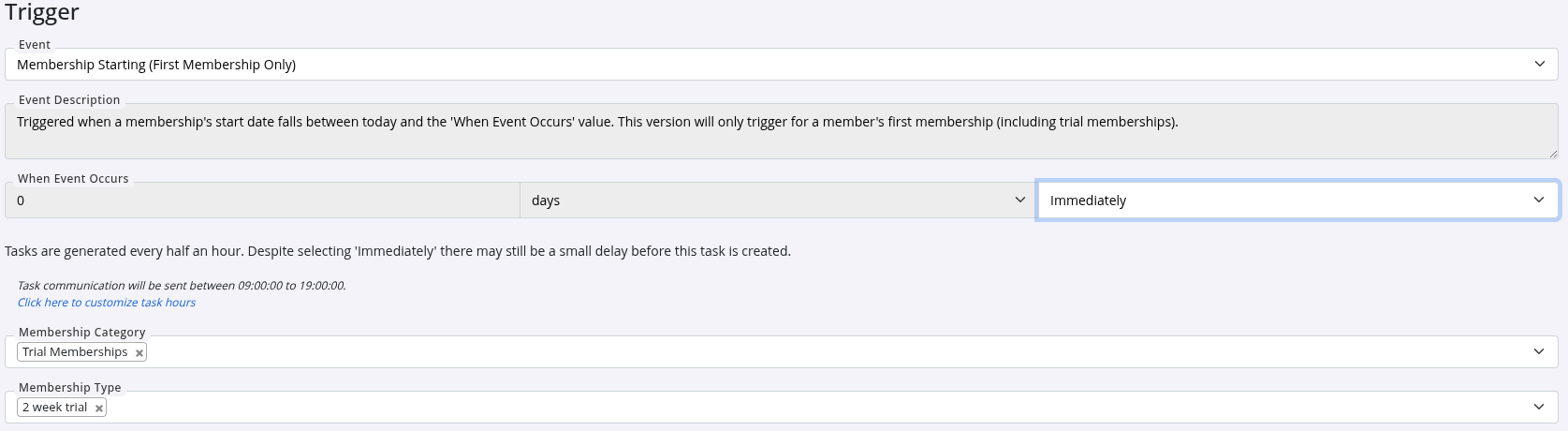
Start by choosing a trigger that reflects the real-world action you want to respond to. Searching by keywords such as Prospect, Tour, Membership, or Class will help narrow down the available options. Additional filters will refine the trigger further.
In the example below, the task is triggered when Membership Starting (First Membership Only) occurs, and the membership type is a 2 Week Trial.
Next, define what should happen to the prospect when this event occurs.
In this example, Change Funnel Stage is selected in the Prospect section at the bottom of the task, moving the prospect into the Trial Membership stage.

Finish by giving the task a clear name and description in the General section.
No staff action is required for this type of task.
Save the task, then test it to confirm it triggers correctly and updates the prospect’s funnel stage as intended.
3. Tasks to Engage Prospects
Not all prospect engagement needs to be tied directly to funnel stage changes. You can also create tasks that simply keep your club top of mind, re-engage cold leads, or deliver timely offers based on specific events.
These tasks don’t move prospects through the funnel, but they can be highly effective for restarting conversations or prompting action at the right moment, for example, after a long period of inactivity or around a meaningful date like a birthday.
Create a Task to Re-Engage a Prospect
Start by searching the available prospect-related trigger events and selecting one that matches your goal.
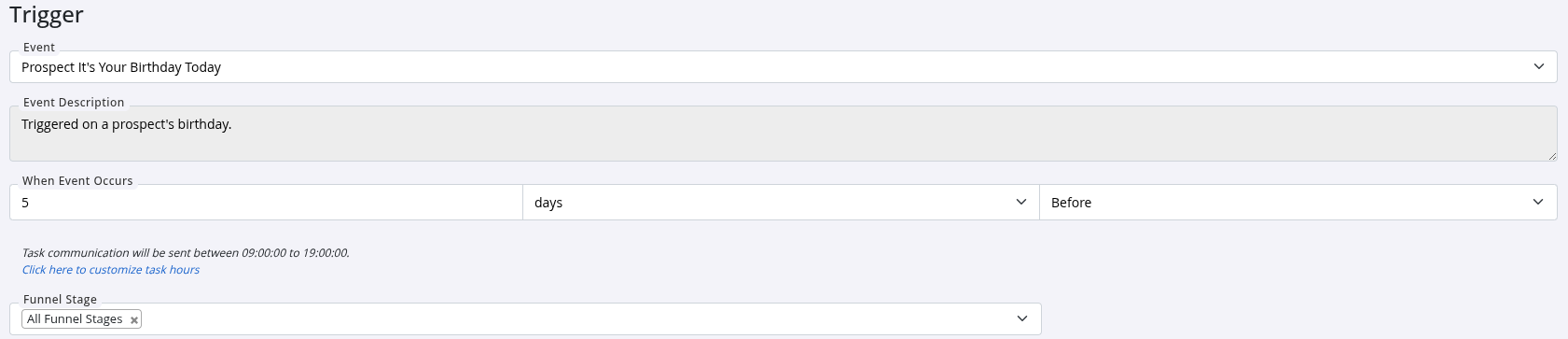
In the example above, the trigger Prospect It’s Your Birthday Today is selected, with the task set to run five days before the prospect’s birthday. A second task could also be created to trigger on the birthday itself, using a different email template.
This task is configured to apply to all funnel stages, but you can limit it to specific stages if you prefer to target only certain prospects.
Once the trigger is selected, choose the action to perform.
In this case, the task sends an email wishing the prospect a happy birthday and offering a promotional membership offer if they sign up within the next two weeks.

Finish by giving the task a clear name and description in the General section.
No staff action is required for this type of task.
Save the task, then test it to ensure it triggers and sends as expected.
Setting Up Your Portal Funnel for Sustainable Growth
Your prospect funnel brings together several moving parts, but taking the time to set it up properly pays off. Once in place, it ensures potential members receive timely, relevant communication and offers, making it easier for them to engage with your club and commit to joining.
A well-designed funnel reduces the need for manual follow-up while ensuring no leads slip through the cracks. This frees your staff to focus on in-club experience and member relationships, rather than chasing enquiries.
If creating funnel emails feels like a hurdle, GymMaster’s AI integrations can help. With a simple prompt outlining the purpose of the message, the system can generate email content in the correct format, saving time and effort during setup.
When your funnel is configured and running smoothly, it becomes a largely hands-off part of your business, supporting consistent growth in the background. That’s why it’s worth investing the time to understand how it works and set it up in a way that supports how you do your best work.

 2026 © Treshna Enterprises Ltd.