Billing Guides
Billing Icons and Terminology
Icons
For full definitions of all icons, see the Glossary .
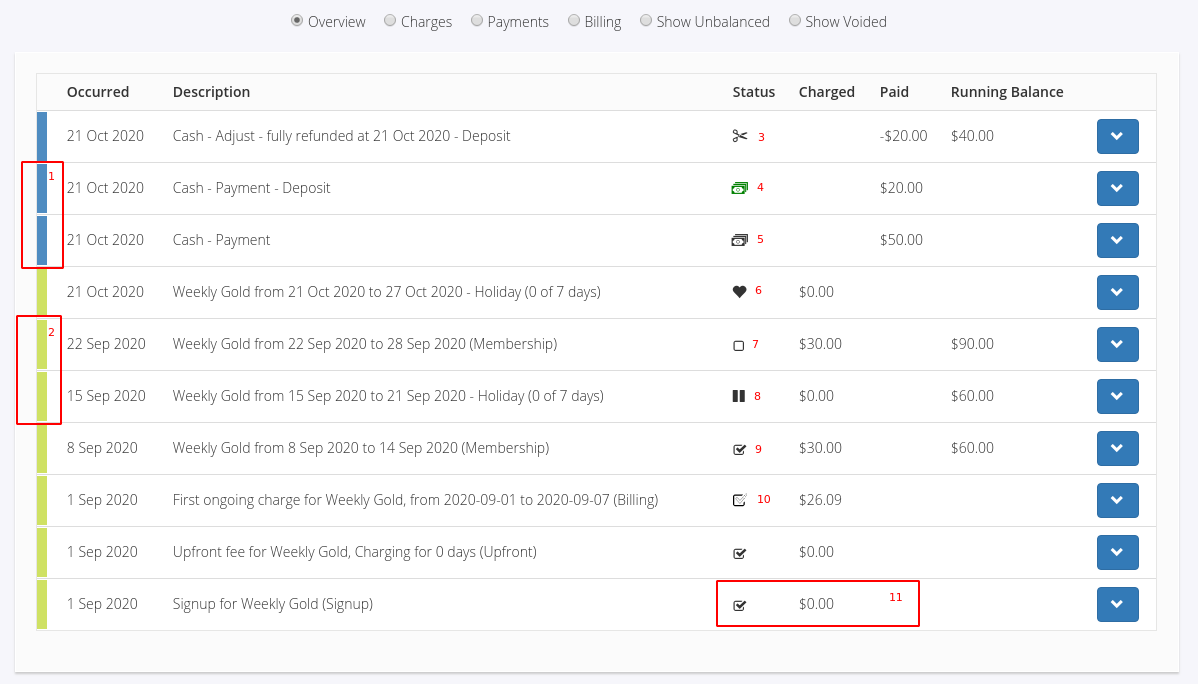
When viewing a member’s account history, various icons indicate the status of payments.
To access Account History:
Go to Member Profile > Accounts and Billing
Scroll down to the Account History section
1 – Payment Line: Blue band on the account history line2 – Charge Line: Green band on the account history line3 – Adjustment: A correction has been made to a payment or charge4 – Overpaid / Deposit: Payment not fully assigned; funds are available to use5 – Payment Received: Payment received icon6 – Gifted Time: Member granted free time; charge adjusted accordingly7 – Unpaid: Charge is outstanding; no payment made8 – Membership Suspended: Membership suspended; charge adjusted accordingly9 – Paid: Charge fully paid10 – Partially Paid: Payment made, but balance still owing11 – Zero Charges: Charges with no value are automatically marked as paid
Terminology
For full definitions, see the Glossary .
Accrued Revenue
Income earned but not yet received or past due
Occurs when a charge is set to Bill Soon , Bill Later , or Charge to Member in Point of Sale
Added to the member’s account for future payment; not recorded in cash-basis accounting until payment is received
Add Payment
Recording a payment made by a member for membership fees, services, or products
Can include cash, card, bank transfer, or any accepted payment method
Adjustment
Changes made to a member’s account balance, such as discounts, refunds, or late fees
Bill Immediately
Charges a member’s account immediately upon a transaction, e.g., selling a membership or booking PT
Bill Later
Creates an invoice without immediately charging the member; payment can be made later in person or via the Member Portal
Bill Soon
Adds a charge to the member’s account to be billed on the next membership billing cycle
Billing
The process of generating invoices, tracking payments, handling recurring billing, and reporting financial activity
Billing Cycle
The regular period during which members are billed, based on payment frequency in membership terms
Billing Date - Monthly
The specific day of the month members are billed for monthly fees
Billing Day - Weekly
The specific day of the week members are billed for weekly or fortnightly fees
Billing Frequency
How often members are charged, e.g., weekly, monthly, quarterly, or annually
Billing Period
Duration for which a member is charged, typically aligned with the billing cycle
Billing Provider
Third-party company handling payments, recurring billing, and invoicing
Examples: Ezypay, Stripe, Square
Ensures secure, compliant processing and reduces administrative workload
Billing Start Date
The first billing date of the club; may precede opening for pre-sale memberships
Charge
A monetary transaction applied to a member’s account for memberships, services, or products
Credit Note
Document issued when a member is owed a credit or refund, which can offset future payments or be paid out
Debit Note
Document issued when a member owes additional funds, e.g., underpayment or billing error
Debtors
Members with unpaid fees past due. Access can be restricted if “stop at gate” is enabled
Discounts
Reductions in price for memberships or products
Final Payment
The last payment made on a membership
First Payment Date
The initial payment due date, typically set at membership purchase
Invoice
A formal request for payment, often for outstanding charges; invoice date may differ from charge dates
Next Payment
The upcoming due date for ongoing membership payments
Outstanding Balance
Total unpaid amount owed by a member, including fees and services
Pay Later
Allows members to defer payment; charges added to account for future payment, often aligned with billing cycles
Payment
Transfer of funds from a member to cover a charge. Can occur before, on, or after the charge due date via accepted methods
Payment Frequency
How often a member is required to pay, e.g., monthly, annually, or per visit
Prepay
Payment made in advance of billing cycles, often to secure membership or take advantage of discounts
Preview Billing
Lets staff view upcoming charges before the billing cycle, enabling adjustments to avoid errors
Prorata
Partial fee adjustment based on joining mid-period or cancelling early. Calculated using start/end dates and billing period length
Prorate First Payment / Upfront Fee
Adjusted first payment reflecting the remaining portion of the billing period when a new member joins
Realtime Billing
Instant processing and updating of transactions by supported billing providers, ensuring current billing status
Receipt
Proof of payment; can be printed or emailed, including POS thermal receipts
Recurring Payment
Automatic, regular payments based on membership terms
Statement
Shows all member transactions for a specified period; can be printed or emailed
X Report
Reports transactions processed from the start of the day to the report time; typically run at shift end
Z Report
Reports transactions processed since the last Z Report; typically run at the end of the day
Billing Guides



 2026 © Treshna Enterprises Ltd.