
GymMaster Gym Software Manual
Getting Started
Your on-boarding training sessions can be booked here
Languages
See which languages GymMaster is available in, and how to change the language for your club, your staff and your members.
Available Languages
GymMaster can be used in the languages below. Text that has not been translated yet is shown in English.
- Translated: 85% or more of the text is translated.
- Mostly translated: 35% to 85% of the text is translated.
- Partly translated: less than 35% of the text is translated.
Translation continues, so these levels go up over time.
| Language | Member Mobile App | GymMaster Staff Platform |
|---|---|---|
| English (US and UK) | Translated | Translated |
| Portuguese (Brazil) | Translated | Translated |
| Vietnamese | Translated | Translated |
| Korean | Translated | Translated |
| Spanish | Translated | Translated |
| Japanese | Translated | Translated |
| French | Translated | Mostly translated |
| Arabic | Translated | Mostly translated |
| German | Translated | Mostly translated |
| Chinese (Traditional) | Translated | Mostly translated |
| Chinese (Simplified) | Translated | Mostly translated |
| Thai | Translated | Mostly translated |
| Italian | Translated | Mostly translated |
| Māori | Translated | Mostly translated |
| Bulgarian | Translated | Mostly translated |
| Indonesian | Translated | Mostly translated |
| Danish | Translated | Mostly translated |
| Dutch | Translated | Mostly translated |
| Swedish | Translated | Mostly translated |
| Finnish | Translated | Mostly translated |
| Norwegian | Translated | Mostly translated |
| Malay | Translated | Mostly translated |
| Filipino | Translated | Mostly translated |
| Polish | Not available yet | Partly translated |
| Croatian | Translated | Not available yet |
Change Your Own Language
Each staff member can choose the language they see GymMaster in. This only changes it for you, not for other staff or your members.
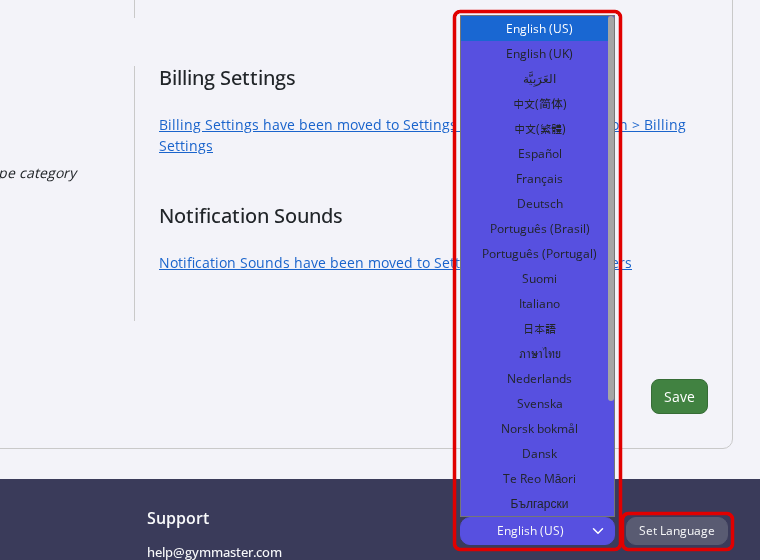
- Scroll to the bottom of any page.
- Choose your language from the drop-down list.
- Click Set Language.
Set Your Club’s Default Language
The default language is used for staff who have not chosen their own language.
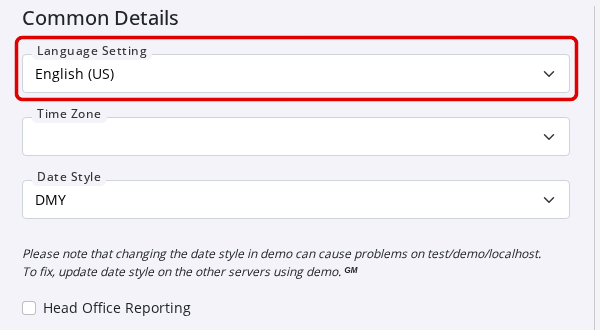
- Go to Club Details > Common Details.
- Choose a language in Language Setting.
- Click Save.
Member Language
Members can choose their own language in the Member Mobile App settings, or in their profile in the Member Portal.
- Default language: in Advanced Configuration, set Default language to the language the Member Portal shows before a member chooses one. If it is blank, the Member Portal uses your club’s default language.
- Language on the login page: turn on Enable language selection on the Login page to let new members and prospects choose their language before they log in. Their account then keeps that language each time they log in.
If you need GymMaster in a language that is not listed, or one that is not fully translated yet, contact our Support Team.

 2026 © Treshna Enterprises Ltd.