
Grouping Memberships within Categories
2 min read
Updated
1 month ago
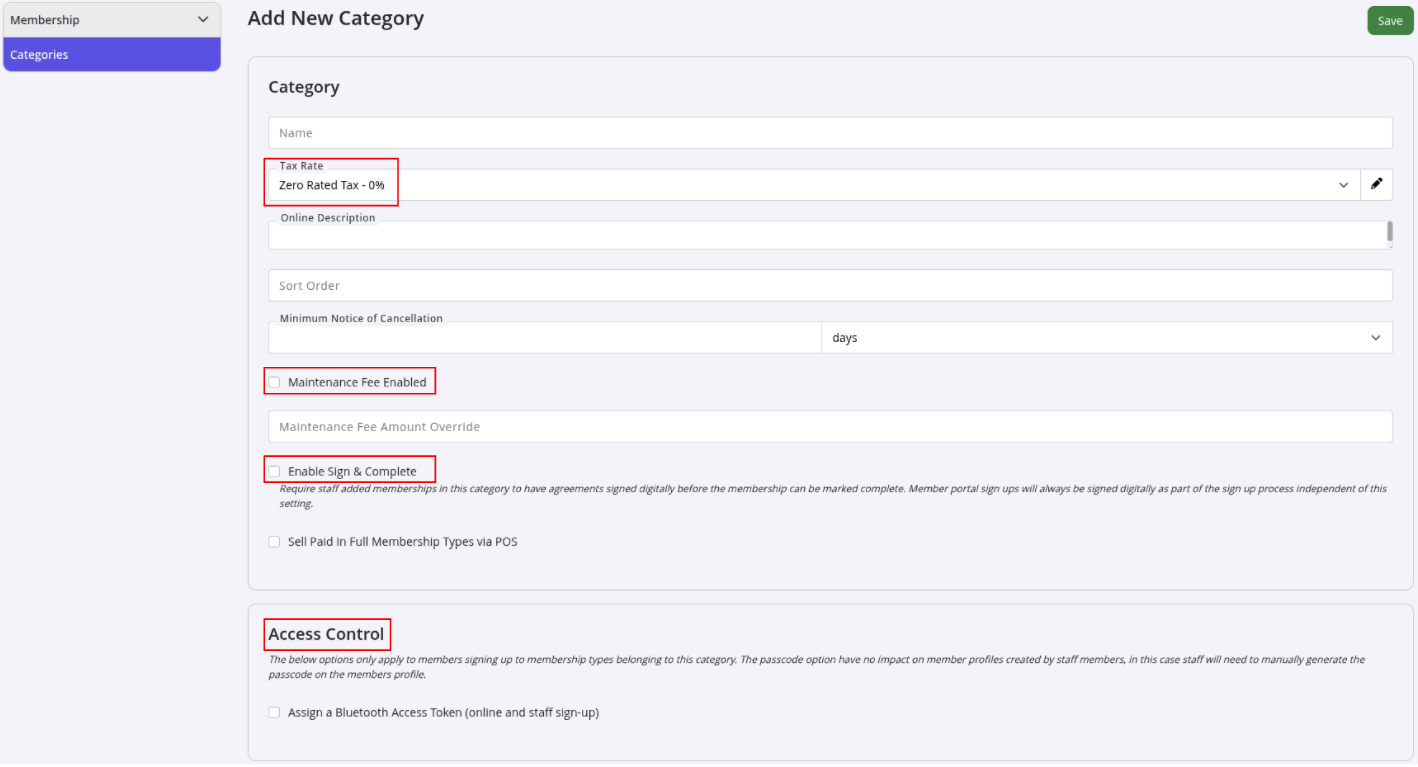
Membership Type Categories allow you to group similar memberships together and apply shared settings across them.
This helps keep memberships organised, simplifies reporting, and makes it much easier to manage settings that should apply across multiple membership types.
Why Use Membership Categories
Membership Categories can be used for things like:
| Example | What it Does |
|---|---|
| Reporting | Filter and report on related memberships together |
| Tax Settings | Apply shared tax rates across a group of memberships |
| Online Sign-Up | Organise memberships into clear groups for online sales |
| Maintenance Fees | Apply maintenance fees to all memberships within a category |
| Bluetooth Access Tokens | Automatically assign Bluetooth credentials during online signup |
| Sign & Complete | Require forms and agreements to be completed during signup |
Create a Membership Category
Navigate to:
- Settings > Membership Types > Membership Type Categories
- Create a new category
- Edit an existing category
- Configure the shared settings for memberships within that category
Assign Memberships to a Category
When creating or editing a Membership Type, select the appropriate category from the Category dropdown.
Once assigned, the membership will inherit the shared settings configured for that category.
Using categories keeps membership management cleaner, more consistent, and much easier to maintain as your club grows.
Common Questions this Covers
- How to group membership types
- how to charge maintenance fee to some memberships only
- How to organise memberships
Get started with a free, no-obligation chat, and see how we can help you grow

Awards and recognition
- Deloitte Master of Growth Index 2025
- Deloitte Master of Growth Index 2024
- Software Advice FrontRunners 2023
- GetApp Category Leaders 2023
- Capterra Best Value 2022
- GetApp Best Functionality & Features 2022
- Software Advice Most Recommended 2022
- SoftwareSuggest User Most Likely to Recommend Summer 2022
- Software Advice Best Customer Support 2021
- Deloitte Technology Fast 500 Asia Pacific 2018
 2026 © Treshna Enterprises Ltd.