
Product Discounts
GymMaster provides several ways to apply discounts to products, depending on when and how the discount should be applied.
Choose the discount method that best suits your club’s needs:
| Scenario | Recommended Method |
|---|---|
| Product on sale, offer available to members and public | Product Sale Price |
| A staff member needs to manually discount an item during checkout | Point of Sale Discounts |
| All premium members should receive 10% off supplements | Membership Benefits |
| Members receive a discount using a promo code | Product Discount Codes |
Product Sale Price
Applies to manual and online sales.
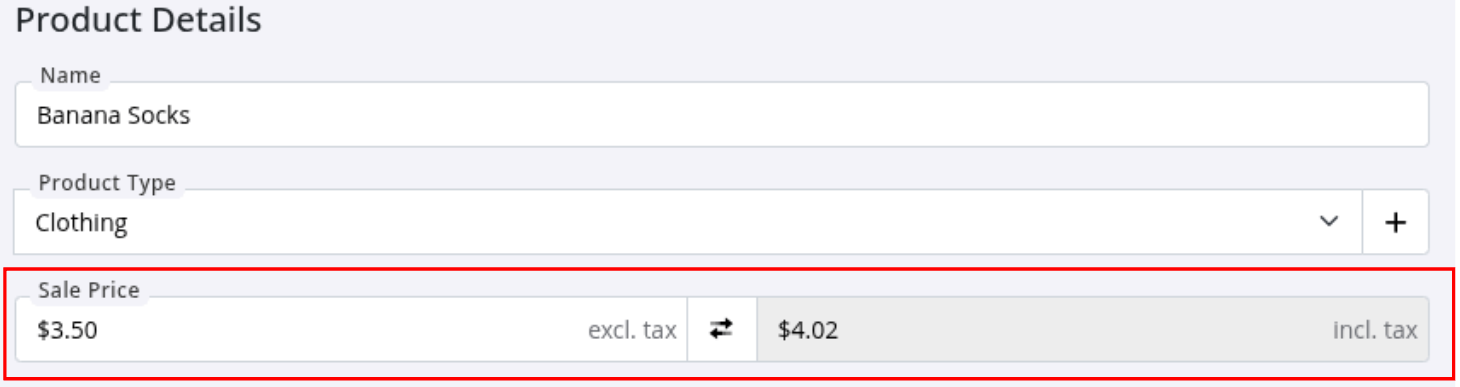
For temporary product sales, update the product’s sale price.
Go to Settings > Products > Edit Product > Sale Price, and update the product Sale Price
Once the sale period has ended, update the product back to its regular selling price.
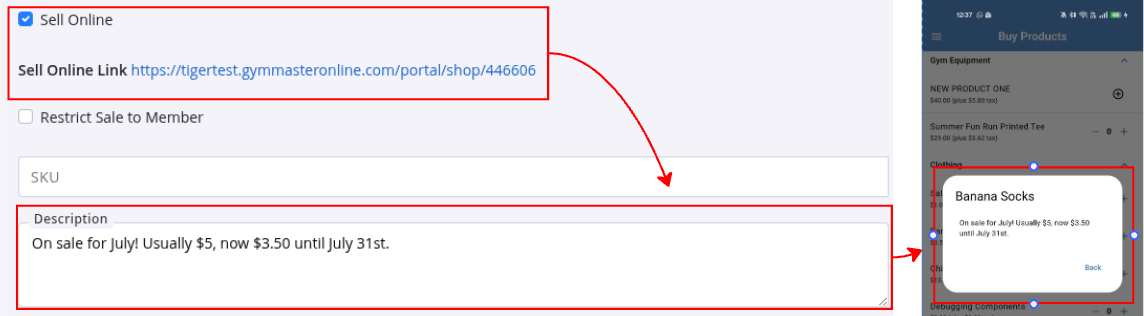
When selling products through the Member Portal, you can add sale details to the product description.
This allows members to see promotional information when they select the product for more details.
Point of Sale Discounts
Full Guide: Point of Sale Discounts
Applies to manual sales only.
Various Point of Sale Discount options allow staff to apply a discount to products / entire sale (excluding bookings and memberships) during checkout.
This is useful when a discount needs to be applied at the time of sale, such as:
- Staff discounts
- Customer goodwill adjustments
- Clearance or promotional pricing
- Correcting pricing errors
POS Discount options are created in advance under Financial Configuration and selected by staff in Point of Sale when processing a product sale.
Membership Benefits
Full Guide: Membership Benefits
Applies to manual and online sales.
Membership Benefits allow you to offer discounted product pricing to eligible members based on their membership.
Discounts can be applied to:
- Specific products
- Product types/groups
- All products
When an eligible member purchases a product, GymMaster automatically applies the relevant membership discount.

Product Discount Codes
Full Guide: Product Discount Codes
Applies to manual and online sales.
Product promo codes are often a mix of letters and numbers, eg PROTEIN20, allowing members to apply the promotional discount code when purchasing eligible products.
Common uses include:
- Marketing campaigns
- Seasonal promotions
- Limited-time offers
- Partner or referral discounts
Discount / Promo Codes can be applied when purchasing online or in person.
These provide a flexible way to offer product discounts without changing the standard product pricing.
Also see Booking Discount Codes and Membership Discount Codes.
Common Questions this Covers
- How do I discount products
- How do I create a product discount
- How can I give members a discount on products
- How do I apply a discount at Point of Sale
- How do I create a sale price for a product in GymMaster
- How do I offer members discounted products
- What is the difference between a POS discount and a membership product benefit
- How do I create a product promotion in GymMaster
- Can I create promo codes for products in GymMaster
- How do I give premium members discounts on retail products

 2026 © Treshna Enterprises Ltd.