
Membership Discount Codes
Membership Discount Codes (also known as promo codes) allow you to offer promotional discounts on selected memberships without changing the standard membership price.
They are useful for seasonal promotions, marketing campaigns, new member offers, corporate or partner discounts, and limited-time membership sales.
Discount Codes can be redeemed during membership sign-up, including online sign-up when enabled.
Create Discount Code
Begin at Settings > Financial Configuration > Discount Codes
- Select Adjust Membership Discount Code
- Complete the basic information for your promotion
- Choose which memberships the discount applies to and how the discount is calculated
- Set restrictions to control how and when the discount code can be used
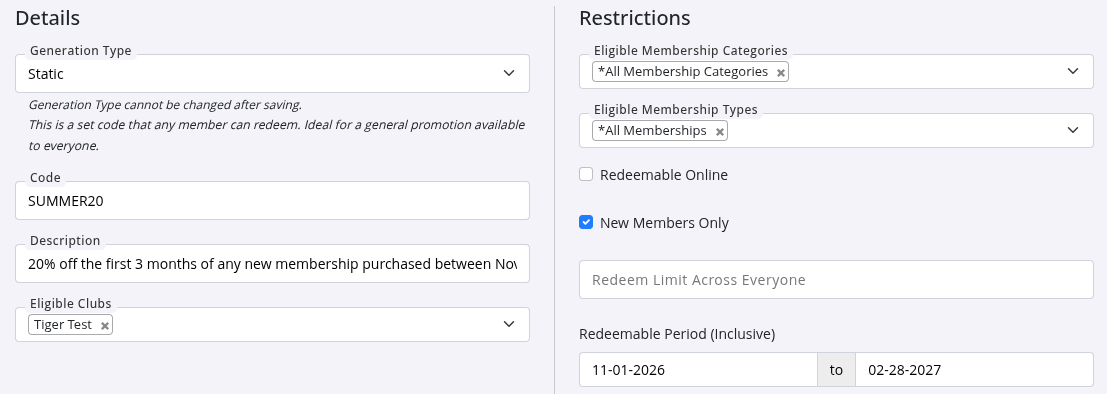
- Set discount structure for this promo code
- Multiple options can be selected per membership
| Reward Type | Effect |
|---|---|
| Account Credit | Account Credit is added to the member’s account when the membership is completed. Any required fees must be paid before the credit is applied. |
| Sign-up Fee Discount | Applies a one-off discount to the membership sign-up fee only. |
| Membership Price Discount | Applies an ongoing discount to the membership price for the duration of the membership. For temporary discounts on recurring memberships, use a promotional period. |
| Promotional Period | A Promotional Period lets you offer discounted membership pricing for a limited time. Once the promotional period ends, the membership automatically returns to its standard pricing.For example, you could offer a discounted first month during a holiday promotion to encourage new member sign-ups.Promotional Periods cannot be applied to Paid In Full membership types. |
- Save
Promote Code
Once created, share your discount / promo code with your intended audience.
| Code Type | How to Promote |
|---|---|
| Static | Promote your static codes through all your usual channels; SMS and email campaigns, social media posts, website and so forth. Simply add the code within your message, and your members / non-members can use the code when they purchase / book online or in person. With static codes everyone can use the same code to receive the reward. |
| Dynamic | Promote dynamic codes to your members directly; SMS and Email through GymMaster. |
Redeem Membership Code
When a valid discount / promo code is entered during membership sign-up, GymMaster automatically applies the discount to eligible memberships.
The discount will only apply when:
- The code is active
- The selected membership is included in the promotion
- The member meets any restrictions
- Any redemption limits have not been reached
Redeem Online
Once enabled, members can enter their discount code during online membership sign-up before completing payment.
- Go to: Settings > Member Portal Configuration > Sign-Up > Enable Online Sign-up > Enable Discount Codes
Redeem in Person
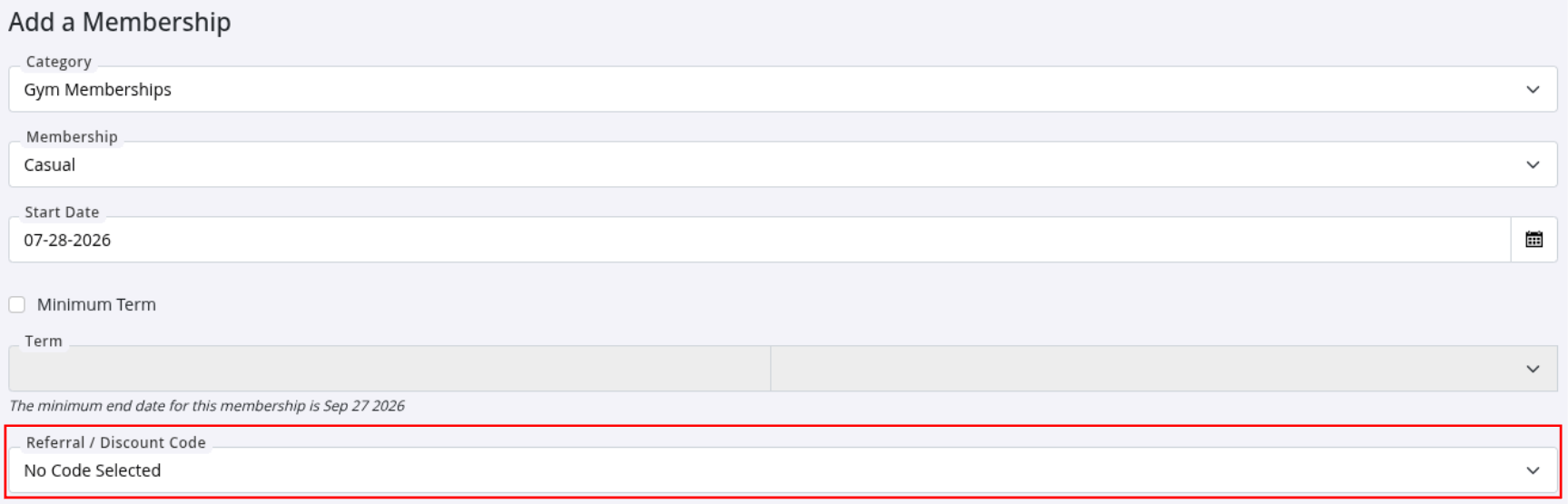
When signing up a member at the club, staff can apply a discount code during the membership sale.
- Begin the membership sign-up
- Select the membership
- Enter the Discount Code when prompted
- Complete the membership sale
GymMaster will automatically apply the discount to eligible memberships before payment is processed.
Also see Booking Discount Codes and Product Discount Codes.
Common Questions this Covers
- How do I create a membership discount code in GymMaster
- How do I create a promo code for memberships
- How do I offer discounted memberships
- How do I set up a membership promotion in GymMaster
- How do members redeem a membership discount code
- Can I limit how many times a membership discount code can be used
- How do I create a percentage or fixed amount discount for memberships
- How do I run a membership promotion without changing my membership prices
- How do I create a promotional code for new members
- How do I apply a discount code during member sign-up

 2026 © Treshna Enterprises Ltd.
