
Setup Automated Billing
Ensure Tax Rates are completed before continuing with billing setup.
Automated billing takes the work out of collecting recurring membership payments. Once configured, GymMaster automatically manages billing runs, payment processing, and collection through your chosen billing provider.
The complete setup process typically takes 3–5 business days, although timing may vary depending on your billing provider and bank.
Before you begin, review the Integrated Billing Process to understand how the different parts of the billing cycle work together.
Automated billing is configured in four steps:
Choose a Billing Provider
A billing provider is required to use GymMaster’s automated billing features.
Billing providers are third-party payment services that securely process membership payments on behalf of your club. They integrate directly with GymMaster to manage recurring billing, payment collection, invoicing, and related financial transactions.
Common GymMaster billing providers include:
- Ezypay
- Stripe
- Square
Using a billing provider helps reduce administration, automate payment collection, and provide members with convenient payment options, while maintaining industry-standard security and compliance.
The following resources can help you choose the right provider for your club:
- PCI Compliant Billing Providers by Region
- Which Billing Provider Is Right for Me?
- Choosing the Best Billing Provider for Your Club
- Billing Providers Available in Your Location
Setup Billing
All base billing setup is completed under Settings > Financial Configuration > Billing Settings
- Select Automatic Billing

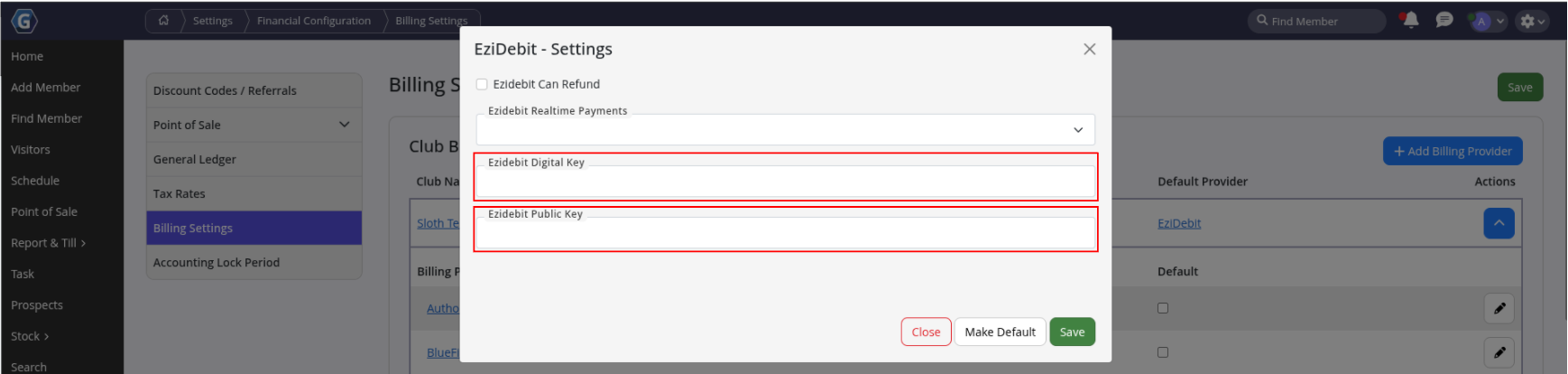
- Using the details from your billing provider, select Edit on the relevant provider in the list
- If your billing provider is not listed, select Add Billing Provider
- Complete required digital codes, as required per Billing Provider
- For a step by step for key providers, see Manual Entry of Billing Tokens
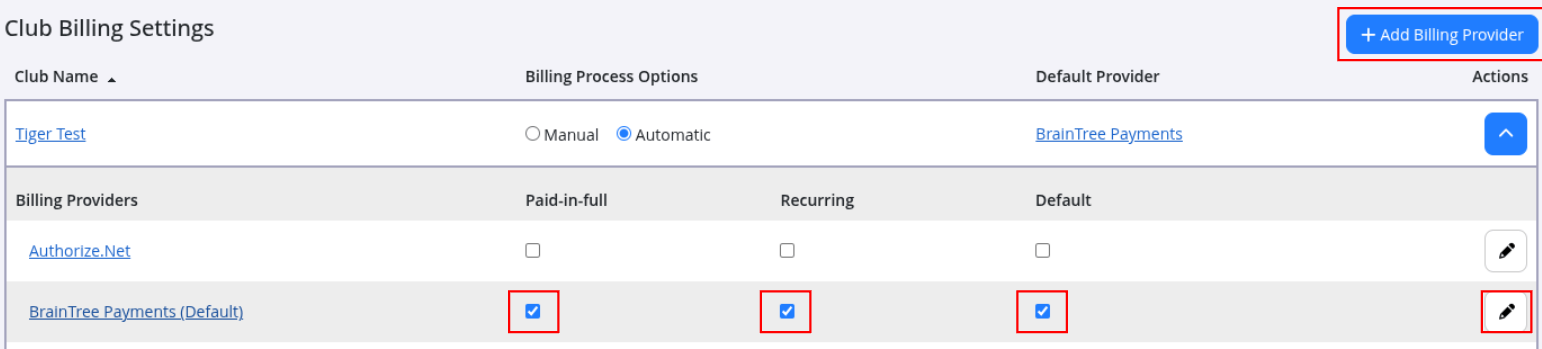
- Assign the provider for Paid-in-Full and/or Recurring Payments
- If using separate providers for each payment type, complete both and assign them accordingly.
- Select the default provider
- Scroll to Global Settings
- Confirm currency is correct (contact GymMaster support if a change is required)
- Billing Days: select the days billing is allowed to run (recommended: all or most days)

- Continue through remaining billing settings and complete configuration as required
Test Your Billing Provider Connection
Before billing members, it’s a good idea to confirm your billing provider has been configured correctly.
- Add billing details to a member under Member Details > Accounts and Billing
- If you do not have any members yet, create a test member and use your own payment details
- Save the billing details
If the billing details are accepted successfully, your billing provider connection is working correctly.
If an error occurs:
- Confirm your credentials are correct
- Contact your billing provider to verify your account is active and ready for live transactions
When you first begin processing member payments, you may notice a higher-than-normal failure rate while your billing provider completes account activation and enables required processing features.
For help understanding and managing billing failures, see Understanding Failed Billing.
Automatic billing is now active. Next step is adding member billing details.
Add Member Billing Details
Full details: New Member - Setup Billing
- Add billing details after membership selection, when signing up new members at the club. Applies when membership has recurring payments
- Manual entry: Member Details > Account and Billing tab
- Members signing up online for memberships with recurring payments will be prompted to add a payment method during signup
- Accepted payment methods are typically Bank Account or Credit / Debit Card
- These details are captured at signup via the Member Portal and automatically stored under the Accounts and Billing tab in the member profile
Send Billing and Collect Payment
When Automatic Billing is enabled under Settings > Financial Configuration > Billing Setiings, billing will automatically run on a scheduled cycle.
Billing cycle is determined by:
- Membership Payment Frequency: Set when creating the membership type
- Membership Start Date: Set when the member purchases the membership
GymMaster sends the payment request to your billing provider. From there, the request is passed to the member’s bank for processing. The bank then returns a success or failure response back through the same chain (from the bank, to the billing provider, and back into GymMaster) where the member’s account is updated with the result.
This process typically takes 3 to 5 working days, though timing can vary depending on your billing provider and the member’s bank.
Further Questions? See our list of Frequently Asked Questions about Billing
Common Questions this Covers
- How do I start setting up automated billing in GymMaster
- What do I need before I can turn on automatic billing
- Why isn’t my billing running after I set everything up
- Where do I choose my billing provider in GymMaster
- What happens if I pick the wrong billing provider
- How do I fix it if members are not being charged automatically
- Where do members add their card or bank details for billing
- Why are members not being asked for payment details when they sign up
- How do I change which days billing is allowed to run
- How long does it take for payments to actually go through after billing is run

 2026 © Treshna Enterprises Ltd.
