
Class and Service Benefits
Membership Benefits define what members receive as part of their membership. including discounts, door access, guest passes, and more.
When a member purchases a Membership Type, they gain access to the benefits configured for that membership.
Class and Service benefits can be used to provide discounted or free access to one, multiple, or all classes and services.
Benefits are configured within the individual Membership Type.
- Begin at: Settings > Membership Types > Edit Membership Type > Membership Benefits
From here, you can add, edit, and manage the booking benefits included with that membership.
- Service Booking Benefits
- Class Booking Benefits
- Multiple Benefits
- Exclude from All Classes/Services Benefit
Service Booking Benefits
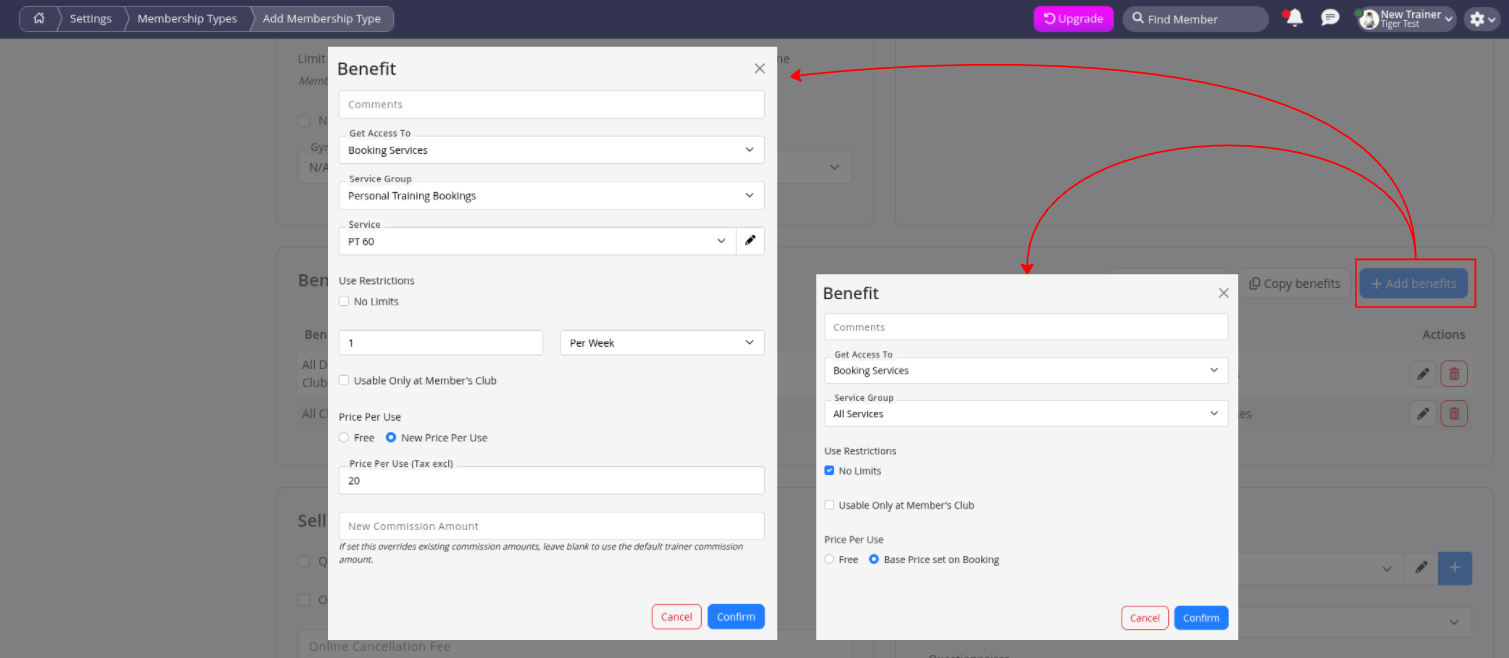
Service Benefits allow members to receive free or discounted access to selected services.
| Left Example | Right Example | |
|---|---|---|
| Service Benefit | Member is entitled to 1 Personal Training (60 min) session per week for $20 per session. Any additional sessions are charged at the standard casual rate. | Member is entitled to the base price for all services offered by the club. |
Any membership can include multiple benefits.
For example, if both of the above benefits were applied to the same membership, the member would receive 1 Personal Training (60 min) session each week for $20, while all other services would be charged at the configured base price. See Multiple Benefits below to learn how to avoid unintended benefit overlaps.
Class Booking Benefits
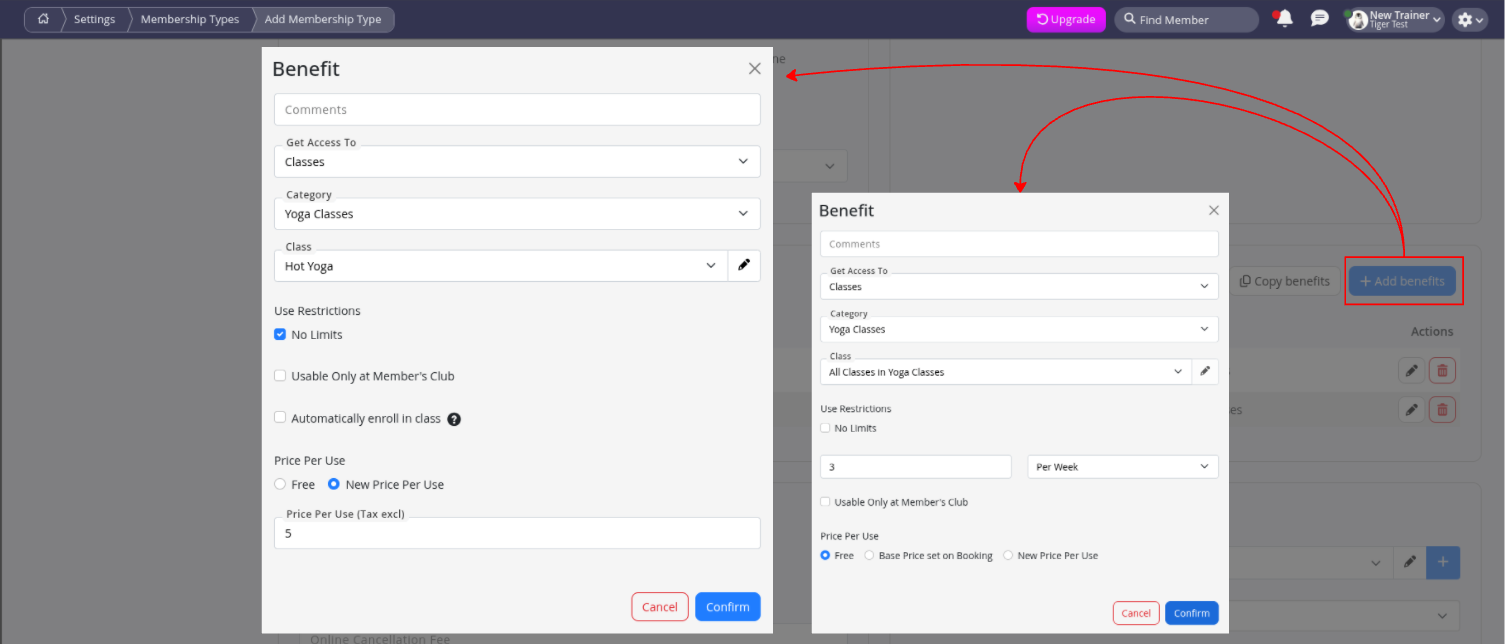
Class Benefits allow members to receive free or discounted access to selected classes.
| Left Example | Right Example | |
|---|---|---|
| Class Benefit | Member is entitled to unlimited Hot Yoga sessions for $5 per session. | Member is entitled to 3 free yoga sessions per week. |
Any membership can include multiple benefits.
For example, if both of the above benefits were applied to the same membership, the member could receive 3 free Hot Yoga sessions each week, then pay $5 per session for any additional Hot Yoga classes. See below to learn how to avoid this.
Automatic Enrolment
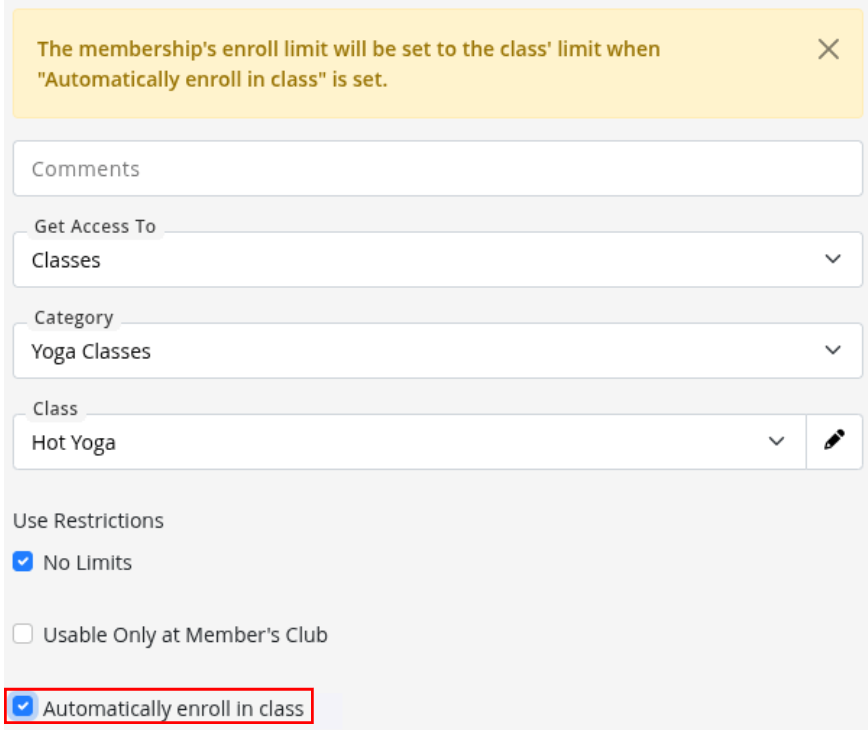
When a specific class is selected within a Class Benefit, an Automatically enrol in class option becomes available.
When enabled, members are automatically booked into that class when they purchase the associated membership.
This is commonly used for structured programs such as speciality short term memberships, holiday programmes, fixed-date courses, pre-booked training programmes.
Multiple Benefits
A single membership can include multiple benefits, allowing you to create flexible membership offerings. For example, one membership could include:
- 3x Free yoga classes per week
- Unlimted $5 Hot Yoga classes per week
- Reduced cost personal training service, 1x per week
- Discounted all services
- And More!

Exclude from All Classes/Services Benefit
When a membership includes multiple benefits, it’s important to consider how those benefits work together.
For example, the membership above includes:
- 3 free yoga sessions per week
- Unlimited Hot Yoga for $5 per session
Because Hot Yoga is also a yoga class, members could use their 3 free yoga sessions to attend Hot Yoga for free, before paying $5 per session for any additional bookings.
If this isn’t the intended outcome, you can exclude Hot Yoga from the broader All Yoga Classes benefit.
To do this:
- Go to Bookings and Classes > Classes > Edit Hot Yoga
- Scroll to Who Can Attend This Class
- Tick Selected Benefits Only for Members and/or Class Packs
The class will then be excluded from all broader benefits such as All Classes or All Yoga Classes, and will only be included as a benefit when individually added.
The same process can be used for services.

GymMaster supports other types of Membership Benefits, including:
For a complete overview of Membership Benefits, see Membership Benefits.
Common Questions this Covers
- How do I set up class benefits for a membership in GymMaster
- How do I give members free class bookings
- How do I give members discounted service bookings
- How do I configure membership booking benefits
- How do I limit how many classes a member can book
- How do I include free services with a membership
- Can a membership have multiple class or service benefits
- What happens when membership benefits overlap
- What does Automatically Enrol in Class do
- How do I control which classes or services are included in a membership

 2026 © Treshna Enterprises Ltd.