
Reporting on Member Visits
1 min read
Updated
2 months ago
Who is visiting your facility? Who has recently stopped visiting? What times are the busiest?
contact specific groups of members where needed.
For example. you could email all recently not visiting members with an invitation to a new class offering or Bootcamp to get them back in the gym.
- Navigate to Report and Till > Standard Report > Retention to view a suite of visitation reports
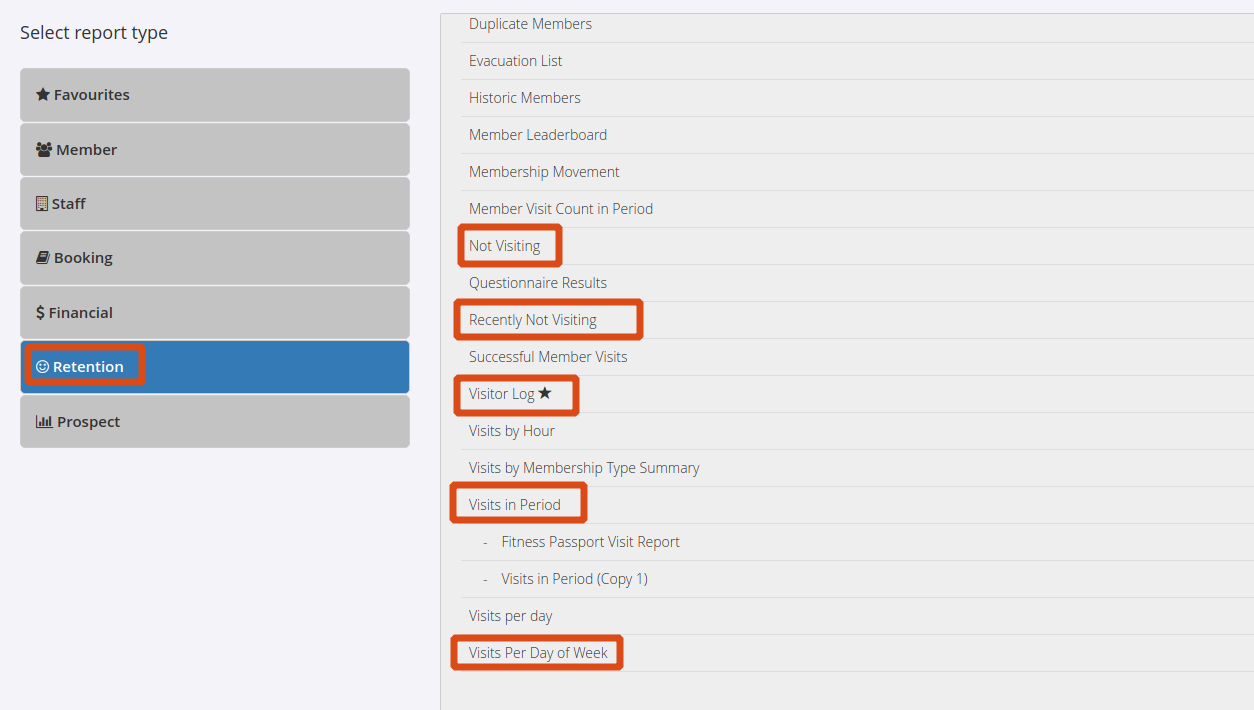
This data can help inform decisions about when to allow access for off-peak memberships, and who to contact for certain offerings.
Get started with a free, no-obligation chat, and see how we can help you grow

Awards and recognition
- Deloitte Master of Growth Index 2025
- Deloitte Master of Growth Index 2024
- Software Advice FrontRunners 2023
- GetApp Category Leaders 2023
- Capterra Best Value 2022
- GetApp Best Functionality & Features 2022
- Software Advice Most Recommended 2022
- SoftwareSuggest User Most Likely to Recommend Summer 2022
- Software Advice Best Customer Support 2021
- Deloitte Technology Fast 500 Asia Pacific 2018
 2026 © Treshna Enterprises Ltd.