
Membership Benefits
Membership Benefits define your members' day-to-day experience within the club. Taking the time to understand and configure them correctly will help you create clear membership tiers, reduce administration, and deliver the experience you intend.
Benefits control what members can book, which doors they can unlock, what product discounts they receive, and whether they can bring guests.
To add benefits to your membership;
- Navigate to: Settings > Membership Types > Add / Edit Membership > Membership Benefits
By combining different benefits, you can create anything from a basic gym membership to a premium membership with exclusive access and privileges.
Membership Benefits Overview
Full guides: linked in table
| Benefit Type | Description |
|---|---|
| Class Benefits | Control which classes members can access and how they are charged. Benefits can provide free access, discounted pricing, unlimited access, or limited usage allowances across all classes, class categories, or specific classes. |
| Service Benefits | Control access and pricing for bookable services such as Personal Training, treatments, facility bookings, or other appointments. Benefits can apply to all services or selected services, with options for free, discounted, or limited access. |
| Door Access Benefits | Control which doors members can unlock and when they can access them. Door benefits can provide general club access, restricted area access, time-limited access, or controlled access to premium facilities. |
| Product Benefits | Provide members with discounts or special pricing on products sold through your club. Benefits can apply to all products or be configured for specific products only. |
| Guest Pass Benefits | Allow members to bring guests into your facility without the guest requiring their own membership. Guest access can be controlled through usage limits, pricing, waivers, and existing member access settings. Enable in Membership Settings. |
Benefits Examples
Memberships can be tailored with one or many benefits, allowing you to create simple memberships or comprehensive packages with different levels of access and pricing.
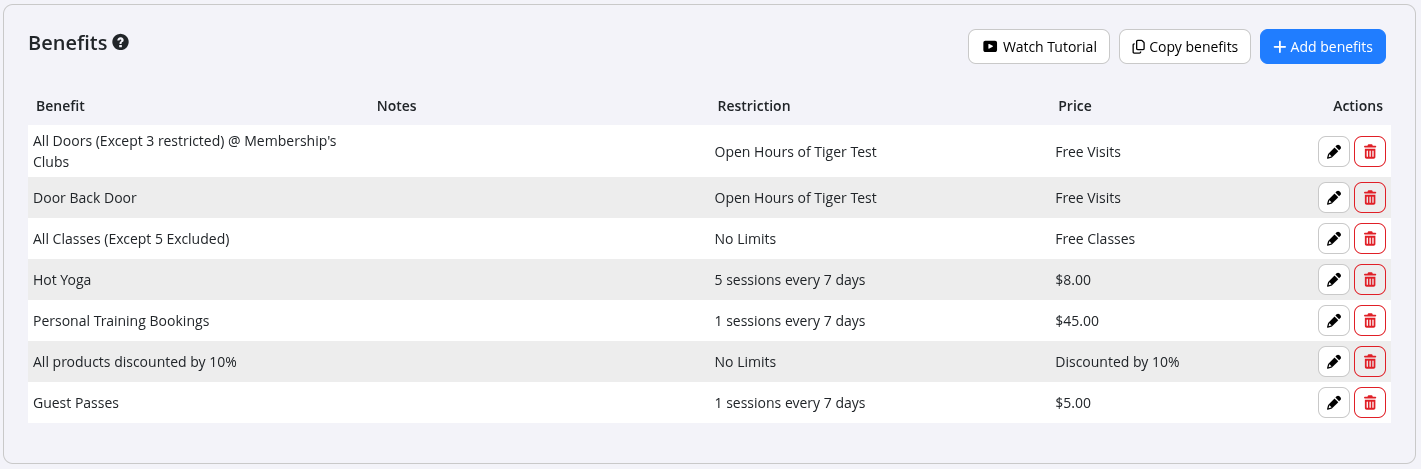
The example below shows a membership with numerous benefits, allowing the member to:
- Access All Doors (excluding restricted doors) during Open Hours
- Access the Back Door (a restricted door) during Open Hours
- Attend All Classes (excluding restricted classes) at no additional cost
- Attend Hot Yoga classes (a door which requires a booking to enter) for $8 per session, up to 5 sessions per week
- Receive one Personal Training session per week for $45
- Receive 10% off all retail products
- Bring one guest per week for a discounted $5 entry fee
Default Benefits
All new Membership Types are created with the following default benefits:
- Access to all doors at the membership club(s) during Open Hours
- Unlimited free access to all classes
If these defaults aren’t appropriate for your membership, simply edit or remove them.

Common Questions this Covers
- What are Membership Benefits
- How do Membership Benefits work
- Where do I configure Membership Benefits
- How do I edit Membership Benefits
- What types of Membership Benefits are available
- Can a membership have multiple benefits
- How do I create different membership tiers
- How do I control what members can access
- How do I add benefits to a membership
- Where do I manage member access and entitlements

 2026 © Treshna Enterprises Ltd.