
Setup Gymmy - GymMaster's AI Integration Tool
2 min read
Updated
today
Gymmy is a GymMaster focused chatbot. It’s been trained on our comprehensive internal knowledge base, including our User Manuals and Knowledge Base. and it has access to all reports, facts and figures within GymMaster, so it can provide insight to your business.
In short, it knows GymMaster, and your business, inside out. This means Gymmy can provide contextually relevant solutions tailored to your specific questions and challenges, and can show you how to use GymMaster to help improve business workflow.
Setup Gymmy
- Sign up with your preferred AI provider: Choose either ChatGPT (OpenAI) or Claude (Anthropic) and create an account on their console
- Set up your Console: Configure your billing directly with your chosen provider
- Get your API key: In your console, navigate to your API keys, press create, name your new key.
- Plug key into GymMasters AI Integration page; Settings > Integrations > AI
- Note that the API key is not typically included within the monthly subscription. This is not something GymMaster can control, and is between you, and your chosen AI provider
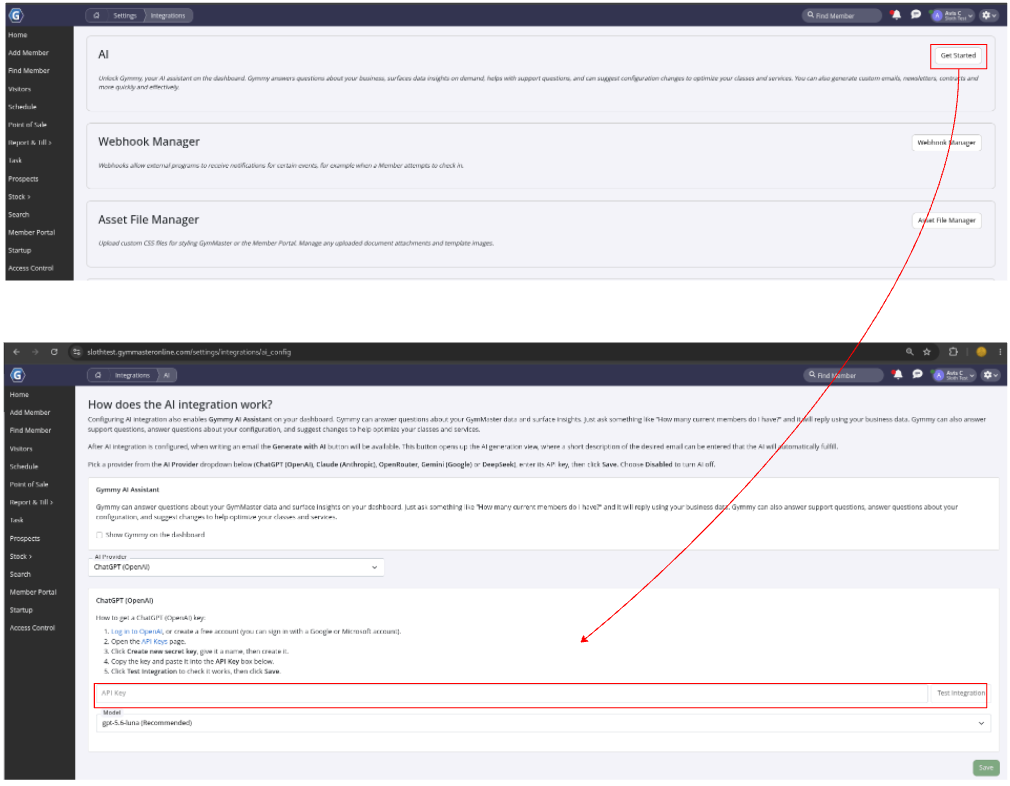
Integration complete.
You can now begin interacting with Gymmy on your Home dashboard.
See Using Gymmy - GymMasters AI Integration Tool for insight on how to use Gymmy for your business.
Common Questions This Covers
- How do I set up Gymmy AI in GymMaster
- Which AI providers can I use with Gymmy
Get started with a free, no-obligation chat, and see how we can help you grow

Awards and recognition
- Deloitte Master of Growth Index 2025
- Deloitte Master of Growth Index 2024
- Software Advice FrontRunners 2023
- GetApp Category Leaders 2023
- Capterra Best Value 2022
- GetApp Best Functionality & Features 2022
- Software Advice Most Recommended 2022
- SoftwareSuggest User Most Likely to Recommend Summer 2022
- Software Advice Best Customer Support 2021
- Deloitte Technology Fast 500 Asia Pacific 2018
 2026 © Treshna Enterprises Ltd.