
Using Gymmy - GymMasters AI Integration Tool
Gymmy is GymMaster’s AI-powered assistant, designed to help gym owners and staff get more out of GymMaster.
Once setup, it can answer questions about using the software and help you explore your business data using natural-language questions.
Instead of searching through documentation or manually reviewing reports, you can ask Gymmy a question in everyday language and use its response to help guide your next steps.
How to Interact with Gymmy
Gymmy can be found on your dashboard, on the GymMaster Home page. When interacting, Gymmy accepts questions in everyday language. You don’t need to know the exact name of a report or feature to get started.
Ask Clear, Specific Questions
Start with a straightforward question and include a relevant timeframe or category where appropriate.
For example, instead of asking “How is the business going?”, try:
- How many new members joined this year?
- Which members have visited the most this month?
- Who currently owes money?
Ask Follow-up Questions
Use the conversation to clarify an answer or explore a related topic. You can also ask Gymmy to help you find information about a GymMaster feature after discussing your business data.
Rephrase When Needed
Gymmy may misinterpret complex or ambiguous questions. If the response doesn’t answer your question, try simplifying the wording or asking for one piece of information at a time.
Gymmy’s Capabilities
Chat
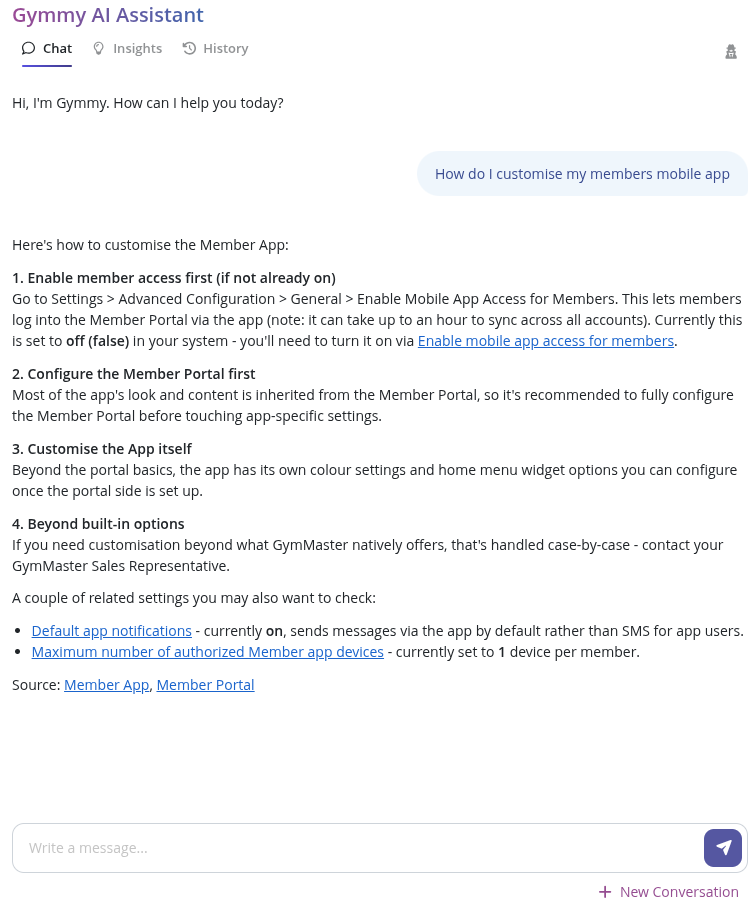
Gymmy is an expert on GymMaster, and it can offer insight as to whats happening with your business, from what it can learn within GymMaster.
| GymMaster | Your Business |
|---|---|
| Technical Guidance: Ask Gymmy how to accomplish tasks within GymMaster and get guidance based on the available documentation. For example, if you want to customise your members' mobile app, Gymmy can help you find instructions on changing colours, explain which features can be modified in-app, and highlight relevant limitations. Answers include references to supporting documentation. | Business Data: Gymmy can help you understand your business data in easy-to-understand terms. It uses real-time data from GymMaster’s internal reporting system to answer questions about your business in natural language, making it easier to explore information without manually locating and interpreting reports. The information available depends on the data and reporting capabilities accessible to Gymmy. |
Insights
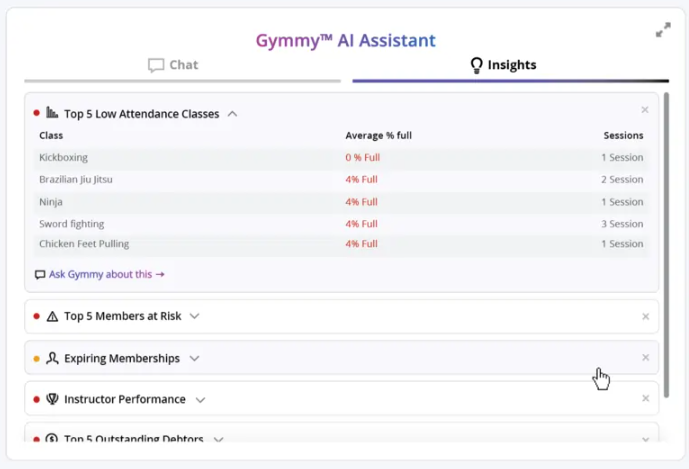
Switch to Gymmy’s “Insights” tab to unlock analysis of your gym’s performance across classes, member retention risk, staff performance, and so on. You can dig deeper into these insights, by asking follow-up questions, explore trends, and discussing potential strategies.
AI makes mistakes; always verify important figures and interpretations against the relevant GymMaster report or source information before making business decisions.
Setup Gymmy
Here’s the full guide to learn how to set up the Gymmy ingetration: Setup Gymmy - GymMaster’s AI Integration Tool
Common Questions This Covers
- What is Gymmy AI in GymMaster
- Does GymMaster have an AI integration tool
- What can Gymmy do
- How can I ask Gymmy questions about my gym’s data
- Can Gymmy help me use GymMaster

 2026 © Treshna Enterprises Ltd.