
Frequently Asked Questions About Billing
Below is a selection of common questions covering the following areas:
Some answers link to full articles for more detail, while others are provided directly here.
If you cannot find the information you need, please contact our Support Team.
Billing Icons
Find the full GymMaster definition of icons in the Glossary
When viewing a members account history, you’ll see a variety of icons denoting the status of various payments.
To see Account History, go to;
- Member Profile > Accounts and Billing
- Scroll down to thei Account History
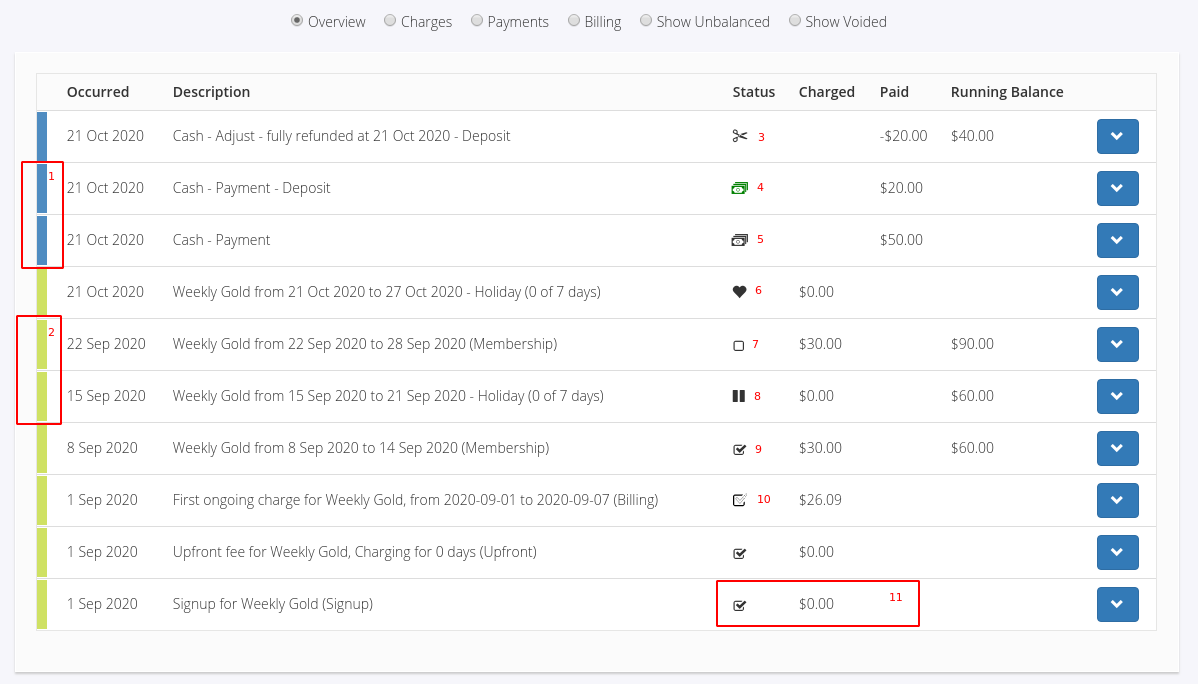
- 1; Payment Line - Indicated by a blue band on the Account’s History line item
- 2; Charge Line - Indicated by a green band on the Account’s History line item
- 3; Adjustment - An adjustment has been made to counteract a payment or charge
- 4; Over paid / Deposit - The payment is not fully assigned to charges yet, there are available funds to be used
- 5; Payment Received - Indicated by the Payment Received icon
- 6; Gifted Time - The member has been given free time during this period, the charge amount is adjusted to reflect this
- 7; Unpaid - Charge is outstanding, no payments have been made yet
- 8; Membership Suspended - The membership is suspended during this period, the charge amount is adjusted to reflect this
- 9; Paid - Charge has been fully paid
- 10; Partially Paid - Charge has an associated payment, but there is still an outstanding amount owing
- 11; Zero Charges - Charges with no value are automatically marked as paid
General Billing
Does GymMaster store payment card details?
- For security reasons, GymMaster does not store billing details such as credit card numbers or expiry dates
- When a member adds a payment method, the details are sent directly to the billing provider, which securely stores the data
- The provider generates a ‘token’ as a reference for the member and passes this token to GymMaster
- GymMaster stores the token on the member’s account and uses it to process payments when billing
Can I refund a billing payment?
- Yes, some billing providers support refunds
- Because GymMaster does not store payment card details, refunds must be initiated through the billing provider
- If a refund button appears in GymMaster for a transaction, your provider likely supports it
- For more information, see Refunding Payments
Member was billed, but I don’t see the reference in GymMaster
- This may occur if member details were added to the wrong account
- Check billing batches on the transaction date in both GymMaster and the billing processor; the reference should appear there
Can I prevent staff from changing payment amounts?
- Yes, via User Administration > Staff Member > Permissions
- Adjust the Member permission according to the restriction level required. Setting the Basic role prevents staff from editing charges and payments
How can I view a member’s billing payments?
- View payments on the Accounts and Billing tab of the member’s page
How do I transfer members to a new provider or to GymMaster Integrated Billing?
How do I manually send an invoice to a member?
How can I view future billing charges for a member?
How do I do manual billing?
- Manual billing is not recommended long-term, but can be used temporarily during setup
- It is advised to set it up with assistance from GymMaster Support to ensure accuracy
- See Manual Billing Only
How do I clear a charge using a Credit Note?
How do I use member credit towards a payment in Point of Sale?
Can I change a member’s payment day for their membership?
Billing Providers
See our guide to all Billing Provider Error and Decline Codes
Do I need to sign up with a specific billing provider to use GymMaster?
- GymMaster works with PCI-compliant billing providers only, but there are multiple options available depending on your region
Which PCI-compliant billing providers are available in my location?
- See the full list of PCI Compliant Billing Providers
How do I transfer members to a new billing provider?
We are transferring the business to a new bank. Do we need to inform our billing provider?
- Yes. Contact your billing provider to update your bank details, as all payments are deposited directly into your business account.
How do I find out what a specific error or declined payment code means?
- Check our list of Billing Provider Error and Decline Codes for each billing provider
- If the code is not listed, search online or contact your provider directly
EziDebit
How do I set up and use EziDebit?
EziDebit Error: ‘Add payment denied
- See [Ezidebit Error](/help/help_ezidebit_only_active_customers_can have_payments_added_to_their_schedule)
EziDebit Error: ‘Payment Stopped’
- This means the member has blocked the payments at their bank. Contact the member directly
Why are RealTime online payments not processing immediately?
- RealTime payments must follow GymMaster’s online billing configuration rules
- Go to Settings > Member Portal Configuration > Billing, check options for ‘Bill Immediately’, enable where required, and save your changes
Failed Billing
See our guide on Understanding Failed Billing
Which report shows failed billing by members?
- View the Reports & Till > Debt Collection Report
How do I find out what a specific error or declined payment code means?
- Check our list of Billing Provider Error and Decline Codes for each billing provider
- If the code isn’t listed, search online or contact your billing provider directly
Why was a member able to access the gym after a failed payment?
- Billing processing times may vary. There can be a delay between when a transaction is sent for processing and when GymMaster receives confirmation
- Recurring billing transactions may take up to five working days to be fully processed
Can staff or members be automatically notified when a billing payment fails?
- Yes. Use the pre-created Task Automation task Failed Integrated Billing Payment
- Assign a performer if required and configure the email template
- You can choose to notify the member, the staff performer, or enable auto-send for both
Billing Reports
Which report shows money owed by members?
- View the Reports > Debt Collection Report
How can I view a member’s full billing history as a report?
- Go to the member’s page, select the Accounts and Billing tab, scroll to the bottom of the Account History list, and select Export to CSV.
- You can also use the account statement button found within Accounts and Billing tab.
How can I see which members are set to ‘Never Bill’ or ‘Billing Pending Review’?
- Go to Reports > Debt Collection
- Select Advanced Search then narrow search options to include Never Bill or Pending Review
Why does my Sales Report show a different total than my Payments Report?
- Sales and payments reports track different data, so totals will differ
- For example, a $100 membership charge on 1st Jan that fails will show;
- Sales: $100
- Payments: $0
If the catch-up payment succeeds on 1st Feb, that month will show:
- Sales: $100
- Payments: $200
Unpaid memberships, booking fees, and product sales increase revenue in the Sales Report but are only reflected in Payments when collected.
See the *Reports > KPI report for a combined overview of income and payments.
Can I run a report on upcoming expiring credit cards?
- No
- GymMaster does not store credit or debit card information; it is stored by the billing provider, so card expiry reports are not available within GymMaster
Terminology
Find the full GymMaster definition of terms in the Glossary
Accrued Revenue
- Income earned but not yet received nor past due.
- A sale that is recognized by the business, but which has not yet been billed to the Member.
- This occurs when a Charge is set to Bill Soon or Bill Later, or Charge to Member is selected in Point of Sale.
- In each case the cost/fee is added to the Members Account for Payment in the future.
- Accrued revenue is not recorded in cash basis accounting, since revenue is only recorded when cash is received from customers.
Add Payment
- The process of recording a Payment made by a Member towards their gym Membership Fees or any other Services or Products offered by the gym.
- This may include cash, credit card, bank transfer, or any other method of payment accepted by the gym.
Adjustment
- Changes made to a Member’s financial Account.
- Adjustments may include changes to Membership Fee, Discounts, refunds, late fees, or any other adjustments made to a member’s account balance.
Bill Immediately
- Payment setting that allows gym Staff to Charge a Member’s Account immediately upon completing a transaction, such as selling a Membership or booking a Personal Training session.
- When the “bill immediately” setting is enabled, the Charge is added to the member’s account balance, and the Member will be required to make payment to cover the charge.
Bill Later
- Payment setting that allows gym Staff to create an Invoice for a Product or Service without Charging the Member’s Account immediately.
- Instead, invoice is saved in the member’s account.
- Member can pay invoice at a later date, either in person or via Member Portal.
Bill Soon
- Payment setting that allows gym Staff to add a Charge to a Member’s Account, to be paid at the Member’s next Billing Cycle.
Billing
- The process of handling financial transactions related to Membership Payments.
- This includes the generation of Invoices or bills for membership fees, tracking payments, managing different membership plans, handling Recurring Payments, and providing a system for financial Reporting.
Billing Cycle
- The regular period during which a gym bills its Members for their Membership Fees or other Charges.
- Billing cycle length is determined by the Payment Frequency set in membership Terms.
Billing Date - Monthly
- The specific date of the month on which a gym bills its Members for their monthly Membership Fees or other Charges.
- For example, if a gym’s monthly billing date is the 15th of each month, then members will be charged for their membership fees on that date every month.
Billing Day - Weekly
- The specific day of the week on which a gym bills its Members for their weekly / fortnightly Membership Fees or other Charges.
- For example, if a gym’s weekly billing day is Thursday, then members will be charged for their weekly / fortnightly membership fees on a Thursday.
Billing Frequency
- How often a gym Charges its Members for Membership Fees or Services.
- Billing frequency is determined by the Payment Frequency set in Membership Terms.
- It determines the regularity of Billing Cycles, whether monthly, weekly, bi-weekly, quarterly, annually, or customized intervals, as defined within the GymMaster system.
Billing Period
- Refers to the duration for which a Member is Charged for their Membership.
- The billing period can vary and is often defined by the gym’s Billing Cycle.
- Common billing periods include monthly, quarterly, or annually.
- During each billing period, the system calculates and generates Invoices for the applicable charges, such as Membership Fees.
Billing Provider
- A third-party company that handles the financial transactions and processing of Membership Fees for the gym.
- The billing provider integrates with GymMaster’s software to manage automated Payments, Recurring Payments, invoicing, and other financial transactions related to gym Memberships.
- Some examples of billing providers that GymMaster supports include Ezypay, Stripe, Square.
- By using a billing provider, gyms can streamline their billing processes and reduce administrative tasks, while also providing Members with a more convenient and flexible payment options.
- Additionally, a billing provider can help to ensure that all financial transactions are secure and compliant with industry standards and regulations.
Billing Start Date
- The first billing date of the Club.
- This date may be earlier than the club’s Opening Date, when pre-sale Memberships are being sold.
Charge
- A charge refers to a monetary transaction that is applied to a Member’s Account for a Product or Service, such as a gym Membership Fee, Personal Training session, or product purchase.
- A charge occurs on it’s due date and requires a payment from the member that incurred it.
- For example a new member signs up starting 19th Aug, their charge for their first period is due on this date.
Credit Note
- A document issued by the gym to a Member, indicating that the gym owes the member a credit or refund.
- This may occur when a member has paid for a Product or Service but later Cancels or returns it, or when the gym has overcharged the member for a fee or service.
- The credit note will typically include the date, the amount of credit or refund owed, and any relevant details or notes.
- The credit note can then be used by the member to offset future Payments, either partially or in full, or may be paid out in cash or by other agreed-upon means.
Debit Note
- A document issued by the gym to a Member, indicating that the member owes the gym an additional amount of money.
- This may occur when a Member has underpaid or not paid for a Product or Service, or when the gym has made an error in billing the Member’s Account.
- The debit note will typically include the date, the amount owed, and any relevant details or notes.
Debtors
- Members who have unpaid fees or dues that are past their due date.
- These unpaid fees can include Membership Fees, Personal Training sessions, or any other Charges that the member has incurred.
- If the “stop at gate” in Advanced Configuration is enabled, members who are debtors can be denied access to the gym.
- A notice period, for instance 7 days, can be set during which they are allowed to either visit the gym or Schedule bookings before their Outstanding Balance needs to be settled.
Discounts
- Refer to a reduction in the regular price of Memberships or Products offered by the gym.
Final Payment
- The last payment made on a Membership.
First Payment Date
- The date on which a Member’s initial Payment is due for a Membership.
- This date is typically set when the membership is purchased, and is used to determine when the member’s financial obligation to the gym or fitness center begins.
Invoice
- An invoice is a formal request for Payment of Outstanding Balance.
- This can happen at any time though usually happens for outstanding Charges.
- The date of an invoice is the date it is created and sent to the Member.
- An invoice can be for any number of charges, meaning that the invoice date is not always the same as the charge dates, though the charges in the invoice will show with their respective due dates.
Next Payment
- The date when the next Payment is due for a Member’s ongoing Membership.
- This date is calculated based on the membership Start Date, the Membership Basis (e.g. fixed-term or ongoing), and the Payment frequency (e.g. monthly or annually).
Outstanding Balance
- The amount of money a Member owes to the gym or fitness center for services or fees that have not been paid.
- This could include Membership Fees, late fees, Cancellation Fees, or fees for additional services or amenities.
- The outstanding balance is the total amount that is currently due and unpaid by the member.
Pay Later
- This option allows Members to defer Payment for services rendered until a later date.
- With pay later, a member can receive services or Products from the gym without immediately paying for them.
- Instead, the gym records the transaction and adds the Charges to the Member’s Account to be paid at a later date, typically at the end of the billing period.
- This arrangement is commonly used to facilitate Recurring Payments for Memberships, Personal Training sessions, or other Services offered by the gym.
Payment
- The transfer of funds from a Member to the gym for Products or services received.
- Payments are made by members to pay for a Charge
- A payment can occur any amount of time before or after the charge is due.
- Usually payments are made on the same date as the charge is due, though this is not always the case.
- If the member misses their first payment they will owe for the charge until payment is made.
- A payment can be made in various forms such as cash, credit/debit cards, electronic funds transfer, or any other payment method accepted by the gym.
Payment Frequency
- How often a Member is required to make Payment for their Membership plan.
- For example, a monthly membership plan requires members to make payments once per month, while an annual membership plan may require members to make a single payment at the beginning of the year.
- Other membership plans may require payments every other week, or on a pay-per-visit Basis.
Prepay
- Payment made by a Member towards future Membership Fees or Services, typically in advance of the Billing Cycles.
- Prepay can be made in various ways, including cash, credit card, or bank transfer, and can be used to secure a Membership plan, to take advantage of Discounts or special offers, or simply to ensure that membership fees are paid on time.
Preview Billing
- A feature that allows gym Staff to preview upcoming Billing Cycles for Members.
- Preview billing allows gym staff to view the billing amounts for each member before the billing cycle occurs, so that any necessary adjustments or corrections can be made in advance.
- Preview billing is typically used to catch any errors or discrepancies in billing amounts, to ensure that members are Charged correctly and to avoid disputes or complaints.
Prorata
- The proportional amount of a fee or Charge that is adjusted to reflect a partial billing period or partial usage of a gym service or program.
- For example, if a Member joins a gym in the middle of the billing period, they may only be charged a prorated fee for the remainder of the period instead of the full fee.
- Likewise, if a member Cancels a Membership or Service before the end of the billing period, they may be refunded a prorated amount for the unused portion of the service.
- Prorated calculations in GymMaster are based on the length of the billing period and the Start and End dates of the membership or service. This enables gyms to provide flexible billing and membership options while ensuring that fees are calculated accurately and fairly.
Prorate First Payment / Upfront Fee
- An adjusted initial Payments amount for a new Membership to reflect the portion of the billing period that remains after the membership Start Date.
- For example, if a New Member Signs Up for a monthly membership on the 15th of the month, they will only be billed for the remaining half of that month, rather than the full monthly amount.
- This is known as prorating the first payment.
Realtime Billing
- Service provided by some Billing Providers
- Realtime billing in GymMaster refers to the capability to process and update billing transactions instantaneously.
- For instance, when a member makes a purchase at the gym’s store or pays for a service, the transaction is billed immediately, and the member’s account is updated in real-time.
- This ensures that their billing status is always current, and any issues can be addressed promptly.
Receipt
- Receipts are a document that provide proof of Payment
- These can be generated for any payment or for any Charge that has associated payments
- These can be generated as a PDF then emailed or printed
- Receipts for point of sale transactions can be printed via Thermal Receipt Printers if your facility is utilizing these.
Recurring Payment
- A Payment that is automatically Charged to a Member’s Account on a regular basis, according to the Terms of their Membership plan.
- Recurring payments are typically used for weekly, monthly or other regular memberships where the Member is required to make payments over an extended period of time.
Statement
- A member’s statement will show all transactions from their account history within a specified date range.
- Member’s often request these so that they can verify what they’re paying matches what they’re getting charged for.
- You can generate a statement by clicking the statement button at the top of the account’s tab, then selecting a date range.
- This can then be printed, or emailed to your member.
X Report
- A Report showing transactions processed from the start of the day to the time the X Report is run.
- Intended to be run at the end of each shift to obtain shift sales.
Z Report
- A Report showing transactions processed since last Z Report was run.
- Intended at the end of the each day.

 2026 © Treshna Enterprises Ltd.
