
Update Club Ownership/Contact Information
1 min read
Updated
15 days ago
Keeping your club ownership and contact details up to date ensures our team always has the right point of contact.
For any major changes, we require approval from the registered owner. If those details are out of date, it can slow things down when you need something actioned quickly. For the same reason, any data change waivers are only sent to the owner email on file.
Updating your club’s ownership and contact details in GymMaster is quick and straightforward.
Updating Your Details
You can update everything directly in GymMaster:
- Change Ownership - Go to: Settings > Club Details > GymMaster Account > Change Ownership
- Update Contact Details - Go to: Settings > Club Details > GymMaster Account > Update Contact Details
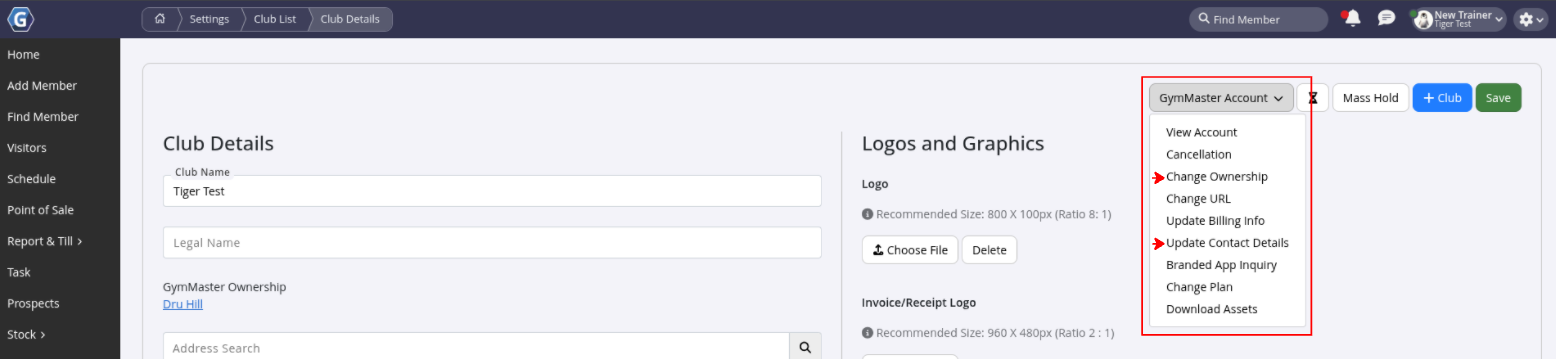
When updating contact details, just fill in the fields you want to change. Leave the rest blank, if unchanged.
Common Questions this Covers
- How to change club ownership details
- How to update gym ownership information
- How to update club contact details
- Update club address
Get started with a free, no-obligation chat, and see how we can help you grow

Awards and recognition
- Deloitte Master of Growth Index 2025
- Deloitte Master of Growth Index 2024
- Software Advice FrontRunners 2023
- GetApp Category Leaders 2023
- Capterra Best Value 2022
- GetApp Best Functionality & Features 2022
- Software Advice Most Recommended 2022
- SoftwareSuggest User Most Likely to Recommend Summer 2022
- Software Advice Best Customer Support 2021
- Deloitte Technology Fast 500 Asia Pacific 2018
 2026 © Treshna Enterprises Ltd.
