
Tax Rates
Before you start selling memberships, bookings, or products in GymMaster, it’s important to set up your tax rates so charges are calculated correctly. Different categories of items can have different tax rates, giving you flexibility to match local tax requirements.
Add Tax Rate
To create a new tax rate:
- Go to Settings > Financial Configuration > Tax Rates
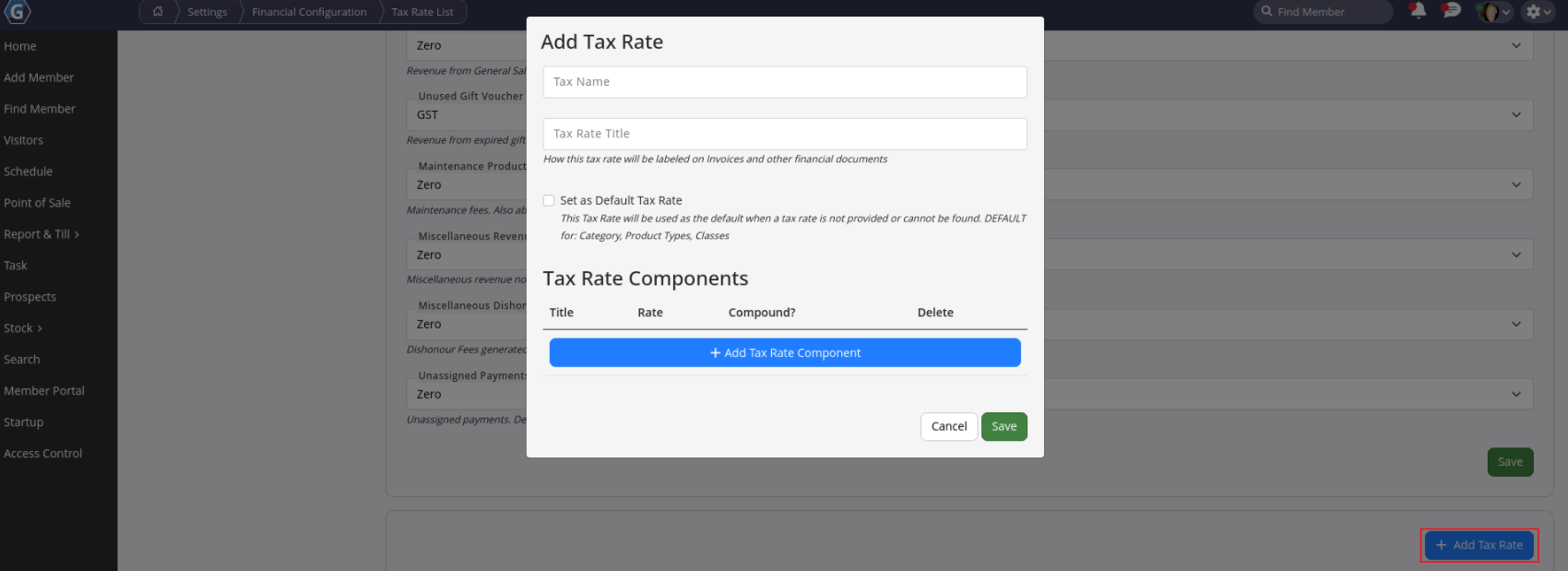
- Select Add Tax Rate
When creating a tax rate you’ll define a few key details:
- Tax Name: This is what members will see on receipts and invoices.
- Tax Rate Title: Your internal reference inside GymMaster (for example Booking Tax or Product Tax).
- Set as Default: Choose this if you want the tax rate to be automatically selected for sales and services (this can still be adjusted per transaction).
- Tax Rate Components: Enter the applicable tax percentage based on your local requirements. Most regions use a single component, though some may require multiple components.
Apply Tax Rates
Once your tax rates are created, they can be applied throughout GymMaster wherever income is generated.
Common areas include:
- Memberships - Settings > Membership Types > Membership Categories
- Class Bookings – Settings > Bookings and Classes > Classes > Class Categories
- Service Bookings – Settings > Bookings and Classes > Services > Service Categories
- Products – Settings > Products
- Maintenance Fees - Settings > Club Details > Maintenance Fee
- General Sales and Miscellaneous Charges – Settings > Financial Configuration > Tax Rates
If you’re setting up GymMaster for the first time, you’ll typically assign these tax rates as you configure each section of the system.
Important
Once a tax rate has been applied to an income stream, it becomes locked. This protects your historical financial records and ensures past reporting remains accurate. Because of this, confirm your tax rates are set up correctly before you begin selling memberships, bookings, or products.
Common Questions this Covers
- How to set tax rate
- How to set up different tax rates
- How to apply tax rates to memberships
- How to apply tax rates to classes and services

 2026 © Treshna Enterprises Ltd.
