
Schedule Report Sending with Auto-Send
You can set up reports to be sent to a specific email address every day, week, fortnight or month. This can be helpful for 3rd parties like accountants, or as a reminder to monitor changes at your site.
For example, you may want a structure like:
- Cancelling Members send every Friday
- New Members send every Friday
- Failed Payments send every Monday
To Auto-Send a report, select the report ** Edit > Autosend.**
The report duration sets the length of each reporting period covered in the email attachment.
If you select Past Reports, report duration will set the start date of the report. If you select Future Reports, report duration will set the end date of the report. e.g. You select Past Reports and set the report duration to 1 week. Every Friday, the report will generate data from the previous Friday until today and then send the report. If you are using Future Reports, the report will generate data from today’s date until next Friday, and then send the report.
Use Past Reports to report on past events like prospect conversions over the past week, and Future Reports to report on upcoming events like bookings for the next week.
If you want the report to send every Monday, make sure the AutoSend start date is a Monday, as this is the basis of the cycle.
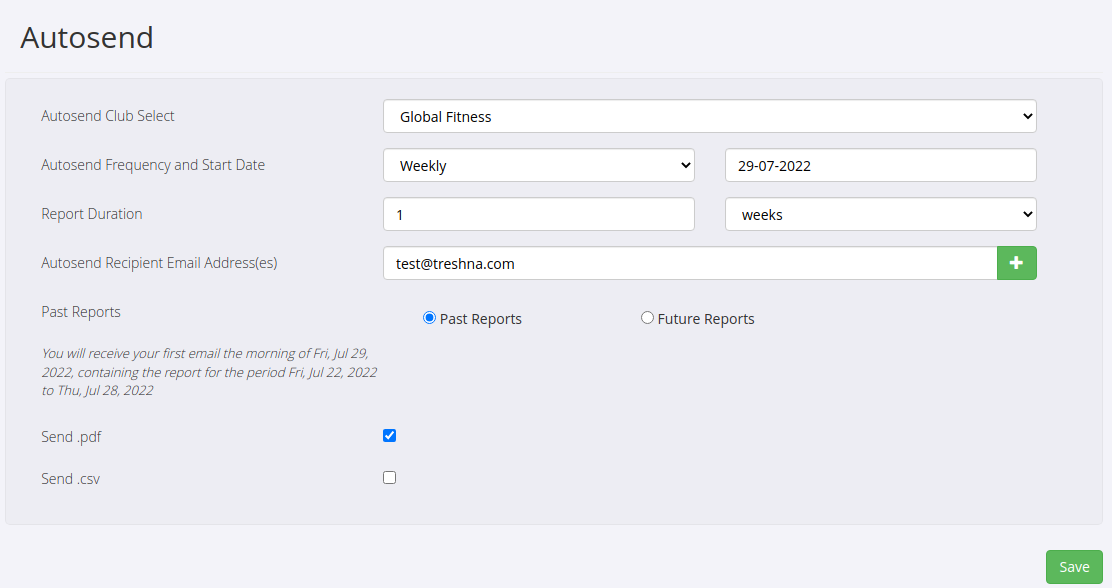
Remember to save. You will now receive a scheduled email with the report attached according to these settings.
Get started with a free, no-obligation chat, and see how we can help you grow

Awards and recognition
- Deloitte Master of Growth Index 2025
- Deloitte Master of Growth Index 2024
- Software Advice FrontRunners 2023
- GetApp Category Leaders 2023
- Capterra Best Value 2022
- GetApp Best Functionality & Features 2022
- Software Advice Most Recommended 2022
- SoftwareSuggest User Most Likely to Recommend Summer 2022
- Software Advice Best Customer Support 2021
- Deloitte Technology Fast 500 Asia Pacific 2018
 2026 © Treshna Enterprises Ltd.