
Planning and Designing your Memberships
GymMaster gives you the flexibility to create simple memberships, such as basic gym access, through to advanced membership journeys including trials, challenges, premium upgrades, shared memberships, and automated conversions.
A well-designed membership determines:
- How members join and progress through your sales journey
- How and when they are charged
- What access and privileges they receive
- Which bookings, products, and facilities they can use
- What agreements, waivers, or information are required
Ready to start building your memberships?
- Navigate to Settings > Membership Types > Add Membership Type
There is no single “correct” membership design.
The best design depends on your club, your target members, and how you want members to progress through your business.
Configuration Options
Every membership is created by combining several configuration options.
Some memberships may only require a few settings, such as a standard gym membership with recurring billing and basic access. Others may combine multiple options to create a complete member journey, such as a free trial that converts into an ongoing membership, or a premium upgrade that unlocks additional facilities.
Key configuration options are listed below.
| Option | Effect | Example |
|---|---|---|
| Membership Basis | Defines the core structure of the membership, including how it starts, how long it lasts, how it is billed, and how it ends. | Open-ended membership, fixed-term contract, challenge program |
| Payment Frequency | Determines how often members are charged. Available options depend on the chosen Membership Basis. | Weekly, fortnightly, monthly, annually, or upfront |
| Membership Fee | Determines how much members are charged for each selected payment period. | $30 per week or $99 per month |
| Sign-Up Fee | Adds a one-off fee when the membership is purchased. Commonly used to cover administration, access cards, onboarding, or setup costs. | $49 joining fee |
| Shared Membership | Allows multiple members to share a single membership and its associated benefits. | Family, couples, or group memberships |
| Promotional Period | Applies introductory pricing or special offers before the membership returns to its standard pricing. | First 28 days for $28, then standard membership pricing |
| Membership Benefits | Defines what members receive with their membership, including access, discounts, booking entitlements, and guest privileges. | Classes, services, products, door access, and guest passes |
| Available For | Controls who can purchase the membership online. | Everyone, new members only, or existing members only |
| Forms and Waivers | Collects the agreements, waivers, and information required when purchasing the membership. | Membership agreement, terms and conditions, waiver, questionnaire |
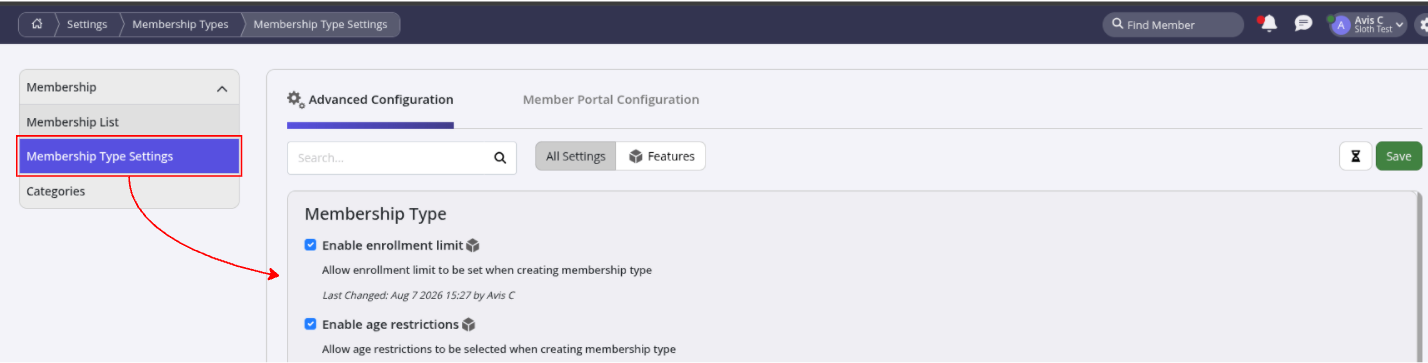
Can’t see all options? Check your Membership Type Settings to enable / disable options.
Membership Design Examples
The examples below show how different combinations of settings can create different membership experiences.
- A traditional gym may focus on ongoing memberships with recurring billing and broad access benefits.
- A boutique studio may use prepaid packs, challenges, and automatic enrolment to create structured programs.
- A premium facility may combine add-on memberships, restricted access, and exclusive benefits to create upgrade pathways.
| Membership Example | Basis | Payment & Fees | Shared | Online Sales | Benefits | Forms |
|---|---|---|---|---|---|---|
| Standard Gym Membership | Open-Ended Contract | $49 sign-up fee + $29/week ongoing membership | No | Yes — Everyone | Open Hours door access + unlimited classes | Membership Agreement |
| Premium All Access Membership | Open-Ended Contract | $99 sign-up fee + $129/month. First month promotional offer available | No | Yes — Everyone | 24/7 access, all classes, discounted services, guest passes, product discounts | Membership Agreement, Waiver |
| Family Membership | Open-Ended Contract | $49 sign-up fee + $199/month | Yes | No — Staff sales only | Shared access for family members, classes, guest passes | Membership Agreement |
| 28-Day Fitness Challenge | Preset Date Program | $299 upfront. Early bird promotional pricing available | No | Yes — New members only | Program classes, automatic enrolment, group coaching sessions | Challenge Waiver + Health Questionnaire |
| 14-Day Trial Membership | Trial Membership | Free or low-cost promotional period. No recurring billing | No | Yes — New members only | Limited gym access + selected classes to experience the club | Trial Waiver |
| Personal Training Pack | Class and Booking Pack | $750 upfront for 10 sessions | No | No — Staff sales only | 10 Personal Training sessions redeemable over time | Health Questionnaire + PT Agreement |
| 10 Visit Pass | Club Visit Pack | $120 upfront for 10 visits | No | Yes — Everyone | Flexible club access without recurring membership | Visitor Waiver |
| Casual Gym Access | Charge per Visit | $20 per visit. No sign-up fee or recurring billing | No | Yes — Everyone | Single club entry when required | Visitor Waiver |
| Hot Yoga Upgrade | Add-On Program | Added to existing membership at $10/week. Introductory offer available | No | No — Existing members only | Unlimited Hot Yoga classes + restricted room access | Add-On Agreement |
| Sauna and Recovery Membership | Add-On Program | Added to existing membership at $39/month. First month introductory pricing available | No | No — Existing members only | Sauna, recovery facilities, premium access areas | Recovery Waiver |
Ready to make your first membership? See Creating Your Memberships.
Common Questions this Covers
- How do I create different types of memberships in GymMaster
- What options do I have when setting up a membership
- How do I design a membership structure for my gym
- What is the best membership type to use for my club
- How do I create a trial membership that converts into a full membership
- How do I set up premium or upgraded memberships in GymMaster
- How do I create family or shared memberships
- How do I choose between recurring memberships, packs, and prepaid options
- What settings should I consider when creating a new membership
- How do I combine membership benefits, pricing, and requirements together

 2026 © Treshna Enterprises Ltd.