
Membership Forms and Waivers
GymMaster makes it easy to set up digital paperwork for members to complete and sign as part of their memberships or bookings.
You can manage this in Settings > Forms and Waivers.
These can be attached to your Membership Types, so you can ensure key agreements, waivers, or questionnaires are completed during sign-up.
Available Form Types
At the top right of the Forms and Waivers page, you’ll find three options:
-
- Agreement
-
- Questionnaire
-
- Contract Summary

+ Agreement
Create your Terms and Conditions or waivers for members to sign.
It’s your go-to for making sure everything is clearly agreed to before members hit the floor.
+ Questionnaire
Build questionnaires to gather extra info during sign-up.
Perfect for things like health screening forms before joining a specific membership (or class) or collecting details that help you support your members better.
+ Contract Summary
Build a clear, simple Contract Summary of the membership, displayed during sign-up.
It should lay out exactly what the member is signing up for, so there are no surprises.
You can simplify this by enabling the default contract template in Advanced Configuration, so it’s automatically applied to all memberships.
Just enable Use Static Contract in Advanced Configuration under Membership, and edit the default contract template in Forms and Waivers to suit.
Attach Forms to Membership Types
Head to Settings > Membership Types, then add or edit a membership.
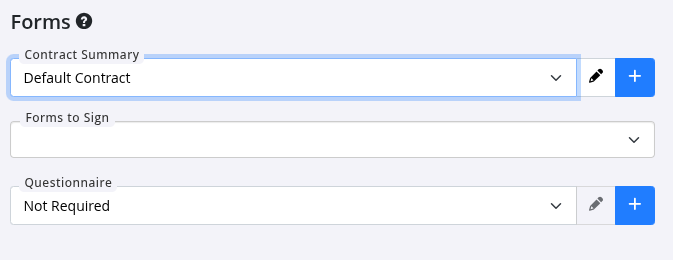
- Scroll down to the Forms section and choose which forms you’d like to attach.
- Waivers and Terms and Conditions are added under Forms to Sign, so members complete them as part of sign-up.
- Questionnaires can also be included, but may need to be enabled first in Advanced Configuration > Membership Types.
Managing Forms at Sign-Up and First Visit
- When a membership is purchased online, any attached forms are presented for the member to complete as part of the sign-up process.
- If a form isn’t completed at that time, the member will be prompted to complete it on their first visit.
- Staff can access and send forms from the Memberships tab within the member’s profile.
- Once completed and signed, all forms are automatically stored in the Communication tab under the member’s details for easy reference.
Common Questions this Covers
- Where to create forms for memberships
- How to attach forms to memberships
- How to attach questionnaire to membership
- How to attach waiver to membership
- How do new members sign forms online
- How do I add forms to online sign up process

 2026 © Treshna Enterprises Ltd.
