
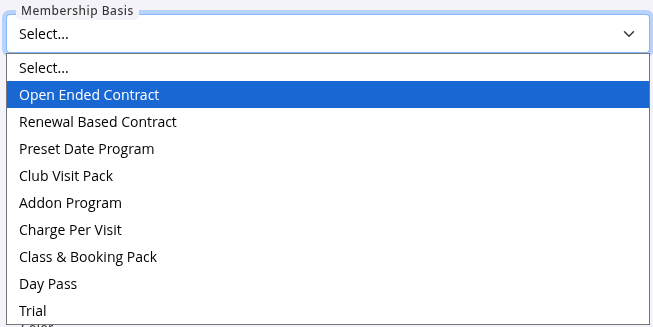
Membership Basis
The Membership Basis defines how a membership is structured and behaves throughout its lifecycle.
It impacts how the membership is billed, renewed, and managed over time.
To select or change a Membership Basis:
- Settings > Membership Types > Add / Edit Membership > Membership Basis
Each Membership Basis is designed for a different billing structure and member experience.
- Membership Basis Comparison Table
- Members, Casuals and Prospects for Classes and Services
- Choosing your Membership Basis
Membership Basis Comparison Table
Review the options below to understand how each Membership Basis works, what member experience it supports, and when it may be the best choice for your club.
| Membership Basis | Overview | Compatible Payment Frequency | Not Suitable For | Typical Use | Example |
|---|---|---|---|---|---|
| Open-Ended Contract | A membership with no fixed end date. Members continue to receive their Membership Benefits while the membership remains active, until cancelled. | Weekly, fortnightly, monthly, quarterly or annually | Fixed-term programs or memberships with a defined finish date | Standard ongoing gym memberships | A gym membership billed $19.95 per week by direct debit until the member cancels |
| Renewal-Based Contract | A membership that runs for a defined contract period before automatically renewing into another term. Members maintain ongoing access while the contract is active. | Weekly, fortnightly, monthly or annual billing during the contract term | Casual memberships or short-term programs | Fixed-term membership agreements | A 12-month membership billed fortnightly that automatically renews for another 12 months |
| Preset Date Program | A short-term membership that starts and ends on specific calendar dates. All members follow the same program timeframe and can be enrolled into scheduled activities using Automatic Enrolment. | One-off upfront payment or instalments across the program period | Ongoing recurring memberships | Holiday programs, challenges and fixed-date courses | An 8-week Summer Challenge running from 1 February to 28 March |
| Add-On Program | An additional membership attached to an existing membership, providing extra access, benefits, or upgrades without replacing the member’s main membership. | One-off, weekly, fortnightly or monthly | Standalone memberships | Premium upgrades and optional extras | An Unlimited Hot Yoga upgrade added to a standard gym membership for $10 per week |
| Charge per Visit | Members are charged only when they visit the club. No recurring membership fee applies. Enable in Membership Settings | Per visit only | Recurring memberships or prepaid access packs | Casual gym access and occasional visitors | A casual member pays $15 each time they visit |
| Club Visit Pack | A prepaid bundle of club visits. Each check-in deducts one visit from the available balance until the pack is used. | One-off upfront payment | Recurring billing or guest pass memberships | Flexible casual memberships | A prepaid 10 Visit Pass |
| Class and Booking Pack | A prepaid bundle of classes or services. Members purchase a set number of bookings upfront and use them as required. Works alongside Classes and Services. | One-off upfront payment | Recurring billing or guest pass memberships | Yoga packs, personal training packs and treatment packages | A prepaid pack of 10 Yoga Classes or 5 Personal Training sessions |
| Day Pass | Single-use entry pass. Expires once used, valid only for day of entry. Designed to allow casuals and prospects to experience your club. | One-off upfront payment. | Ongoing access | Casual gym access, friend access, prospect trial day | A 1-day club experience allowing prospects full access to club. |
| Trial Membership | A short-term membership designed to allow prospects to experience your club before committing to a full membership. Automatically expires after the trial period. | One-off payment or free trial period | Ongoing memberships intended to renew automatically | Prospect trials and introductory offers | A 14-day free trial membership that converts prospects into ongoing members |
- Options are found within Settings > Membership type > Add / Edit Membership > Membership Basis
Members, Casuals and Prospects for Classes and Services
When someone books a class or service, GymMaster checks if they are a Current Member or a Casual or Prospect on the date of the booking. This decides which options on the class or service they can use, and what they pay.
Current Members for bookings
A person is a Current Member for a booking when both of these are true;
- Their member status is a current status, such as Member, Free membership, Current member on hold or Current member notified cancelling
- They have a complete membership that covers the booking date. Memberships shared with them also count
Their member status comes from the Types of memberships that are counted as current members setting in Settings > Advanced Configuration > Member Reports. This is the same setting that decides your current member count in reports. A membership only makes someone a current member if its Membership Basis is ticked.
- Most clubs tick Open-Ended Contract, Renewal-Based Contract and Preset Date Program
- Members who only have memberships that are not ticked, for example only a Class & Booking Pack or a Trial, have the status Casual member with visit pack. They book as Casuals
- To let pack holders or trial members book as Current Members, tick their Membership Basis in this setting. This also adds them to your current member count
If you can not see this setting, contact GymMaster support to change it.
Casuals and Prospects for bookings
- Prospects
- Members with no membership on the booking date, for example an expired or cancelled member. These show as Expired Member
- Members whose memberships are not counted as current, for example pack only or trial only members on most clubs
Casuals can still use their pack passes and benefits, when the class or service allows them.
Who Can Attend This Class or Service
Classes and services have the same options, to set who can book and what they pay. Tick the options people can use.
- Classes - Bookings and Classes > Classes > Add / Edit Class > Who Can Attend This Class
- Services - Bookings and Classes > Services > Add / Edit Service > Who Can Attend This Service
| Option | Who can use it | What they get |
|---|---|---|
| Current Members | Current Members | Book using their Membership Benefits, either All class benefits (All service benefits) or Selected benefits only. Tick Base price to also let them pay the Base Price instead. Packs are not used here |
| Casuals & Prospects | Casuals and Prospects | Book for Free or at a Fixed price |
| Class Packs (Service Packs for services) | Anyone with a Class & Booking Pack | Use one pass from their pack, with all or selected benefits |
- When Casuals & Prospects is not ticked, Casuals and Prospects can only book if they have a benefit or pack they can use
- When neither Current Members nor the pack option is ticked, Current Members can not book
All class benefits or Selected benefits only
- All class benefits - any benefit that covers this class can be used, including an All Classes benefit
- Selected benefits only - only benefits for this class, or for its class group, can be used. All Classes benefits can not be used
- Members pay the cost set on the benefit they use, which may be free or a fixed price. Members with no benefit they can use pay the Base price, if it is ticked. If not, they can only book with a pack
Use Selected benefits only for classes that should not be included in a standard membership, such as a premium class or a sauna session.
Default benefits on new membership types
When you create a membership type and choose its Membership Basis, GymMaster adds default benefits. You can edit or delete them before saving.
| Membership Basis | Door access | All Classes benefit (free, unlimited) |
|---|---|---|
| Open-Ended Contract | Yes | Yes |
| Renewal-Based Contract | Yes | Yes |
| Preset Date Program | Yes | Yes |
| Trial Membership | Yes | Yes |
| Class and Booking Pack | No | Yes, shown as 10 sessions pack for a 10 use pack. Services are not included |
| Club Visit Pack | Yes | No |
| Charge per Visit | Yes | No |
| Day Pass | Yes | No |
| Add-On Program | No | No |
- Changing the Membership Basis adds or removes these default benefits. Benefits you have added or edited are kept
- For a Class and Booking Pack, the Usage Limit on the membership type sets how many uses the pack has, for example 10. Its class benefits only set which classes the pack can be used for, and do not change the number of uses. Pack benefits can only be used through the Class Packs option, and each booking uses one pass
- If you delete the All Classes benefit from a pack, add a benefit for the classes or class group it should cover. A pack with no class benefits can not be used to book any class
- To let a pack be used for services, such as personal training, add a service benefit to the membership type. Classes and services use the same pack, so a 10 use pack gives 10 bookings in total
- Members on membership types with an All Classes benefit can book any class set to All class benefits for free. Pack holders use a pass each time. To charge for a class, or limit who can book it, set the class to Selected benefits only and add a benefit for that class to the membership types that should include it
Choosing your Membership Basis
When selecting the Membership Basis, start by considering the experience you want to create for your members.
Ask yourself:
- Is this an ongoing membership, or does it have a defined start and end date?
- Should members be charged regularly, or pay upfront?
- Should the membership renew automatically?
- Is this a complete membership, or an additional upgrade to an existing membership?
- Is this designed for members, casual visitors, or prospects trying your club?
To get a sense of the full membership combinations possible, see Membership Design Examples.
Common Questions this Covers
- What is Membership Basis in GymMaster
- How do I choose the right Membership Basis
- What is the difference between Open-Ended and Renewal-Based memberships
- How do I create a fixed-term membership in GymMaster
- How do I create a challenge or program membership
- How do I create a trial membership in GymMaster
- How do I create an add-on membership
- What is the difference between a membership pack and a recurring membership
- Which Membership Basis should I use for casual members
- Can I change the Membership Basis after creating a membership
- Who counts as a member when booking classes and services
- Why is a member paying the casual price for a class
- Can concession pack holders book classes as members
- What is the difference between All class benefits and Selected benefits only
- Which benefits are added to a new membership type by default
- Why can members book a class for free

 2026 © Treshna Enterprises Ltd.