
Invoicing Members
Invoices in GymMaster are a simple way to request payment for charges on a member’s account. An invoice gathers one or more existing charges together and sends them to the member as a clear payment request.
The invoice date is the date the invoice is created and sent. This may not match the dates of the charges included in it; each charge keeps its own due date, and those dates will still appear on the invoice.
Invoices can only be created for charges that already exist. If you need to invoice future payments, use the Prepay function first to generate those charges.
Generate an Invoice
To send an invoice, you’ll first generate it from the member’s account.
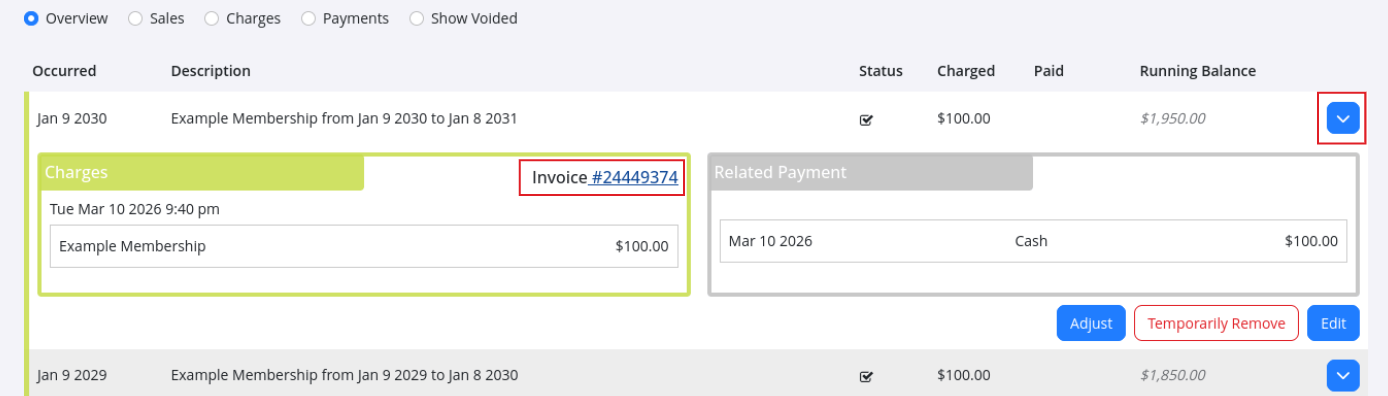
- Open the member’s profile
- Go to Accounts History
- Edit one of the outstanding charges
- Click the Invoice number
This opens a PDF preview showing the charges that will appear on the invoice. Once you’re happy with it, head back to the edit page and select Email Invoice to send it to the member.
Choose Which Charges Appear on Invoice
Charges can be grouped together however you like, so you don’t need to include every outstanding charge each time.
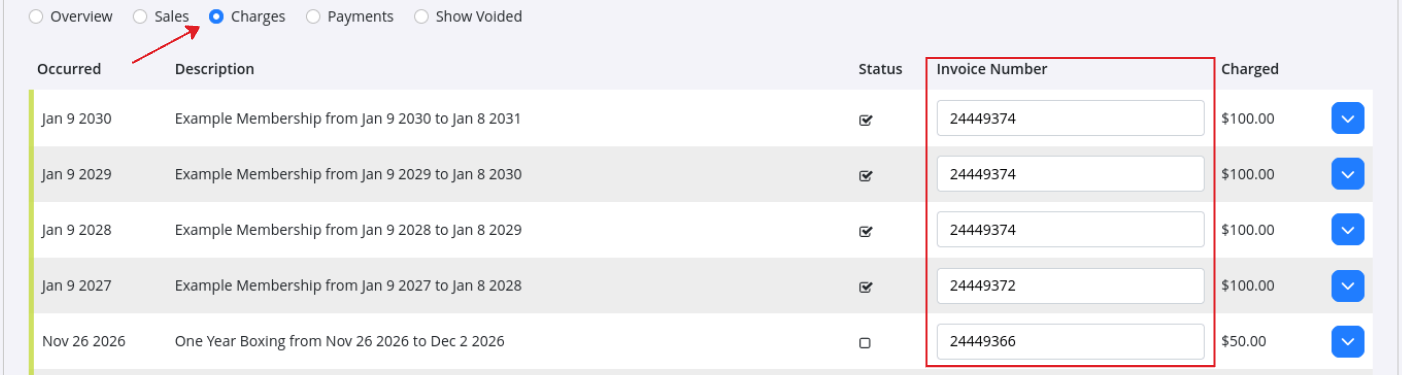
- In Accounts History, switch to the Charges view
- Each charge will show an Invoice Number field
- Remove the invoice number from any charges you don’t want included
- Add the same invoice number to the charges you do want on the invoice
- Click Save
When everything looks right, head to Charges Awaiting Payment and use Email Invoice to choose which invoice to send to your member.
Manage Invoices
The Invoices section in the member profile shows all invoices linked to that member, including past invoices and any charges that haven’t been invoiced yet.
From here you can:
- View or edit an invoice
- Add or remove charges
- Email or print the invoice

Email Invoice to a Member
When you’re ready to send an invoice, it only takes a moment.
- Open Email Invoice
- Select the invoice (or invoices) you want to send.
- Send them directly to the member for payment or reference
If you need to make a change first, you can edit the invoice in the Invoices section before sending it.

Common Questions this Covers
- How to view and email invoice
- How to edit and send an invoice
- How to generate invoices for a member

 2026 © Treshna Enterprises Ltd.
