
Run a Virtual Class or Service
2 min read
Updated
1 month ago
Using GymMaster with Zoom, it’s easy to allow members to book into classes, workshops, group training or events which are streamed online.
Before you begin - Setup a business Zoom account and integrate this with GymMaster.
Setup Classes and Services with Zoom
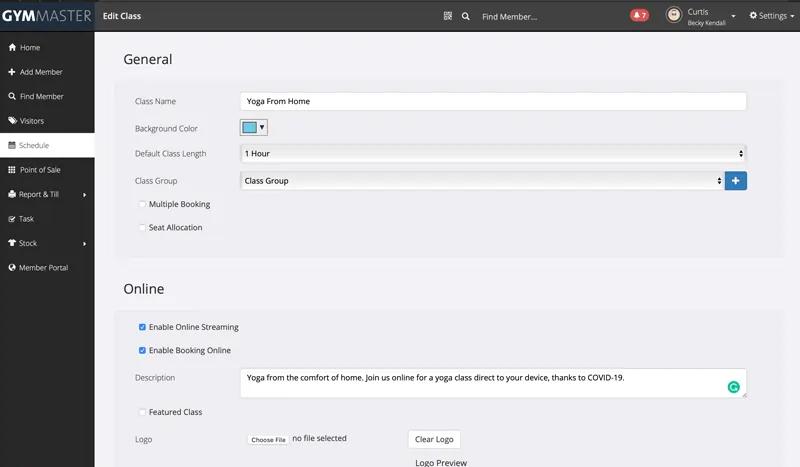
Once the integration process is complete, additional options will be available in your class and service settings.
- Navigate to Settings > Bookings & Classes or Services.
- Select an existing class/service to edit or create a new one
- Under the Online section, click Enable Online Streaming to link this class with Zoom. This tells GymMaster and members that this session will be available virtually, making it easy for members to join
- For any of those bookings in the next 30 days, it will automatically create a meeting in Zoom at the same time
- Streaming is available for classes and services; this can be utilized to create any online group workshop, training, seminar, or class
Hosting Live Stream
When it’s time to go live;
- Open your GymMaster schedule and select the class you want to stream
- Click Start Livestream as Host and follow the prompts in Zoom to begin
Joining live stream as a member
Members can join directly from the class list, your member portal, or confirmation emails, making online participation seamless and hassle-free.
Common Questions this Covers
- How do we host online classes
- Can we live stream on zoom
- How to run virtual events
- How to setup zoom or online class
- How to start zoom or online class
- How to join zoom or online class
Get started with a free, no-obligation chat, and see how we can help you grow

Awards and recognition
- Deloitte Master of Growth Index 2025
- Deloitte Master of Growth Index 2024
- Software Advice FrontRunners 2023
- GetApp Category Leaders 2023
- Capterra Best Value 2022
- GetApp Best Functionality & Features 2022
- Software Advice Most Recommended 2022
- SoftwareSuggest User Most Likely to Recommend Summer 2022
- Software Advice Best Customer Support 2021
- Deloitte Technology Fast 500 Asia Pacific 2018
 2026 © Treshna Enterprises Ltd.