
How to Report on Member Billing
If you want to check member billing and see what’s been paid (and what’s still outstanding), GymMaster provides a few useful reports to make it easy.
Below are the recommended reports and what each one is best used for.
These reports all show billing activity generated through GymMaster, just at different stages of the payment process;
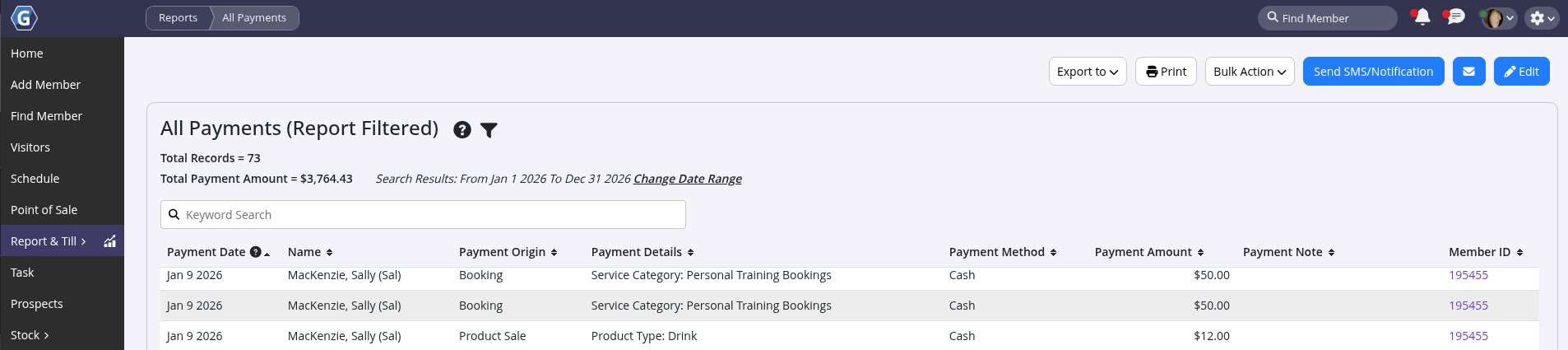
All Payments Report
Go to: Report & Till > Standard Report > Financial > All Payments Report
This report shows all payments within your selected date range, including payments that are still processing.
- Total payments are displayed at the top left of the report
- Useful for a full overview of all billing activity
Settled Billing Payments Report
Go to: Report & Till > Standard Report > Financial > Settled Billing Payments Report
This report shows only payments that have been fully processed and settled.
- Excludes pending or processing payments
- Total settled amount is shown at the top left
- Useful for confirmed revenue tracking
Billing History Report
Go to: Report & Till > Billing > Billing History Report
This view provides a batch-by-batch breakdown of billing created in GymMaster.
- Each batch may contain one member or multiple members
- Click on a batch date to drill into the details
- When the Processing column shows $0.00, the batch is complete
- Each transaction will be marked as:
- Settled
- Failed
- Dishonored
This makes it easy to track exactly where each payment stands.
Further Questions? See our list of Frequently Asked Questions about Billing
Common Questions this Covers
- Which report shows overview of all billing
- Which report shows processed payments only
- Which report shows full billing history
Get started with a free, no-obligation chat, and see how we can help you grow

Awards and recognition
- Deloitte Master of Growth Index 2025
- Deloitte Master of Growth Index 2024
- Software Advice FrontRunners 2023
- GetApp Category Leaders 2023
- Capterra Best Value 2022
- GetApp Best Functionality & Features 2022
- Software Advice Most Recommended 2022
- SoftwareSuggest User Most Likely to Recommend Summer 2022
- Software Advice Best Customer Support 2021
- Deloitte Technology Fast 500 Asia Pacific 2018
 2026 © Treshna Enterprises Ltd.
