
How to Cancel a Member's Membership
2 min read
Updated
1 month ago
If a member no longer wishes to continue, maybe they’re moving away, can’t afford it anymore, or simply finished up, you can cancel their membership quickly through their profile.
Cancel Membership
- Go to the member’s profile and click into their Membership tab
- Find the membership you wish to cancel and hit the Cancel button next to it
- You’ll see a screen similar to this:
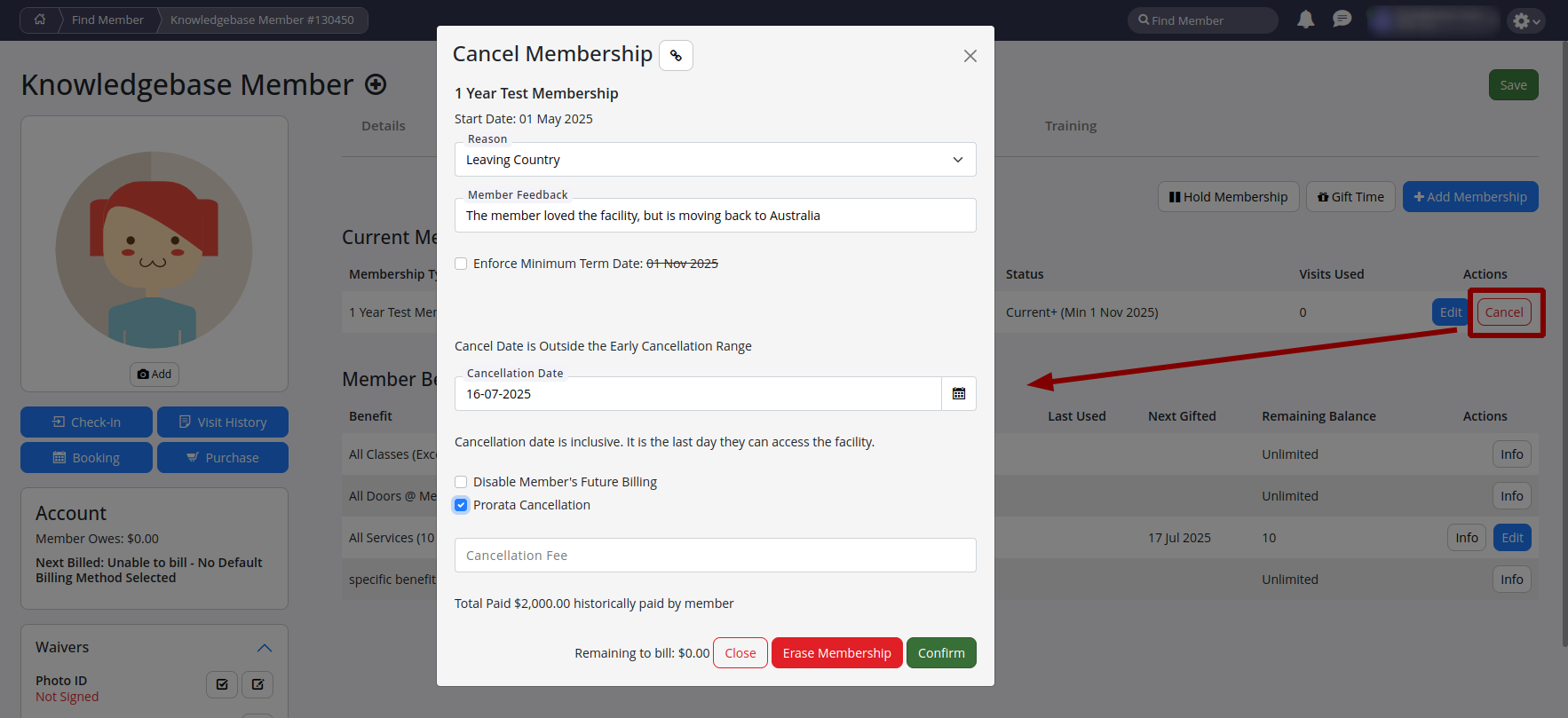
When cancelling, you’ll want to pay attention to a few key details:
| Option | What it Does |
|---|---|
| Reason for cancellation | Select a reason for reporting and analytics purposes |
| Minimum term | May restrict available cancellation dates; an override checkbox can be used if required |
| Cancellation date | Sets the effective date the membership will end |
| Future billing | Usually left enabled; ensures billing is correctly finalised up to the cancellation date |
| Prorating | Adjusts charges so the member only pays for the time used based on the cancellation date |
| Cancellation fee | Allows a fee to be applied at the time of cancellation if required |
Once everything looks right, click Confirm to lock it in.
Erasing a Membership
If the membership was added by mistake, is less than 3 months old, and hasn’t been paid for or used, you can use the Erase Membership button instead.
This wipes the membership and any related charges completely, like it was never there.
Common Questions this Covers
- How do I cancel a member’s membership
- What happens if the membership has a minimum term
- Can I override the minimum term restriction
- How do I set the cancellation date
- Do I need to disable future billing when cancelling
- How does prorating work when cancelling a membership
- Can I charge a cancellation fee
- Can I undo a membership cancellation
Get started with a free, no-obligation chat, and see how we can help you grow

Awards and recognition
- Deloitte Master of Growth Index 2025
- Deloitte Master of Growth Index 2024
- Software Advice FrontRunners 2023
- GetApp Category Leaders 2023
- Capterra Best Value 2022
- GetApp Best Functionality & Features 2022
- Software Advice Most Recommended 2022
- SoftwareSuggest User Most Likely to Recommend Summer 2022
- Software Advice Best Customer Support 2021
- Deloitte Technology Fast 500 Asia Pacific 2018
 2026 © Treshna Enterprises Ltd.