
Discontinue a Membership Type
When you no longer want to sell a membership to new members, you can discontinue it.
If you discontinue a membership type, members who hold the memebership can still use and renew it, but new members cannot purchase the membership type.
This allows you to retain legacy pricing for your loyal members, without having new members see the old membership fees.
Discontinuing a membership will also make life easier for your staff and members, as there will be fewer options to choose from when adding a membership.
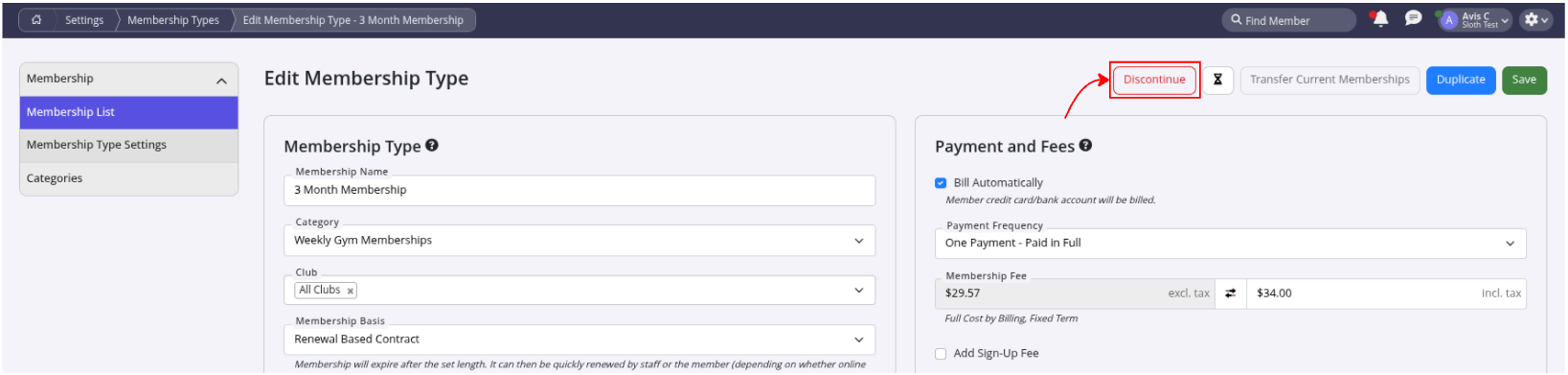
- To discontinue a membership type, navigate to Settings > Membership Types > Edit Membership
- Select Discontinue
This will remove the membership type from the Current Memberships list. It will stop you being able to sell this membership, but will not affect any members who have this membership.
Note: You can never fully delete a membership type, only discontinue it.
You will still be able to see memberships in the Discontinued Memberships list.
If you decide in the future that you would like to start selling the membership type again, you can select the restore button. The membership type will return to the Current Memberships list.

Common Questions this Covers
- How do I stop selling a membership type in GymMaster
- What happens to existing members if I discontinue a membership type
- Can I remove a membership option without affecting current members
- How do I hide old membership plans from new sign-ups
- Can a discontinued membership type be restored later in GymMaster
Get started with a free, no-obligation chat, and see how we can help you grow

Awards and recognition
- Deloitte Master of Growth Index 2025
- Deloitte Master of Growth Index 2024
- Software Advice FrontRunners 2023
- GetApp Category Leaders 2023
- Capterra Best Value 2022
- GetApp Best Functionality & Features 2022
- Software Advice Most Recommended 2022
- SoftwareSuggest User Most Likely to Recommend Summer 2022
- Software Advice Best Customer Support 2021
- Deloitte Technology Fast 500 Asia Pacific 2018
 2026 © Treshna Enterprises Ltd.