
Deposit Money to a Member's Account
1 min read
Updated
28 days ago
A deposit is when a member makes a payment in anticipation of future charges. Their deposit stays on their account as credit which can be used to reduce their next automatic billing, for their next POS purchases, or anything else that requires a payment.
To make deposit to member’s account;
- Navigate to the member
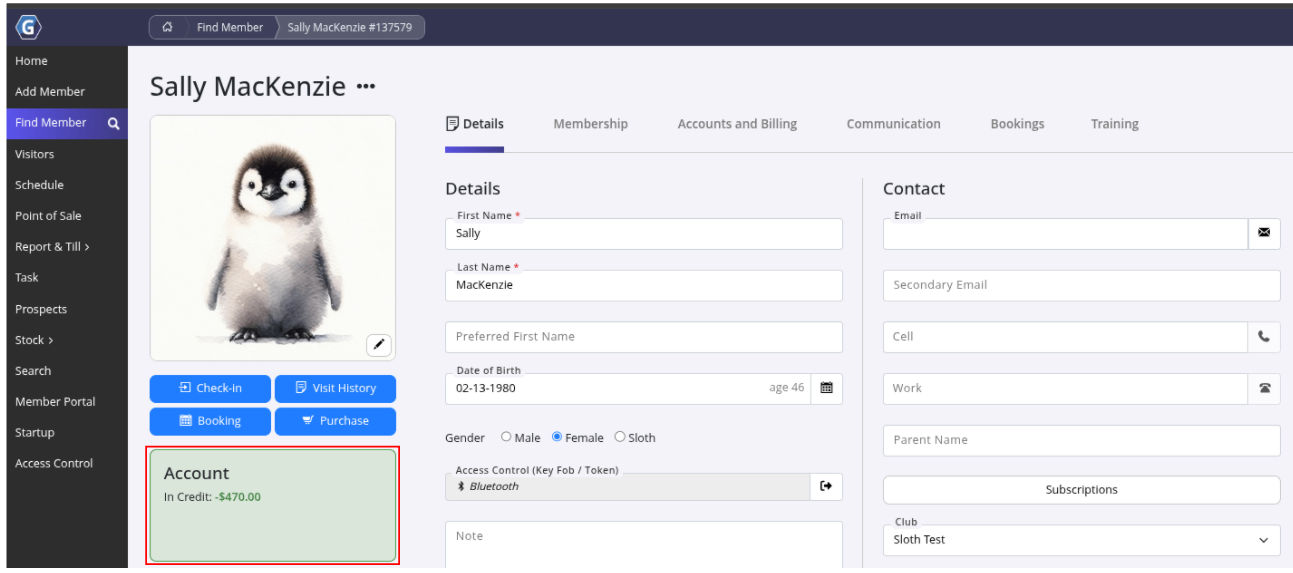
- Select the Purchase below their profile picture
- This will redirect you to POS where you can select the Deposit to Account POS button
- Enter amount
- Select the payment method the member is using to make the deposit
Example - Member shows $470 in credit after a deposit is made to their account.
To use this credit to pay for membership charges or POS items, see the article Using a members credit as a payment method
Common Questions this Covers
- How do I add credit or a deposit to a member’s account in GymMaster
- Where do I find the option to deposit money into a member’s account
- How does member account credit work in GymMaster
- Can members use account credit to pay for future charges or purchases
- How do I apply a member’s deposit toward POS purchases or membership fees
Get started with a free, no-obligation chat, and see how we can help you grow

Awards and recognition
- Deloitte Master of Growth Index 2025
- Deloitte Master of Growth Index 2024
- Software Advice FrontRunners 2023
- GetApp Category Leaders 2023
- Capterra Best Value 2022
- GetApp Best Functionality & Features 2022
- Software Advice Most Recommended 2022
- SoftwareSuggest User Most Likely to Recommend Summer 2022
- Software Advice Best Customer Support 2021
- Deloitte Technology Fast 500 Asia Pacific 2018
 2026 © Treshna Enterprises Ltd.