
Confirmation Messages
Confirmation messages are often among the first automated communications your members receive. Well-written templates help create a professional, consistent experience while keeping members informed every step of the way. GymMaster includes a range of ready-to-use confirmation templates which are already linked to key events. These allocations are found within your Advanced Configuration and Member Portal Configuration settings.
As part of your setup, take time to review these templates, tailoring the wording to suit your club.
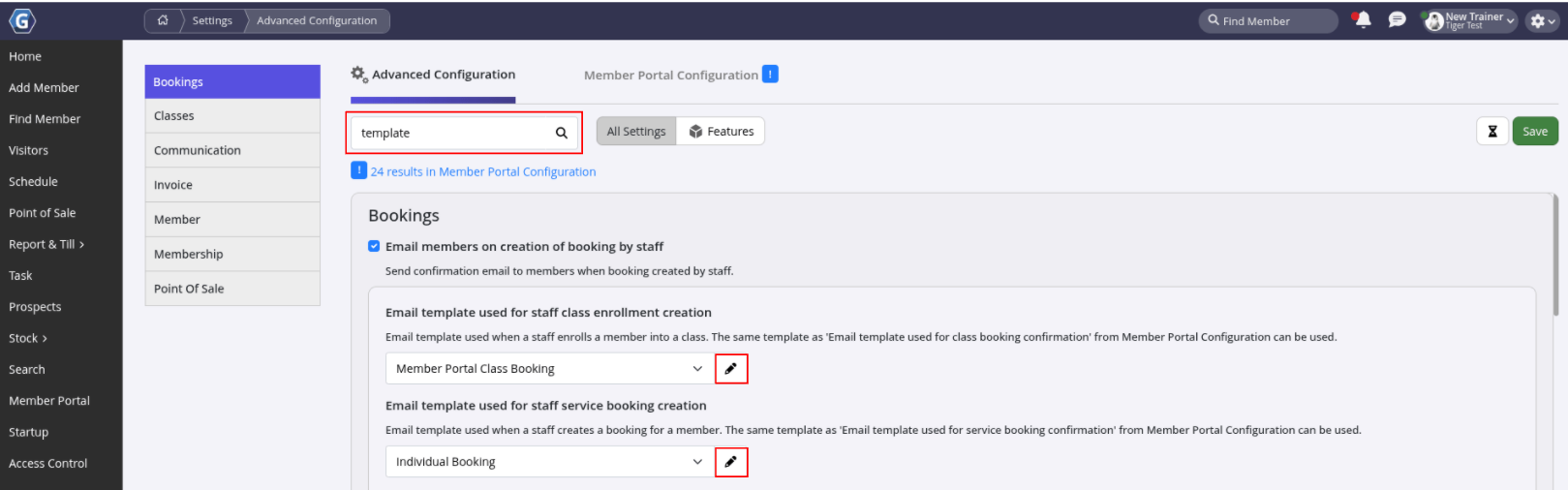
Go to Advanced Configuration and Member Portal Configuration
- Search for Template
- Review the available confirmation message templates
- Edit, enable, or disable confirmations as required
If you need to send automated communication that falls outside the standard confirmation options, use Tasks together with Templates to create custom automated messages that send exactly when you need them.
Common Questions this Covers
- How to set up confirmation emails
- How to customize automatic member notifications
- Where to edit confirmation message templates
- How to send automatic email and SMS confirmations to members
- How to create custom automated messages that aren’t standard confirmations
Get started with a free, no-obligation chat, and see how we can help you grow

Awards and recognition
- Deloitte Master of Growth Index 2025
- Deloitte Master of Growth Index 2024
- Software Advice FrontRunners 2023
- GetApp Category Leaders 2023
- Capterra Best Value 2022
- GetApp Best Functionality & Features 2022
- Software Advice Most Recommended 2022
- SoftwareSuggest User Most Likely to Recommend Summer 2022
- Software Advice Best Customer Support 2021
- Deloitte Technology Fast 500 Asia Pacific 2018
 2026 © Treshna Enterprises Ltd.
