
Troubleshooting Access Control
If you’re having trouble with the access system, go through these in order;
- Check Power and Internet
- Troubleshoot On-screen
- Troubleshoot when No Error
- Video Mini Guides
- GymMaster Support
Check Power and Internet
Start by finding your Gatekeeper and make sure it’s plugged into both power and the internet.
Once confirmed, explore the following steps.
Troubleshoot On-screen
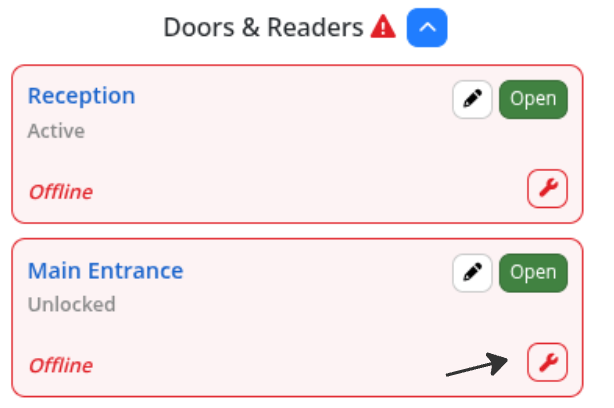
If an error shows up next to a reader on the Visitors page, click the Troubleshooting (spanner) icon. This takes you straight to a help article tailored to that specific issue.
The articles guide you through quick checks, simple tests, and step-by-step fixes you can do any time of day. Each article also has a built-in form to contact support directly, showing exactly what you’ve tried so we can help faster.
Troubleshoot when No Error
Even if no error appears, you can find helpful troubleshooting resources on our website,. Just match the symptom, for example Door isn’t opening, and follow the steps provided.
Video Mini Guides
Visit our YouTube Channel for short GymMaster help videos.
These mini guides show you how to resolve common Gatekeeper and door access issues, step by step, in just a few minutes.
- Testing a Normally OPEN / Fail Secure Door Lock
- Testing a Normally CLOSED / Fail Safe Door Lock
- Bench Testing a GateKeeper
- Checking a GateKeeper for Errors
- Investigating a GateKeeper Offline
- Finding GateKeeper Errors in GymMaster
GymMaster Support
If you’ve worked through these resources without resolution, contact us at GymMaster Support.
Common Questions this Covers
- What does GateKeeper error mean
- Why is door not opening
- Why is door not responding
- How to resolve door access issue
- How to resolve GateKeeper issue
- How to troubleshoot GateKeeper
- How to troubleshoot doors
Get started with a free, no-obligation chat, and see how we can help you grow

Awards and recognition
- Deloitte Master of Growth Index 2025
- Deloitte Master of Growth Index 2024
- Software Advice FrontRunners 2023
- GetApp Category Leaders 2023
- Capterra Best Value 2022
- GetApp Best Functionality & Features 2022
- Software Advice Most Recommended 2022
- SoftwareSuggest User Most Likely to Recommend Summer 2022
- Software Advice Best Customer Support 2021
- Deloitte Technology Fast 500 Asia Pacific 2018
 2026 © Treshna Enterprises Ltd.